Sendora - استرجاع الرسائل
تم التحديث
الإصدار الحالي
1.1.0
تقديم

لا داعي للقلق بشأن الشحن الزائد عند استخدام Sendora - استرجاع الرسائل على هاتفك. تحرر من قيود الشاشة الصغيرة واستمتع به على شاشة أكبر باستخدام لوحة المفاتيح والفأرة. يوفر MEmu جميع الميزات الرائعة التي تتوقعها: تثبيت سريع، إعداد سهل، أدوات تحكم بديهية، ودون قيود على عمر البطارية، أو استخدام البيانات، أو المكالمات الواردة. يُعد MEmu 9 الجديد الخيار الأمثل لتجربة Sendora - استرجاع الرسائل على جهاز الكمبيوتر. بفضل تقنية التشفير الفريدة، يتيح لك مدير الحسابات المتعددة تشغيل حسابين أو أكثر في وقت واحد. والأهم من ذلك، أن محرك المحاكاة الفريد يستغل أداء جهاز الكمبيوتر بالكامل، مما يُحسّن تجربة التطبيق ويجعل كل شيء سلسًا للغاية.
أظهر المزيد
استمتع بتجربة رائعة لاستخدام Sendora - استرجاع الرسائل على جهاز الكمبيوتر مع MEmu Play. إنه محاكي أندرويد قوي ومجاني يوفر لك آلاف تطبيقات أندرويد لإصدار سطح المكتب. استمتع بالتواصل مع أصدقائك وحسّن عملك بكفاءة أعلى! Never lose an important message again.
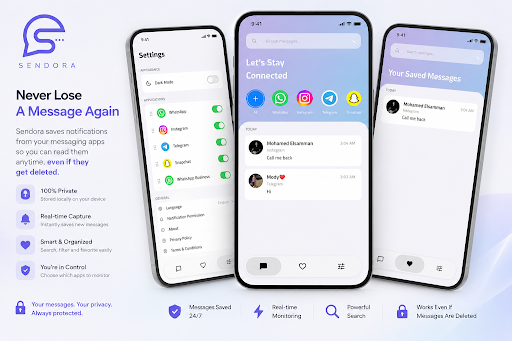
Never lose an important message again.
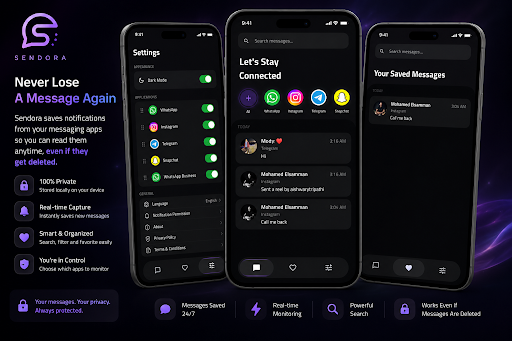
Sendora securely saves notifications from the messaging apps you choose, allowing you to access them later—even if the original notification is dismissed or the message is deleted.
Your data stays on your device. Sendora does not upload your notifications to any server or cloud service.
Features
• Save notifications automatically from selected apps.
• Read previously saved messages anytime.
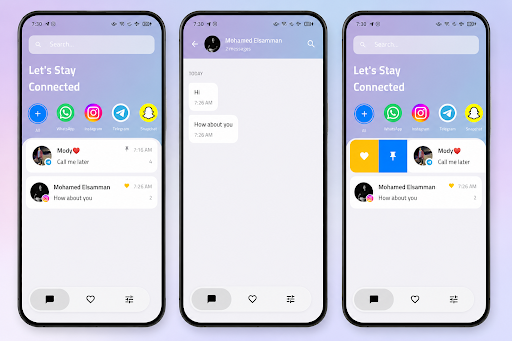
• Organize conversations in a clean, modern interface.
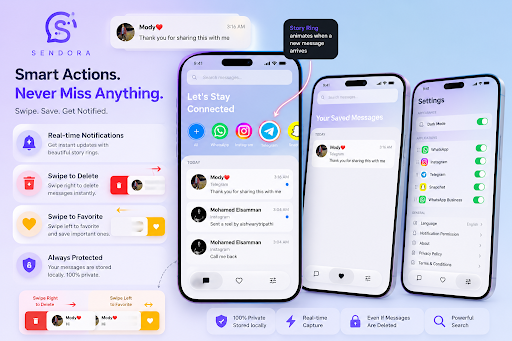
• Favorite important conversations for quick access.
• Search through saved messages instantly.
• Pin important conversations.
• Swipe actions for favorites, pinning, and deletion.
• Choose which apps Sendora monitors.
• Light and Dark mode support.
• Fast, lightweight, and privacy-focused.
Privacy First
• All notification data is stored locally on your device.
• No cloud backup.
• No account required.
• No message data is shared with third parties.
• You remain in complete control of your data.
Permissions
Sendora uses the Notification Access permission only to save notifications from the apps you enable.
This permission is required for the app's core functionality.
Sendora does not modify, send, or delete messages from any messaging application.
أظهر المزيد

1. قم بتنزيل برنامج MEmu واكمال تثبيته

2. قم بتشغيل برنامج MEmu وفتح Google Play على الصفحة الرئيسية

3. ابح Sendora - استرجاع الرسائل في Google Play
Install
4. تنزيل وتثبيت Sendora - استرجاع الرسائل
5. انقر على الرمز للتشغيل بعد اكتمال التثبيت

6. استخدم MEmu لتجربة Sendora - استرجاع الرسائل على جهاز الكمبيوتر الخاص بك.
تطبيق MEmuهو افضل محاكى اندرويد مجانى وبالفعل 50 مليون شخص يستمتعون حاليا بتجربه اللعب عليه. تمكّنك تقنية MEmu الافتراضية من تشغيل آلاف ألعاب Android بسلاسة على الكمبيوتر الشخصي ، حتى أكثرها استخدامًا للرسومات.
شاشة أكبر وجرافيك افضل ووقت أطول بدون حدود البطارية وباقة التليفون
لوحة مفاتيح كاملة تدعم تحكم كامل عن طريق لوحة المفاتيح و الفأره وجيم باد
عدة العاب وحسابات ومهمات علي جهاز الكمبيوتر في وقت معين عن طريق Memu متعدد النوافذ
Use Sendora - استرجاع الرسائل on PC by following steps: