Fcc Car Launcher
تم التحديث
الإصدار الحالي
3.900
تقديم

لا داعي للقلق بشأن الشحن الزائد عند استخدام Fcc Car Launcher على هاتفك. تحرر من قيود الشاشة الصغيرة واستمتع به على شاشة أكبر باستخدام لوحة المفاتيح والفأرة. يوفر MEmu جميع الميزات الرائعة التي تتوقعها: تثبيت سريع، إعداد سهل، أدوات تحكم بديهية، ودون قيود على عمر البطارية، أو استخدام البيانات، أو المكالمات الواردة. يُعد MEmu 9 الجديد الخيار الأمثل لتجربة Fcc Car Launcher على جهاز الكمبيوتر. بفضل تقنية التشفير الفريدة، يتيح لك مدير الحسابات المتعددة تشغيل حسابين أو أكثر في وقت واحد. والأهم من ذلك، أن محرك المحاكاة الفريد يستغل أداء جهاز الكمبيوتر بالكامل، مما يُحسّن تجربة التطبيق ويجعل كل شيء سلسًا للغاية.
أظهر المزيد
قم بتنزيل Fcc Car Launcher على الكمبيوتر بإستخدام جهاز مقلد أندروز MEmu.استمتع بمتعة اللعب على الشاشة الكبيرة. This car launcher for your auto allows you to get new cool features for your Rockchip (MTCB / MTCD+ / PX3 / PX5 / PX6 and later), MTK 8227 (YT9216-YT9218 and later) FlyAudio or AllWinner android head unit (launcher has some features deeply integrated for these units like FM Radio support and others).
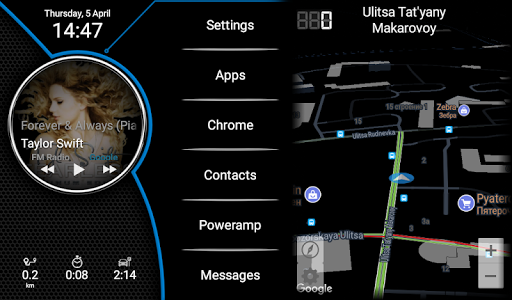
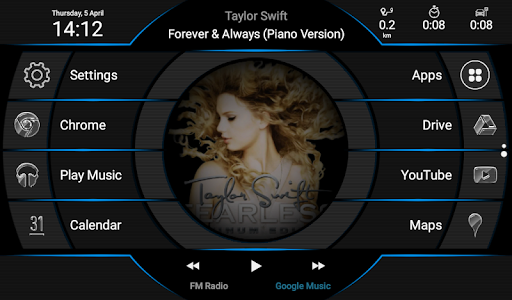
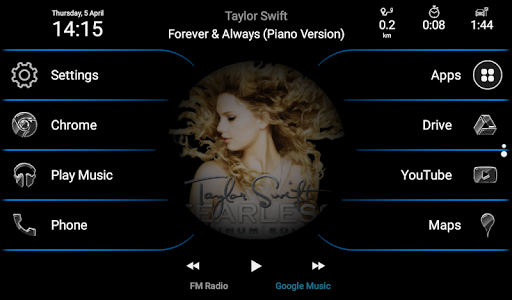
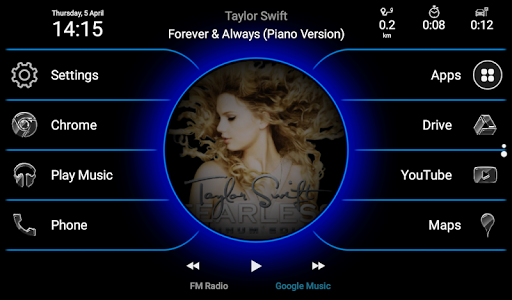
This car launcher for your auto allows you to get new cool features for your Rockchip (MTCB / MTCD+ / PX3 / PX5 / PX6 and later), MTK 8227 (YT9216-YT9218 and later) FlyAudio or AllWinner android head unit (launcher has some features deeply integrated for these units like FM Radio support and others).
Fcc Car Launcher can easily be launched on ANY OTHER android head unit / android tablet or phone.
This car launcher is FULLY customizable as it is built around widget concept. You can change colors, placement, size, combination of any information on the screen. And.. you have many screens, one of which can be used as a screensaver screen! Interactive MiniMap is also available and can be integrated right into your home screen!
ROOT is NOT required.
Beta version is available here: https://play.google.com/apps/testing/ru.speedfire.flycontrolcenter
===============
FCC LAUNCHER v.3.0 RELEASE! New features
===============
- Skins support! It looks completely different with skins. You can even draw your own custom skin. Skins + Wallpaper works together!
- Interactive MiniMap with traffic data.
- Icon packs support
- Customizable Screensaver screen
- New widgets. Player widget supports most popular players!
- OBD2 widget.
- Auto-brightness based on sunrise / sunset time
- Wheel buttons interception
- And much more!
===============
Previous features
===============
== Free features ==
- Support for app shortcuts, widgets and multiple home screens!
- Launch Google Voice by pushing Speech button on steering wheel (Speech function should be mapped to the button using built-in FlyAudio settings).
- Speedometer in notification bar.
- Autoadjustment of volume depending on speed (free version have only one speed limit available - 40 km/h).
- Change of speedometer's color in app's main window depending on speed.
- Launching FM radio in background.
- Calculation of distance travelled and average speed during a day and showing it in notification (may be incorrect, still experimental)
- Ability to set the app as a default launcher
- Information about the track on main screen
- Ability to set wallpaper (including live wallpaper)
== Paid PREMIUM features ==
All free features, and:
- Autoplay last player after sleep (FM Radio, PowerAmp, Spotify, Google Music and Neutron are supported).
- Advanced customizations of the Fcc Car Launcher's appearance.
- Ability to assign text names to FM stations in player widget.
- Ability to make phone calls via connected phone's SIM-card (by Bluetooth). You can use most of third party speed dialers as well.
- Make phone calls via connected phone by saying "Ok, Google, call [name]"
- Decrease volume during voice input when FM radio is playing.
- Autoadjustment of volume depending on speed - all 3 custom speed limits are available (you can set speed limits values and an amount of volume adjustment)
- Sound notifications when reaching certain speed limits (two different sounds for two limits)
- Double click action can be assigned to Speech button, including app launch or MODE function (cycle through 3 apps).
== AccessibilityService API ==
This app uses AccessibilityService API to allow to assign "Back" and "Home" actions to the steering wheel buttons (if applicable for your device). This allows you to safely navigate head unit while driving without unnecessary distraction from road.
== Feedback ==
Our Fcc Car Launcher XDA forum:
https://forum.xda-developers.com/android-auto/android-head-units/fcc-car-launcher-official-thread-t3639659
In case of errors: a.kurapov@gmail.com
أظهر المزيد

1. قم بتنزيل برنامج MEmu واكمال تثبيته

2. قم بتشغيل برنامج MEmu وفتح Google Play على الصفحة الرئيسية

3. ابح Fcc Car Launcher في Google Play
Install
4. تنزيل وتثبيت Fcc Car Launcher
5. انقر على الرمز للتشغيل بعد اكتمال التثبيت

6. استخدم MEmu لتجربة Fcc Car Launcher على جهاز الكمبيوتر الخاص بك.
تطبيق MEmuهو افضل محاكى اندرويد مجانى وبالفعل 50 مليون شخص يستمتعون حاليا بتجربه اللعب عليه. تمكّنك تقنية MEmu الافتراضية من تشغيل آلاف ألعاب Android بسلاسة على الكمبيوتر الشخصي ، حتى أكثرها استخدامًا للرسومات.
شاشة أكبر وجرافيك افضل ووقت أطول بدون حدود البطارية وباقة التليفون
لوحة مفاتيح كاملة تدعم تحكم كامل عن طريق لوحة المفاتيح و الفأره وجيم باد
عدة العاب وحسابات ومهمات علي جهاز الكمبيوتر في وقت معين عن طريق Memu متعدد النوافذ
Use Fcc Car Launcher on PC by following steps: