Hakki
تم التحديث
الإصدار الحالي
1.0.64
تقديم

لا داعي للقلق بشأن الشحن الزائد عند استخدام Hakki على هاتفك. تحرر من قيود الشاشة الصغيرة واستمتع به على شاشة أكبر باستخدام لوحة المفاتيح والفأرة. يوفر MEmu جميع الميزات الرائعة التي تتوقعها: تثبيت سريع، إعداد سهل، أدوات تحكم بديهية، ودون قيود على عمر البطارية، أو استخدام البيانات، أو المكالمات الواردة. يُعد MEmu 9 الجديد الخيار الأمثل لتجربة Hakki على جهاز الكمبيوتر. بفضل تقنية التشفير الفريدة، يتيح لك مدير الحسابات المتعددة تشغيل حسابين أو أكثر في وقت واحد. والأهم من ذلك، أن محرك المحاكاة الفريد يستغل أداء جهاز الكمبيوتر بالكامل، مما يُحسّن تجربة التطبيق ويجعل كل شيء سلسًا للغاية.
أظهر المزيد
قم بتنزيل Hakki على الكمبيوتر بإستخدام جهاز مقلد أندروز MEmu.استمتع بمتعة اللعب على الشاشة الكبيرة. Hakki brought to you by Rcell, is a free messaging and video calling app.

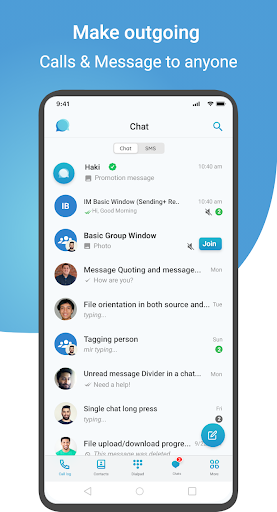

Hakki brought to you by Rcell, is a free messaging and video calling app. You may conveniently stay in touch with your friends and family since it is simple to use, dependable, yet secure. We are continuously looking for new technologies to make our customers' life easier. Hakki utilizes a range of gadgets.
We can confidently state that Hakki provides secure protection and that it uses industry-standard encryption technology to protect your personal information. Hakki seeks to close the communication gap in our community because we feel that society as a whole deserves to stay connected.
End-to-end encryption, high-quality phone, and video calls, texting, as well as file and multimedia sharing are just a few of the features that give the Hakki app its power and well-known. Furthermore, Rcell users can keep using the app even when their internet subscription is over.
You can enjoy more about the life you appreciate the most with the help of Hakki. You can enjoy free forever, cross-platform, privacy, voice call, video call, text conversation, multimedia sharing, and outgoing calls.
Users can exchange audio and video conversations, stickers, group chats, and instant voice and video messages with the help of the VoIP and instant messaging program Hakki, which is cross-platform capable.
Free Video and Audio Calls Make crystal-clear voice and video calls while enjoying limitless calling. Hakki is fantastic for keeping in touch with friends, family, and coworkers
End-to-end encryption is enabled by default for calls, chats, and group chats, allowing you to communicate with confidence knowing that no one, not even Hakki, can read your private messages.
Start the group chat Start a group chat to catch up with coworkers, families, and friends. because of a platform created to facilitate team members' collaboration, one of the other useful features is when Hakki is running in the background, you'll be able to receive incoming calls and chat notifications via push notifications.
Free Text Messages, Communication has never been easier. Send a free text message, picture, sticker, GIF, or video along with a variety of other file formats. For those who enjoy being in touch, Hakki is a fantastic solution.
Users of Rcell can log in directly or using their Rcell Selfcare username and password, which is another Hakki characteristic.
All of these fantastic features are available for free, to get started, all you need is a data plan or Wi-Fi internet connection. You may call, text, start a group chat, and so much more!
أظهر المزيد

1. قم بتنزيل برنامج MEmu واكمال تثبيته

2. قم بتشغيل برنامج MEmu وفتح Google Play على الصفحة الرئيسية

3. ابح Hakki في Google Play
Install
4. تنزيل وتثبيت Hakki
5. انقر على الرمز للتشغيل بعد اكتمال التثبيت

6. استخدم MEmu لتجربة Hakki على جهاز الكمبيوتر الخاص بك.
تطبيق MEmuهو افضل محاكى اندرويد مجانى وبالفعل 50 مليون شخص يستمتعون حاليا بتجربه اللعب عليه. تمكّنك تقنية MEmu الافتراضية من تشغيل آلاف ألعاب Android بسلاسة على الكمبيوتر الشخصي ، حتى أكثرها استخدامًا للرسومات.
شاشة أكبر وجرافيك افضل ووقت أطول بدون حدود البطارية وباقة التليفون
لوحة مفاتيح كاملة تدعم تحكم كامل عن طريق لوحة المفاتيح و الفأره وجيم باد
عدة العاب وحسابات ومهمات علي جهاز الكمبيوتر في وقت معين عن طريق Memu متعدد النوافذ
Use Hakki on PC by following steps: