HondaLink
تم التحديث
الإصدار الحالي
5.0.17
تقديم

لا داعي للقلق بشأن الشحن الزائد عند استخدام HondaLink على هاتفك. تحرر من قيود الشاشة الصغيرة واستمتع به على شاشة أكبر باستخدام لوحة المفاتيح والفأرة. يوفر MEmu جميع الميزات الرائعة التي تتوقعها: تثبيت سريع، إعداد سهل، أدوات تحكم بديهية، ودون قيود على عمر البطارية، أو استخدام البيانات، أو المكالمات الواردة. يُعد MEmu 9 الجديد الخيار الأمثل لتجربة HondaLink على جهاز الكمبيوتر. بفضل تقنية التشفير الفريدة، يتيح لك مدير الحسابات المتعددة تشغيل حسابين أو أكثر في وقت واحد. والأهم من ذلك، أن محرك المحاكاة الفريد يستغل أداء جهاز الكمبيوتر بالكامل، مما يُحسّن تجربة التطبيق ويجعل كل شيء سلسًا للغاية.
أظهر المزيد
قم بتنزيل HondaLink على الكمبيوتر بإستخدام جهاز مقلد أندروز MEmu.استمتع بمتعة اللعب على الشاشة الكبيرة. Use HondaLink® app with compatible Honda vehicles to access features such as remote commands, vehicle status, scheduling service appointments, roadside assistance, and more.
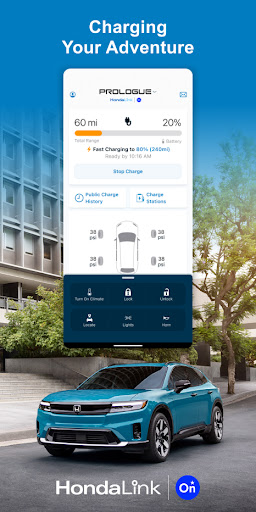
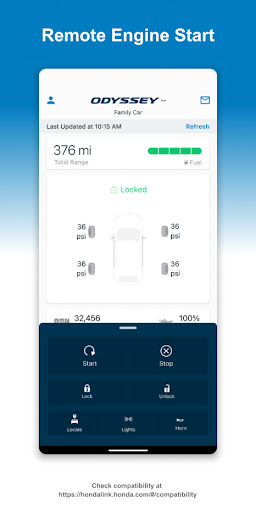
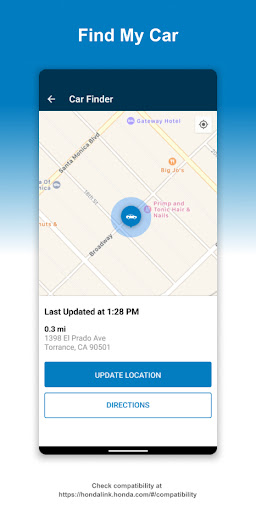
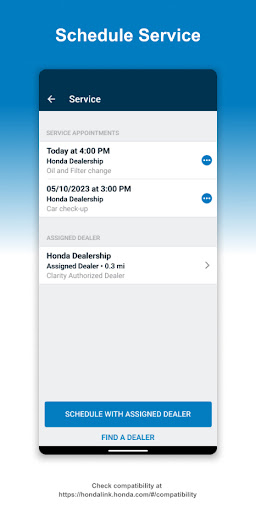
Use HondaLink® app with compatible Honda vehicles to access features such as remote commands, vehicle status, scheduling service appointments, roadside assistance, and more.
New for 2024 Prologue: with the HondaLink app, you can take control with remote commands, check your charge status, locate your vehicle, and redeem your charging credits* for EVgo charging network. Activate HondaLink Connected by OnStar in the app for safety and connectivity services.
Check vehicle compatibility: hondalink.honda.com/#/compatibility
Features availability:
The HondaLink® app has exciting remote control features like Remote Engine Start, Remote Door Lock/Unlock, and Find My Car. Available for 2018+ Odyssey Touring/Elite, 2018-2022 Accord Touring and 2023+ Accord all trims, 2019+ Insight Touring, 2019+ Pilot Touring/Elite/Black Edition*, 2019+ Passport Touring/Elite*, 2023+ Civic Type R*, 2023+ CR-V Sport Touring Hybrid, and 2023+ Pilot Touring/Elite vehicles. Battery charge monitoring and control is available for Prologue, Clarity Electric and Plug-in Hybrid vehicles.
*Remote Engine Start is currently not available for 2019-2022 Pilot Touring/Elite/Black Edition, 2019+ Passport Touring/Elite, and 2023+ Civic Type R vehicles.
HondaLink subscription package may be required.
أظهر المزيد

1. قم بتنزيل برنامج MEmu واكمال تثبيته

2. قم بتشغيل برنامج MEmu وفتح Google Play على الصفحة الرئيسية

3. ابح HondaLink في Google Play
Install
4. تنزيل وتثبيت HondaLink
5. انقر على الرمز للتشغيل بعد اكتمال التثبيت

6. استخدم MEmu لتجربة HondaLink على جهاز الكمبيوتر الخاص بك.
تطبيق MEmuهو افضل محاكى اندرويد مجانى وبالفعل 50 مليون شخص يستمتعون حاليا بتجربه اللعب عليه. تمكّنك تقنية MEmu الافتراضية من تشغيل آلاف ألعاب Android بسلاسة على الكمبيوتر الشخصي ، حتى أكثرها استخدامًا للرسومات.
شاشة أكبر وجرافيك افضل ووقت أطول بدون حدود البطارية وباقة التليفون
لوحة مفاتيح كاملة تدعم تحكم كامل عن طريق لوحة المفاتيح و الفأره وجيم باد
عدة العاب وحسابات ومهمات علي جهاز الكمبيوتر في وقت معين عن طريق Memu متعدد النوافذ
Use HondaLink on PC by following steps: