IRCTC Rail Connect
تم التحديث
الإصدار الحالي
4.2.28
تقديم

لا داعي للقلق بشأن الشحن الزائد عند استخدام IRCTC Rail Connect على هاتفك. تحرر من قيود الشاشة الصغيرة واستمتع به على شاشة أكبر باستخدام لوحة المفاتيح والفأرة. يوفر MEmu جميع الميزات الرائعة التي تتوقعها: تثبيت سريع، إعداد سهل، أدوات تحكم بديهية، ودون قيود على عمر البطارية، أو استخدام البيانات، أو المكالمات الواردة. يُعد MEmu 9 الجديد الخيار الأمثل لتجربة IRCTC Rail Connect على جهاز الكمبيوتر. بفضل تقنية التشفير الفريدة، يتيح لك مدير الحسابات المتعددة تشغيل حسابين أو أكثر في وقت واحد. والأهم من ذلك، أن محرك المحاكاة الفريد يستغل أداء جهاز الكمبيوتر بالكامل، مما يُحسّن تجربة التطبيق ويجعل كل شيء سلسًا للغاية.
أظهر المزيد
قم بتنزيل IRCTC Rail Connect على الكمبيوتر بإستخدام جهاز مقلد أندروز MEmu.استمتع بمتعة اللعب على الشاشة الكبيرة. OFFICIAL MOBILE APP by Indian Railway Catering And Tourism Corporation Limited (IRCTC).
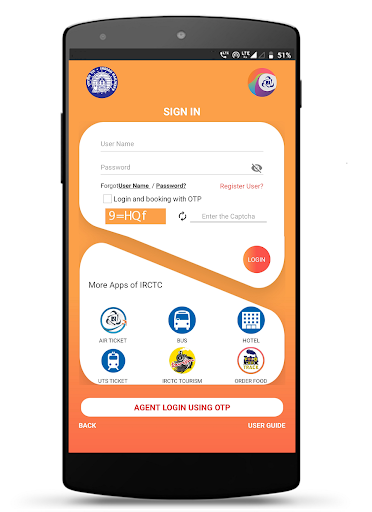
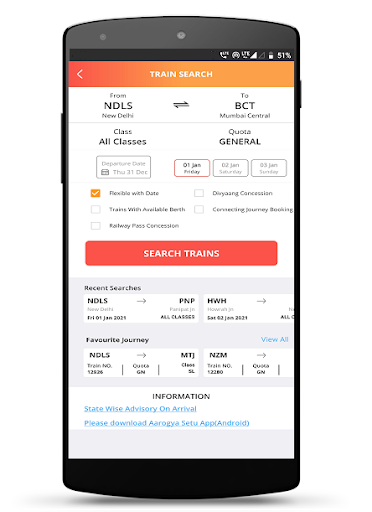
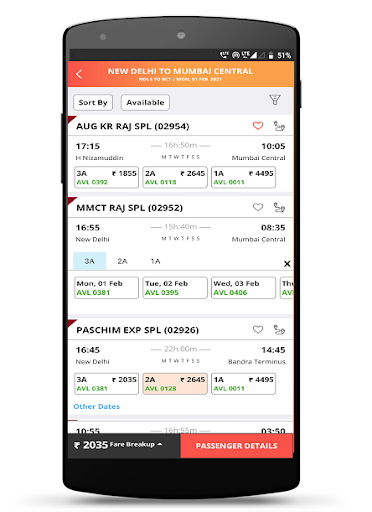
OFFICIAL MOBILE APP by Indian Railway Catering And Tourism Corporation Limited (IRCTC)
IRCTC Train ticketing now made simpler just by SWIPE and SHUFFLE, SELECT and BOOK. Install the newly launched "IRCTC RAIL CONNECT" android app and book a railway ticket anywhere in India at your fingertips.
Experience the latest features in addition to existing train ticketing services:
:: New users register and activate from App directly.
:: Optimized Registration Flow with minimalistic two-page process.
:: Advanced security features of self-assigned PIN to login without entering username and password on each login.
:: Biometric Based Login
:: Enhanced Dashboard with Integrated Menu Bar.
:: Seamless Account & Transaction Management directly from app Dashboard.
:: Train Search, Train Route and Train Seat Availability Enquiries.
:: Enquire without login for trains, routes and seat availability.
:: Any PNR Enquiry facility to check the PNR reservation status.
:: Check PNR Confirmation Chances Probability before and after booking train tickets for waitlisted availability/tickets.
:: Supports Ladies, Tatkal, Premium Tatkal, Divyangjan and Lower Berth/Sr. Citizen in addition to General Quota train tickets.
:: Divyangjan passengers can book Train Tickets at concessional rates through Photo Identity Card issued by Indian Railways.
:: Google Talk Back feature to assist visually impaired to book train e-tickets.
:: Current Reservation train tickets booking facility.
:: Master Passenger List feature to manage frequent travelling passengers.
:: Recover your forgotten user Id through Forgot User Id facility.
:: Integrated with IRCTC e-wallet for faster and hassle free transactions.
:: Boarding point change facility.
:: Syncing of IRCTC's Official Web Site (www.irctc.co.in) and IRCTC Rail Connect Mobile Apps tickets. Now users can view, cancel or file TDR of train e-tickets booked through official website or IRCTC Rail Connect mobile apps and vice-versa.
:: Users can view status of train e-tickets booked through our authorized Online Travel Agents (OTA).
:: Book train tickets through Various Payment Modes like BHIM/UPI, e-Wallets, Net banking, Credit and Debit cards.
:: Vikalp scheme which provides an option to avail confirmed berth / seat in alternate train to the wait listed passengers.
:: Aadhaar Linking facility through mobile app to avail up to 12 train tickets booking in a month.
:: Online Reservation Chart facility.
Give feedback: Let us know what you think and help improvements in IRCTC Rail Connect Android App.
Enjoy the never before experience of online train ticketing with all new IRCTC Rail Connect Mobile App.
Registered Office / Corporate Office
Indian Railway Catering and Tourism Corporation Ltd.,
B-148, 11th Floor, Statesman House,
Barakhamba Road, New Delhi 110001
أظهر المزيد

1. قم بتنزيل برنامج MEmu واكمال تثبيته

2. قم بتشغيل برنامج MEmu وفتح Google Play على الصفحة الرئيسية

3. ابح IRCTC Rail Connect في Google Play
Install
4. تنزيل وتثبيت IRCTC Rail Connect
5. انقر على الرمز للتشغيل بعد اكتمال التثبيت

6. استخدم MEmu لتجربة IRCTC Rail Connect على جهاز الكمبيوتر الخاص بك.
تطبيق MEmuهو افضل محاكى اندرويد مجانى وبالفعل 50 مليون شخص يستمتعون حاليا بتجربه اللعب عليه. تمكّنك تقنية MEmu الافتراضية من تشغيل آلاف ألعاب Android بسلاسة على الكمبيوتر الشخصي ، حتى أكثرها استخدامًا للرسومات.
شاشة أكبر وجرافيك افضل ووقت أطول بدون حدود البطارية وباقة التليفون
لوحة مفاتيح كاملة تدعم تحكم كامل عن طريق لوحة المفاتيح و الفأره وجيم باد
عدة العاب وحسابات ومهمات علي جهاز الكمبيوتر في وقت معين عن طريق Memu متعدد النوافذ
Use IRCTC Rail Connect on PC by following steps: