
LINE TV
تم التحديث
الإصدار الحالي
1.1.1
تقديم

لا داعي للقلق بشأن الشحن الزائد عند استخدام LINE TV على هاتفك. تحرر من قيود الشاشة الصغيرة واستمتع به على شاشة أكبر باستخدام لوحة المفاتيح والفأرة. يوفر MEmu جميع الميزات الرائعة التي تتوقعها: تثبيت سريع، إعداد سهل، أدوات تحكم بديهية، ودون قيود على عمر البطارية، أو استخدام البيانات، أو المكالمات الواردة. يُعد MEmu 9 الجديد الخيار الأمثل لتجربة LINE TV على جهاز الكمبيوتر. بفضل تقنية التشفير الفريدة، يتيح لك مدير الحسابات المتعددة تشغيل حسابين أو أكثر في وقت واحد. والأهم من ذلك، أن محرك المحاكاة الفريد يستغل أداء جهاز الكمبيوتر بالكامل، مما يُحسّن تجربة التطبيق ويجعل كل شيء سلسًا للغاية.
أظهر المزيد
قم بتنزيل LINE TV على الكمبيوتر بإستخدام جهاز مقلد أندروز MEmu.استمتع بمتعة اللعب على الشاشة الكبيرة. “Watch your favorite contents - anytime, anywhere!
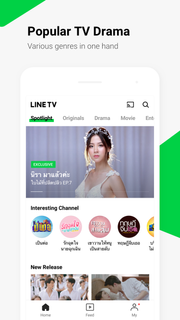
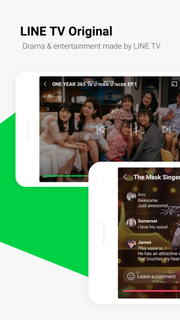

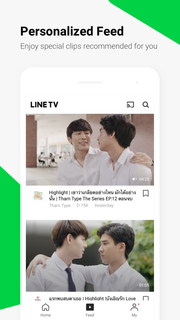
“Watch your favorite contents - anytime, anywhere!”LINE TV is a premium video streaming service where you can watch all the contents for ‘FREE’.You can watch high-quality video content in a variety of categories such as TV dramas, entertainment shows, movies, Y-series, music videos, and more.◆ Everything is FREE! on Multi-DevicesYou can download LINE TV app on smartphones, tablets and Android TV and watch all contents For Free! Just log in with your LINE email account on your device!To check your LINE email account, go to LINE app > Settings > Accounts > Email Account Registration※ PC Version : https://tv.line.me◆ Trending TV ShowsCheck out the most trending dramas, variety, movies and your favorite shows from leading TV station on LINE TV. The more you watch, the better LINE TV gets at recommending contents for you, based on your watching history.◆ LINE TV OriginalWatch exclusive LINE TV Original contents which are offered for LINE TV users only.◆ Experience more with LINE TV on a bigger screenYou can enjoy LINE TV on big screen through Android TV and Chromecast.※ For best performance, we recommend using LINE TV on Android TV OS 8 or higher.◆ Easy to explore by CategoryFind all the latest and most popular videos organized into categories such as Drama, Movie, Music, Entertainment, Y-series, Lifestyle and more.◆ Search with any wordsYou can also search for specific videos by content’s name, clip title, genre, or cast members.◆ Non stop Music PlaylistEnjoy Music videos and shows from global partners on our Music playlist player! You can shuffle, play by order or even repeat it again and again.◆ Become a Fan of Your Favorite ChannelsBecome a fan of your favorite channels and be informed when new content is added.◆ Personal Video RecommendationEnjoy your personalized recommendation of contents through FEED view on LINE TV.▣ In case of any error, please send us your feedback with your information below to analyze the problem.※ Device Model※ OS version※ Carrier※ App versionYour valuable feedback will help us improve our servicesFor our latest content and more program information, you can follow LINE TV social media accounts:Facebook: https://www.facebook.com/linetvthTwitter: https://twitter.com/linetvthInstagram: https://www.instagram.com/linetvthWebsite: https://tv.line.me*Content availability varies by country and is subject to change without notice.▣ Notes:※ For better video streaming, please connect to a Wi-Fi network.※ For best performance, we recommend using LINE TV on Mobile APP OS 5.0 or higher / TV APP OS 8.0 or higher.※ LINE uses third party advertising agencies to place advertisements. To measure the effectiveness of the advertisements, we install third-party modules within the Apps. We may also install third-party modules within the Apps in order to help us understand how the Service is used. Details regarding the Apps in which such third-party modules follow:- Installed on: LINE TV 3.1.0 and higher for Android/iOS- Operator: Nielsen- Details Obtained: Advertisement Identifiers- Aims: To measure audience of LINE TV in Thailand- Sharing to third-parties: No- To learn more about the information that Nielsen software may collect and your choices with regard to it, please see the Nielsen Digital Measurement Privacy Policy:(App) http://priv-policy.imrworldwide.com/priv/mobile/th/en/optout.html(Web) http://priv-policy.imrworldwide.com/priv/browser/th/en/optout.html
أظهر المزيد

1. قم بتنزيل برنامج MEmu واكمال تثبيته

2. قم بتشغيل برنامج MEmu وفتح Google Play على الصفحة الرئيسية

3. ابح LINE TV في Google Play
Install
4. تنزيل وتثبيت LINE TV
5. انقر على الرمز للتشغيل بعد اكتمال التثبيت

6. استخدم MEmu لتجربة LINE TV على جهاز الكمبيوتر الخاص بك.
تطبيق MEmuهو افضل محاكى اندرويد مجانى وبالفعل 50 مليون شخص يستمتعون حاليا بتجربه اللعب عليه. تمكّنك تقنية MEmu الافتراضية من تشغيل آلاف ألعاب Android بسلاسة على الكمبيوتر الشخصي ، حتى أكثرها استخدامًا للرسومات.
شاشة أكبر وجرافيك افضل ووقت أطول بدون حدود البطارية وباقة التليفون
لوحة مفاتيح كاملة تدعم تحكم كامل عن طريق لوحة المفاتيح و الفأره وجيم باد
عدة العاب وحسابات ومهمات علي جهاز الكمبيوتر في وقت معين عن طريق Memu متعدد النوافذ
Use LINE TV on PC by following steps: