
MAPinr - KML/KMZ/OFFLINE/GIS
تم التحديث
الإصدار الحالي
3.8
تقديم

لا داعي للقلق بشأن الشحن الزائد عند استخدام MAPinr - KML/KMZ/OFFLINE/GIS على هاتفك. تحرر من قيود الشاشة الصغيرة واستمتع به على شاشة أكبر باستخدام لوحة المفاتيح والفأرة. يوفر MEmu جميع الميزات الرائعة التي تتوقعها: تثبيت سريع، إعداد سهل، أدوات تحكم بديهية، ودون قيود على عمر البطارية، أو استخدام البيانات، أو المكالمات الواردة. يُعد MEmu 9 الجديد الخيار الأمثل لتجربة MAPinr - KML/KMZ/OFFLINE/GIS على جهاز الكمبيوتر. بفضل تقنية التشفير الفريدة، يتيح لك مدير الحسابات المتعددة تشغيل حسابين أو أكثر في وقت واحد. والأهم من ذلك، أن محرك المحاكاة الفريد يستغل أداء جهاز الكمبيوتر بالكامل، مما يُحسّن تجربة التطبيق ويجعل كل شيء سلسًا للغاية.
أظهر المزيد
قم بتنزيل MAPinr - KML/KMZ/OFFLINE/GIS على الكمبيوتر بإستخدام جهاز مقلد أندروز MEmu.استمتع بمتعة اللعب على الشاشة الكبيرة. Thank you for using Mapinr.
Thank you for using Mapinr. The ever faster life cycles of Android versions make it difficult for non-profit projects to survive. Nevertheless, we will keep this project alive and follow our vision to provide a secure, privacy-friendly and affordable app.
We recognise that G requires a minimum Android version, which many devices do not support. We offer downloads for previous Android versions (below Android 14), that are not supported by the Play Store anymore, on our website.
Do you want to view and manage your own points of interest? Are you searching for an app to put your pictures on a map?
MAPinr is a simple (ad-free) Android app that allows you to manage your kml/kmz files and display your gpx files on different maps. MAPinr is perfect for professional use but also hiking, cycling, running, skiing, etc.
Please let us know your problems and ideas on how to improve MAPinr (mapinr@farming.software). Don't be rude just because we do not provide some functionality you were looking for. Instead drop us an email with your thoughts and suggestions. We know that software bugs can be highly frustrating. Please be patient and accept that our limited resources do not allow us to implement all suggestions.
MAPinr provides the following functionality:
1. Ad free / No ads
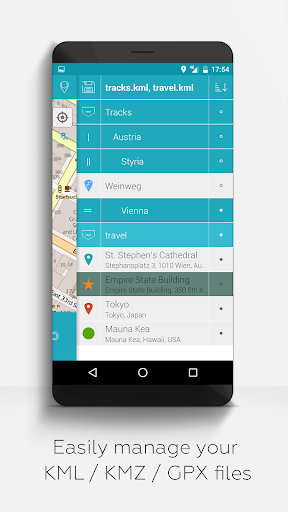
2. Hierarchical folder structure for managing multiple kml/kmz/gpx files
3. Create, load, edit, save, import, export and share kml/kmz files
4. Create, load, edit, save, import, export and share waypoints, lines/tracks and polygons
5. Add pictures to your waypoints (to create photomaps)
6. Display waypoints, lines/tracks and polygons on different maps (Maps, Satellite, Hybrid, OpenStreetMap, Opentopomap, Opencyclemap)
7. Share coordinates of waypoints
8. Individually colorize waypoints, lines/tracks and polygons
9. Open exported kml/kmz files in other apps
10. Search by name, address and coordinates
11. Location-sharing to let your friends know where you are
12. Display multiple kml/kmz/gpx files simultaneously
13. Merge kml/kmz files
14. Cloud integration
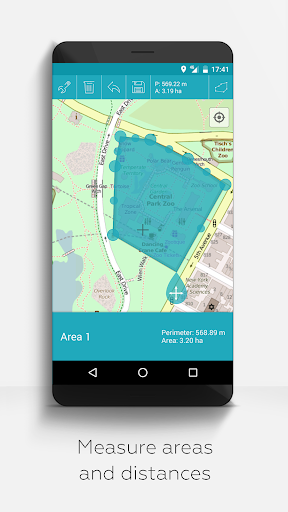
15. Measure distances and areas on your map
16. Multilanguage (currently English, Spanish, Lithuanian, Polish)
Extended features (For free with donations or like on LInkedIN; activate in Settings):
1. Download maps for free / Offline maps (openstreetmap)
2. GPX viewer (GPX files can only be displayed!)
3. Display arbitrary map data using Web Map Service (WMS), e.g., Opendata from www.data.gov
4. Create custom metadata
5. Upload and use custom icons
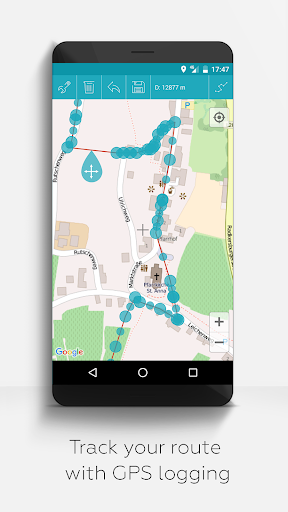
6. Record GPS tracks
Compared to related apps MAPinr will not sniff into your private data or even sell it. Please note that donations are a free contribution to support our non-profit work.
أظهر المزيد

1. قم بتنزيل برنامج MEmu واكمال تثبيته

2. قم بتشغيل برنامج MEmu وفتح Google Play على الصفحة الرئيسية

3. ابح MAPinr - KML/KMZ/OFFLINE/GIS في Google Play
Install
4. تنزيل وتثبيت MAPinr - KML/KMZ/OFFLINE/GIS
5. انقر على الرمز للتشغيل بعد اكتمال التثبيت

6. استخدم MEmu لتجربة MAPinr - KML/KMZ/OFFLINE/GIS على جهاز الكمبيوتر الخاص بك.
تطبيق MEmuهو افضل محاكى اندرويد مجانى وبالفعل 50 مليون شخص يستمتعون حاليا بتجربه اللعب عليه. تمكّنك تقنية MEmu الافتراضية من تشغيل آلاف ألعاب Android بسلاسة على الكمبيوتر الشخصي ، حتى أكثرها استخدامًا للرسومات.
شاشة أكبر وجرافيك افضل ووقت أطول بدون حدود البطارية وباقة التليفون
لوحة مفاتيح كاملة تدعم تحكم كامل عن طريق لوحة المفاتيح و الفأره وجيم باد
عدة العاب وحسابات ومهمات علي جهاز الكمبيوتر في وقت معين عن طريق Memu متعدد النوافذ
Use MAPinr - KML/KMZ/OFFLINE/GIS on PC by following steps: