Mapy.cz: maps & navigation
تم التحديث
الإصدار الحالي
9.57.1
تقديم

لا داعي للقلق بشأن الشحن الزائد عند استخدام Mapy.cz: maps & navigation على هاتفك. تحرر من قيود الشاشة الصغيرة واستمتع به على شاشة أكبر باستخدام لوحة المفاتيح والفأرة. يوفر MEmu جميع الميزات الرائعة التي تتوقعها: تثبيت سريع، إعداد سهل، أدوات تحكم بديهية، ودون قيود على عمر البطارية، أو استخدام البيانات، أو المكالمات الواردة. يُعد MEmu 9 الجديد الخيار الأمثل لتجربة Mapy.cz: maps & navigation على جهاز الكمبيوتر. بفضل تقنية التشفير الفريدة، يتيح لك مدير الحسابات المتعددة تشغيل حسابين أو أكثر في وقت واحد. والأهم من ذلك، أن محرك المحاكاة الفريد يستغل أداء جهاز الكمبيوتر بالكامل، مما يُحسّن تجربة التطبيق ويجعل كل شيء سلسًا للغاية.
أظهر المزيد
قم بتنزيل Mapy.cz: maps & navigation على الكمبيوتر بإستخدام جهاز مقلد أندروز MEmu.استمتع بمتعة اللعب على الشاشة الكبيرة. PLAN YOUR ROUTE.
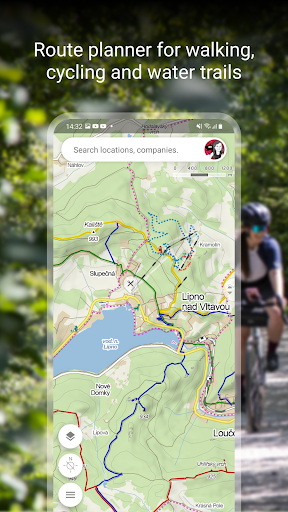
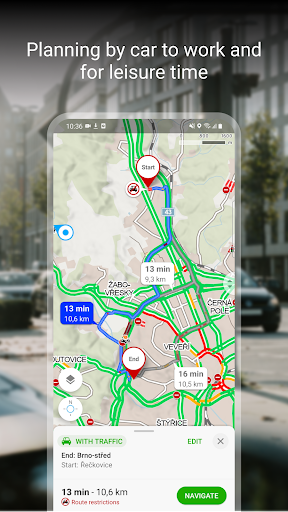
PLAN YOUR ROUTE
- hiking and cycling trails
- cross-country skiing and ski-alpine trails
- unique “travel tips” feature plans a trip through the most interesting places in the area
- route elevation profile
- 5-day weather, temperature, wind and precipitation forecasts for any location on earth
BROWSE THE TOURIST MAP OF THE WHOLE WORLD
- hiking trails, bike trails, singletracks and single trails
- marking of roads, mixed cycle paths, unpaved paths and footpaths
- hillshade anywhere in the world, marking of ferrata and their difficulty
- educational trails, pedestrian closures, national park zones
- routes for wheelchair users
SWITCH TO OTHER MAP LAYERS
- aerial map of the world
- panoramic images of Czech streets and 3D view
- winter maps with up-to-date cross-country ski trails and ski resorts
- traffic map with current traffic, closures and parking zones in the Czech Republic
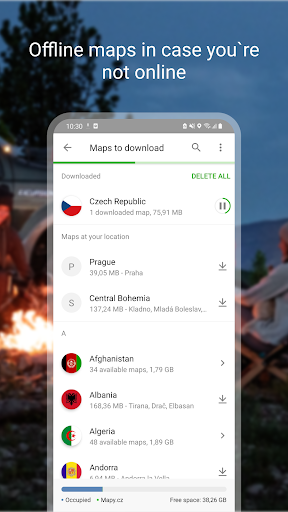
DOWNLOAD OFFLINE MAPS
- offline tourist map of the whole world with hiking and cycling trails
- offline voice navigation for drivers, cyclists and pedestrians
- offline winter maps of the Czech Republic with cross-country skiing trails and ski resorts
- individual regions for download and navigation
- search for places and plan routes around the world even without a signal
- offline map of one country, including individual regions and regular updates, is available for free in the basic version of the app
FREE NAVIGATION FOR DRIVERS, CYCLISTS AND PEDESTRIANS
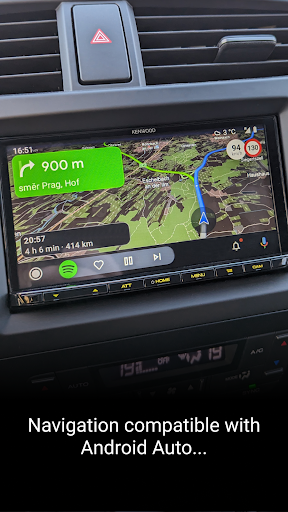
- clear instructions on which lane to get into
- highlighting of roundabout exits
- ability to avoid toll lanes
- dark mode in the navigation
- sharing arrival time, route and current location via SMS, email or chat
- view navigation onto the large on-board display via Android Auto
- speeding alerts and speed cameras for the Czech Republic and Slovak Republic
- important notifications from other drivers about accidents, police patrols, roadblocks, road closures and roadworks in the Czech Republic and Slovak Republic
- the latest traffic situation in the Czech Republic and Slovak Republic with an overview of traffic jams and alternative routes
- warnings on sections of frequent traffic accidents on Czech and Slovak roads, sections without winter maintenance
SAVE TO MY MAPS
- save places, routes, photos and activities in clear folders
- track activities with Tracker for walking, cycling, running, cross-country skiing and hiking
- GPX file upload, GPX import and export
- synchronization of planned routes across devices
MAPY.CZ PREMIUM:
- Annual subscription for premium features to tailor Mapy.cz to your needs
- Customizable speed settings for walking, running, and cycling
- Offline maps of the entire world for traveling without internet (unlimited offline map downloads)
- Personal notes for saved places
- Priority customer support
- Exclusive premium supporter badge
CHOOSE BY REVIEWS OF PLACES, RESTAURANTS AND SERVICES
- up-to-date user photos of what the place looks like
- users' experiences with food, service, ambience and price
- search by rating level and highlight top-rated establishments
RECOMMENDATIONS AND TIPS:
- you will need an internet connection to download the map
- to make the app work properly, turn on location services in your phone settings
- ror the location sharing function, this app will need access to background location data
- for questions or troubleshooting, use the form in the app settings
- using the app in the background with GPS running can reduce battery life
- join our user community at www.facebook.com/Mapy.cz/ to share your experience with the app, follow the latest news or suggest new features
أظهر المزيد

1. قم بتنزيل برنامج MEmu واكمال تثبيته

2. قم بتشغيل برنامج MEmu وفتح Google Play على الصفحة الرئيسية

3. ابح Mapy.cz: maps & navigation في Google Play
Install
4. تنزيل وتثبيت Mapy.cz: maps & navigation
5. انقر على الرمز للتشغيل بعد اكتمال التثبيت

6. استخدم MEmu لتجربة Mapy.cz: maps & navigation على جهاز الكمبيوتر الخاص بك.
تطبيق MEmuهو افضل محاكى اندرويد مجانى وبالفعل 50 مليون شخص يستمتعون حاليا بتجربه اللعب عليه. تمكّنك تقنية MEmu الافتراضية من تشغيل آلاف ألعاب Android بسلاسة على الكمبيوتر الشخصي ، حتى أكثرها استخدامًا للرسومات.
شاشة أكبر وجرافيك افضل ووقت أطول بدون حدود البطارية وباقة التليفون
لوحة مفاتيح كاملة تدعم تحكم كامل عن طريق لوحة المفاتيح و الفأره وجيم باد
عدة العاب وحسابات ومهمات علي جهاز الكمبيوتر في وقت معين عن طريق Memu متعدد النوافذ
Use Mapy.cz: maps & navigation on PC by following steps: