Nebo: Note Taking for Students
تم التحديث
الإصدار الحالي
6.4.1
تقديم

لا داعي للقلق بشأن الشحن الزائد عند استخدام Nebo: Note Taking for Students على هاتفك. تحرر من قيود الشاشة الصغيرة واستمتع به على شاشة أكبر باستخدام لوحة المفاتيح والفأرة. يوفر MEmu جميع الميزات الرائعة التي تتوقعها: تثبيت سريع، إعداد سهل، أدوات تحكم بديهية، ودون قيود على عمر البطارية، أو استخدام البيانات، أو المكالمات الواردة. يُعد MEmu 9 الجديد الخيار الأمثل لتجربة Nebo: Note Taking for Students على جهاز الكمبيوتر. بفضل تقنية التشفير الفريدة، يتيح لك مدير الحسابات المتعددة تشغيل حسابين أو أكثر في وقت واحد. والأهم من ذلك، أن محرك المحاكاة الفريد يستغل أداء جهاز الكمبيوتر بالكامل، مما يُحسّن تجربة التطبيق ويجعل كل شيء سلسًا للغاية.
أظهر المزيد
قم بتنزيل Nebo: Note Taking for Students على الكمبيوتر بإستخدام جهاز مقلد أندروز MEmu.استمتع بمتعة اللعب على الشاشة الكبيرة. Create stunning notes and professional documents effortlessly by hand, brainstorm ideas on an infinite canvas, and annotate PDFs seamlessly.
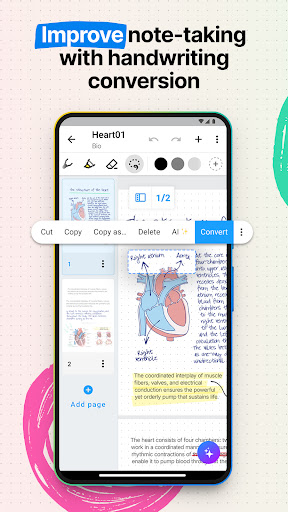
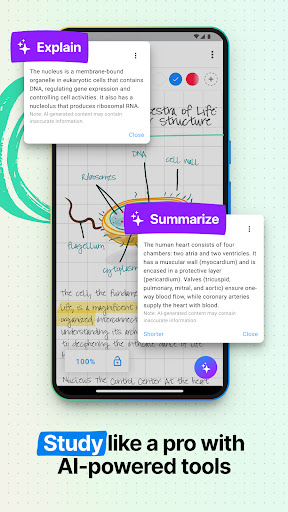
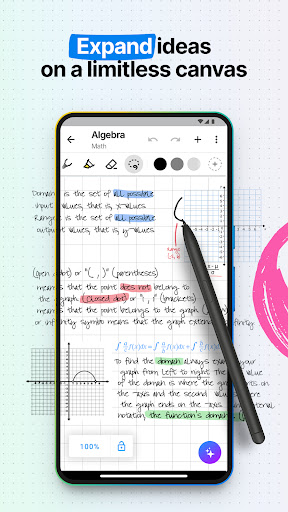
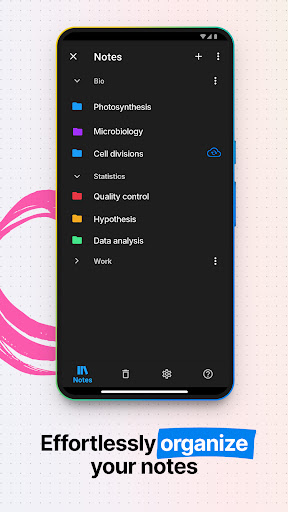
Create stunning notes and professional documents effortlessly by hand, brainstorm ideas on an infinite canvas, and annotate PDFs seamlessly. Powered by the world's leading AI handwriting recognition technology, Nebo offers a dynamic platform where handwriting, text, drawings, diagrams, and images seamlessly coexist on an expandable canvas. Enhance your note-taking experience with intuitive pen gestures, effortlessly converting handwriting and shapes into typed text and precise forms.
Nebo understands every word you write in your choice of 66 languages, and works on all platforms - so you can access and search your notes from any device.
Enjoy 4 powerful experiences in one app:
** Create unlimited notebooks and fixed-size pages for your daily notes. **
** Take freeform notes on boards – the world's most advanced endless canvas. **
** Handwrite responsive documents, adding math calculations and diagrams. **
** Import existing files as PDFs, ready to annotate. **
** NEBO: FEATURES **
• Digital handwriting:
- Write¹, type or dictate in the same page, sentence or even word.
- Accurately convert handwriting and math to typed text, and drawn diagrams to perfect shapes. Diagrams stay editable when pasted into PowerPoint!
- Write emoji and symbols with your pen.
• Edit with your pen:
- Use intuitive gestures to edit and format content without breaking your flow.
- Use the marker to highlight or color, the lasso to select, and the eraser to delete entire strokes or precisely defined content.
• Write, type and draw freely on a board:
- Enjoy an infinite canvas, ideal for brainstorming, mind mapping and freeform note-taking.
- Pan around and zoom in or out for a fresh perspective.
- Use the lasso to select, move, copy, delete or resize content - and to convert handwriting to typed text.
• Switch to a document for a responsive experience:
- Create and edit structured notes – your handwriting will automatically reflow as needed.
- Make edits, adjust layout, rotate your device or split your screen without worrying about readability.
• Enrich your notes:
- Personalize content using a range of pen types and page backgrounds.
- Add photos, sketches and smart objects like math and diagrams.
- Handwrite math equations and matrices across several lines, solve simple calculations and copy math as LaTeX or image.
Nebo respects your privacy and never stores content on our servers without your explicit consent.
For help or feature requests, create a ticket at https://myscri.pt/support
Check minimum and recommended requirements for Nebo: https://myscri.pt/devices
Nebo requires a separate purchase for each platform (iOS, Android, Windows), as each store has its own licensing system, and these licenses are not shared across platforms.
¹You can use any compatible active or passive pen to write in Nebo. More details at https://myscri.pt/pens
أظهر المزيد

1. قم بتنزيل برنامج MEmu واكمال تثبيته

2. قم بتشغيل برنامج MEmu وفتح Google Play على الصفحة الرئيسية

3. ابح Nebo: Note Taking for Students في Google Play
Install
4. تنزيل وتثبيت Nebo: Note Taking for Students
5. انقر على الرمز للتشغيل بعد اكتمال التثبيت

6. استخدم MEmu لتجربة Nebo: Note Taking for Students على جهاز الكمبيوتر الخاص بك.
تطبيق MEmuهو افضل محاكى اندرويد مجانى وبالفعل 50 مليون شخص يستمتعون حاليا بتجربه اللعب عليه. تمكّنك تقنية MEmu الافتراضية من تشغيل آلاف ألعاب Android بسلاسة على الكمبيوتر الشخصي ، حتى أكثرها استخدامًا للرسومات.
شاشة أكبر وجرافيك افضل ووقت أطول بدون حدود البطارية وباقة التليفون
لوحة مفاتيح كاملة تدعم تحكم كامل عن طريق لوحة المفاتيح و الفأره وجيم باد
عدة العاب وحسابات ومهمات علي جهاز الكمبيوتر في وقت معين عن طريق Memu متعدد النوافذ
Use Nebo: Note Taking for Students on PC by following steps: