Opera GX: Gaming Browser
تم التحديث
الإصدار الحالي
2.6.8
تقديم

لا داعي للقلق بشأن الشحن الزائد عند استخدام Opera GX: Gaming Browser على هاتفك. تحرر من قيود الشاشة الصغيرة واستمتع به على شاشة أكبر باستخدام لوحة المفاتيح والفأرة. يوفر MEmu جميع الميزات الرائعة التي تتوقعها: تثبيت سريع، إعداد سهل، أدوات تحكم بديهية، ودون قيود على عمر البطارية، أو استخدام البيانات، أو المكالمات الواردة. يُعد MEmu 9 الجديد الخيار الأمثل لتجربة Opera GX: Gaming Browser على جهاز الكمبيوتر. بفضل تقنية التشفير الفريدة، يتيح لك مدير الحسابات المتعددة تشغيل حسابين أو أكثر في وقت واحد. والأهم من ذلك، أن محرك المحاكاة الفريد يستغل أداء جهاز الكمبيوتر بالكامل، مما يُحسّن تجربة التطبيق ويجعل كل شيء سلسًا للغاية.
أظهر المزيد
قم بتنزيل Opera GX: Gaming Browser على الكمبيوتر بإستخدام جهاز مقلد أندروز MEmu.استمتع بمتعة اللعب على الشاشة الكبيرة. Opera GX brings the gaming lifestyle to your mobile.
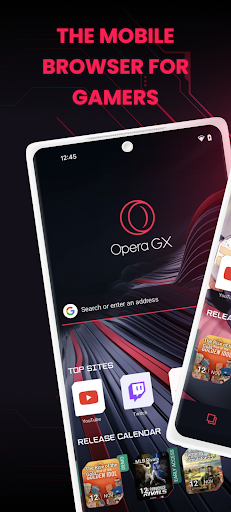
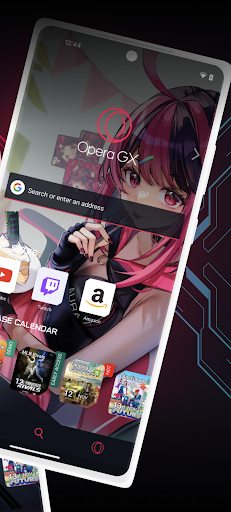
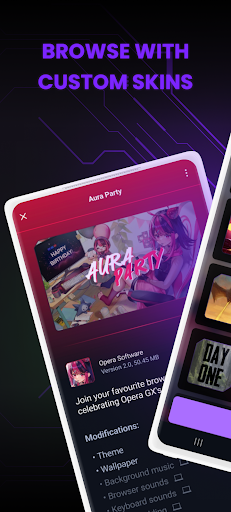
Opera GX brings the gaming lifestyle to your mobile. Express yourself with custom skins, discover free games and the best deals with GX Corner, share links easily between mobile and desktop with My Flow, and much more. All in a secure, private browser.
Designed for gamers
Opera GX’s unique design is inspired by gaming and gaming gear, with the same style that won the desktop GX browser the Red Dot and IF Design awards. Choose from custom themes like GX Classic, Ultra Violet, Purple Haze and White Wolf.
Free games, gaming deals, upcoming releases
Always just a tap away, GX Corner brings you daily gaming news, an upcoming release calendar and trailers. It’s everything a gamer needs to stay on top of the latest news and gaming deals in their mobile web browser.
Connect your phone and computer
Just scan a QR code to connect your phone and computer with Flow. It’s encrypted and safe, with no login, password or account needed. Send links, videos, files and notes to yourself in a single click, and access them instantly in your web browser on all your devices.
Lightning fast browser
Choose between the Fast Action Button (FAB) and standard navigation. The FAB is always within reach of your thumb and uses vibrations when you interact with it, which is perfect when you’re on the move.
Private browser: ad blocker, cookie dialog blocker, and more
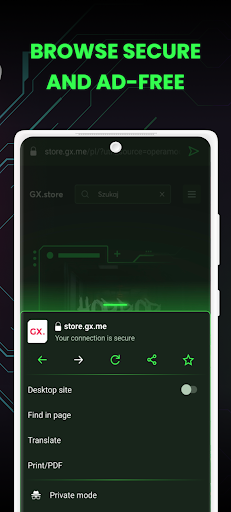
Browse safely and load pages faster with integrated security features like the built-in ad blocker and cookie dialog blocker. This secure browser also comes with cryptojacking protection, stopping others from using your device to mine cryptocurrencies.
About Opera GX
Opera is a global web innovator headquartered in Oslo, Norway and listed on the NASDAQ stock exchange (OPRA). Founded in 1995 on the idea that everyone should be able to browse the web, we have spent the last 25+ years helping millions of people access the internet in a safe, private and innovative way.
By downloading this application, you are agreeing to the End User Licence Agreement at https://www.opera.com/eula/mobile Also, you can learn how Opera handles and protects your data in our Privacy Statement at https://www.opera.com/privacy
أظهر المزيد

1. قم بتنزيل برنامج MEmu واكمال تثبيته

2. قم بتشغيل برنامج MEmu وفتح Google Play على الصفحة الرئيسية

3. ابح Opera GX: Gaming Browser في Google Play
Install
4. تنزيل وتثبيت Opera GX: Gaming Browser
5. انقر على الرمز للتشغيل بعد اكتمال التثبيت

6. استخدم MEmu لتجربة Opera GX: Gaming Browser على جهاز الكمبيوتر الخاص بك.
تطبيق MEmuهو افضل محاكى اندرويد مجانى وبالفعل 50 مليون شخص يستمتعون حاليا بتجربه اللعب عليه. تمكّنك تقنية MEmu الافتراضية من تشغيل آلاف ألعاب Android بسلاسة على الكمبيوتر الشخصي ، حتى أكثرها استخدامًا للرسومات.
شاشة أكبر وجرافيك افضل ووقت أطول بدون حدود البطارية وباقة التليفون
لوحة مفاتيح كاملة تدعم تحكم كامل عن طريق لوحة المفاتيح و الفأره وجيم باد
عدة العاب وحسابات ومهمات علي جهاز الكمبيوتر في وقت معين عن طريق Memu متعدد النوافذ
Use Opera GX: Gaming Browser on PC by following steps: