
PS4 & PS5 Emulator: LSX4
تم التحديث
الإصدار الحالي
0.1.15
تقديم

لا داعي للقلق بشأن الشحن الزائد عند استخدام PS4 & PS5 Emulator: LSX4 على هاتفك. تحرر من قيود الشاشة الصغيرة واستمتع به على شاشة أكبر باستخدام لوحة المفاتيح والفأرة. يوفر MEmu جميع الميزات الرائعة التي تتوقعها: تثبيت سريع، إعداد سهل، أدوات تحكم بديهية، ودون قيود على عمر البطارية، أو استخدام البيانات، أو المكالمات الواردة. يُعد MEmu 9 الجديد الخيار الأمثل لتجربة PS4 & PS5 Emulator: LSX4 على جهاز الكمبيوتر. بفضل تقنية التشفير الفريدة، يتيح لك مدير الحسابات المتعددة تشغيل حسابين أو أكثر في وقت واحد. والأهم من ذلك، أن محرك المحاكاة الفريد يستغل أداء جهاز الكمبيوتر بالكامل، مما يُحسّن تجربة التطبيق ويجعل كل شيء سلسًا للغاية.
أظهر المزيد
استمتع بتجربة رائعة لاستخدام PS4 & PS5 Emulator: LSX4 على جهاز الكمبيوتر مع MEmu Play. إنه محاكي أندرويد قوي ومجاني يوفر لك آلاف تطبيقات أندرويد لإصدار سطح المكتب. استمتع بالتواصل مع أصدقائك وحسّن عملك بكفاءة أعلى! LSX4 is a PS4 and PS5 emulator for Android phones and tablets with an ARM64 processor and Vulkan support.
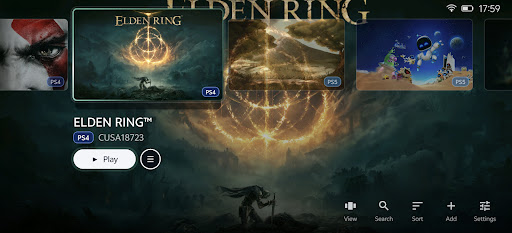
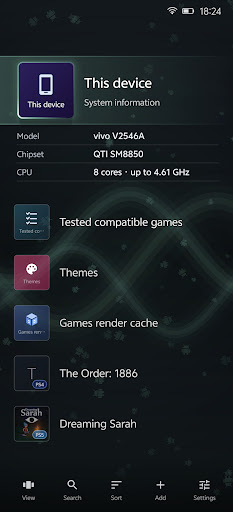
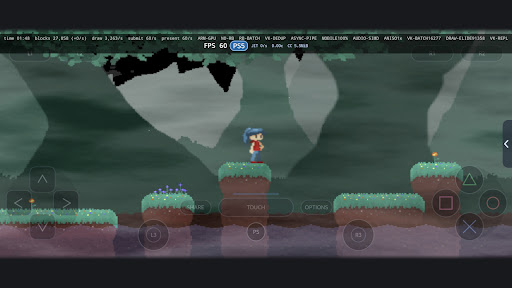
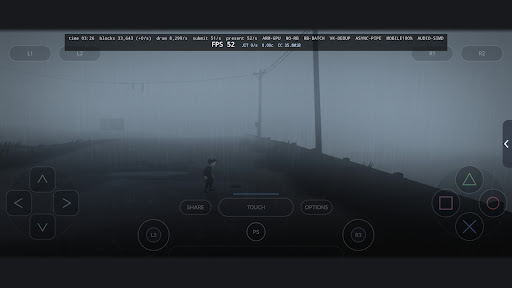
LSX4 is a PS4 and PS5 emulator for Android phones and tablets with an ARM64 processor and Vulkan support.
Add your own files to the library, adjust graphics and controls, and run compatible games on your device.
LSX4 is at an early stage of development. Compatibility is limited and varies by game, device and settings. A game appearing in the library does not mean that it will run correctly.
FEATURES
• PS4 and PS5 emulation in one app
• Two CPU backends, including an experimental option
• Select and import compatible Vulkan graphics drivers
• Resolution, scaling and graphics settings
• Gamepad support and customizable touch controls
• Screenshots, screen recording and a local gallery
• Share a selected screenshot or video through the Android share menu
• English, Russian, German, Spanish, French and Chinese interface
• No ads or in-app purchases
YOUR OWN FILES
Games and console system software are not included. Add only files you are entitled to use.
Emulation runs on your device. LSX4 does not upload your games or captures to the developer's servers. Emulation itself does not require an internet connection. Google Play may use a connection for installation and license checks.
GAMEPLAY CAPTURE
Screen recording starts after you approve the Android capture prompt. It may include controls and visible notifications. Game-audio recording is available on Android 10 or later; the microphone is not recorded. You can also record video without audio.
REQUIREMENTS
• Android 8.0 or later
• ARM64 processor with Vulkan support
• Enough free storage for your files and captures
LSX4 is not affiliated with or endorsed by the PS4 and PS5 platform holder. PS4 and PS5 are trademarks of their respective owners.
Website: https://lsx4.app
أظهر المزيد

1. قم بتنزيل برنامج MEmu واكمال تثبيته

2. قم بتشغيل برنامج MEmu وفتح Google Play على الصفحة الرئيسية

3. ابح PS4 & PS5 Emulator: LSX4 في Google Play
Install
4. تنزيل وتثبيت PS4 & PS5 Emulator: LSX4
5. انقر على الرمز للتشغيل بعد اكتمال التثبيت

6. استخدم MEmu لتجربة PS4 & PS5 Emulator: LSX4 على جهاز الكمبيوتر الخاص بك.
تطبيق MEmuهو افضل محاكى اندرويد مجانى وبالفعل 50 مليون شخص يستمتعون حاليا بتجربه اللعب عليه. تمكّنك تقنية MEmu الافتراضية من تشغيل آلاف ألعاب Android بسلاسة على الكمبيوتر الشخصي ، حتى أكثرها استخدامًا للرسومات.
شاشة أكبر وجرافيك افضل ووقت أطول بدون حدود البطارية وباقة التليفون
لوحة مفاتيح كاملة تدعم تحكم كامل عن طريق لوحة المفاتيح و الفأره وجيم باد
عدة العاب وحسابات ومهمات علي جهاز الكمبيوتر في وقت معين عن طريق Memu متعدد النوافذ
Use PS4 & PS5 Emulator: LSX4 on PC by following steps: