Randonautica
تم التحديث
الإصدار الحالي
3.0.17
تقديم

لا داعي للقلق بشأن الشحن الزائد عند استخدام Randonautica على هاتفك. تحرر من قيود الشاشة الصغيرة واستمتع به على شاشة أكبر باستخدام لوحة المفاتيح والفأرة. يوفر MEmu جميع الميزات الرائعة التي تتوقعها: تثبيت سريع، إعداد سهل، أدوات تحكم بديهية، ودون قيود على عمر البطارية، أو استخدام البيانات، أو المكالمات الواردة. يُعد MEmu 9 الجديد الخيار الأمثل لتجربة Randonautica على جهاز الكمبيوتر. بفضل تقنية التشفير الفريدة، يتيح لك مدير الحسابات المتعددة تشغيل حسابين أو أكثر في وقت واحد. والأهم من ذلك، أن محرك المحاكاة الفريد يستغل أداء جهاز الكمبيوتر بالكامل، مما يُحسّن تجربة التطبيق ويجعل كل شيء سلسًا للغاية.
أظهر المزيد
قم بتنزيل Randonautica على الكمبيوتر بإستخدام جهاز مقلد أندروز MEmu.استمتع بمتعة اللعب على الشاشة الكبيرة. "The law of attraction meets geocaching.
"The law of attraction meets geocaching." -The New York Times
Reasons to use Randonautica to generate completely random coordinates for you to travel to:
-To go on an unexpected adventure
-To test out quantum entropy and the mind's ability to influence reality
-To escape the matrix
-To test the law of attraction
-To get some exercise by walking to a random location
-To open a real world portal!
-To get off screens and into the world around you
-To feel heightened awareness and observation
-To feel being present
-To feel a spiritual connection with a higher power, nature or the universe
-To find new areas in your neighborhood, town or city
-To gets signs and symbols from the universe
-To defeat feeling "stuck" in the day-to-day
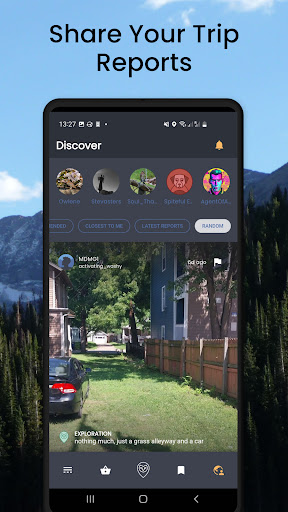
-To connect with people across the globe on Randonautica's in-app social media feed Discover
-To post reports and log your insight and adventures
-To journal synchronicities and coincidences associated with your random exploration
Proven:
Going to a random location makes you hyperaware and present, often providing a sense of meditation or the feeling of "being alive again". Random exploration adds novelty to life!
Theoretical:
By interfacing with quantum entropy there is growing evidence that the mind, thoughts, emotions and words have an impact on matter. Using Randonautica creates a bridge to access a very malleable reality. Having an intense thought or "intention" while the generation process is happening can result in an effect in the real world as you journey to the random coordinates provided by the app. People have reported that there is a ripple effect where their intention has lasting effect on their personal reality and observation.
Want to break out of the matrix?
Open a real world portal?
Jump to an alternate timeline to better your life?
Go on a fun random adventure to explore areas you never knew existed?
Add novelty and fun to your life through random exploration?
See if your mind can influence reality, the REAL WORLD, just by thinking! It's a bit like accessing the quantum metaverse! With Randonautica you can travel to a random location with the powerful use of quantum entropy to see if your MIND can influence REALITY!
Wander into wonder with Randonautica, the official app of the global Randonauts phenomenon. Use intention to explore the world around you with the OFFICIAL app of The Randonauts.
Randonautica is the first ever quantumly generated adventure game that takes you on a journey of true randomness. The adventure is yours to have and the legend will be yours to tell. Welcome, future Randonauts!
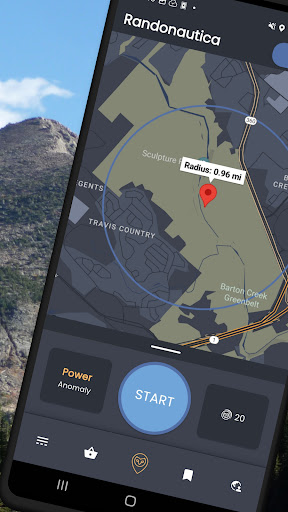
This app provides you with totally random coordinates within a set radius. You can then choose if you’d like to adventure to the point. It’s been said by the Randonaut community that breaking out of what’s called your “probability-tunnel” can bring about serendipitous experiences and provide great fun while journeying into the world around you.
The app uses both pseudo and quantum entropy sources for randomization which provides a set of coordinates that can be opened in a map to navigate to or the user can digitally explore the coordinates. While “Blind Spots” are random points meant to be visited for exploring the unknown world around you, choosing an “Anomaly” type coordinate will run an algorithm over your radius to find the most statistically improbable distribution of random points within your radius. These are destinations where the real magic happens.
Explore the world beyond the habitual and deterministic patterns of your everyday life, discover adventures right in front of your doorstep. Become part of the international community of the Randonauts and share your findings and legendary trips on Reddit, Telegram, Discord, or Facebook.
➤ reddit.com/r/randonauts
➤ t.me/randonauts
➤ discord.gg/r4ek9ZH
➤ fb.com/groups/randonauts/
أظهر المزيد

1. قم بتنزيل برنامج MEmu واكمال تثبيته

2. قم بتشغيل برنامج MEmu وفتح Google Play على الصفحة الرئيسية

3. ابح Randonautica في Google Play
Install
4. تنزيل وتثبيت Randonautica
5. انقر على الرمز للتشغيل بعد اكتمال التثبيت

6. استخدم MEmu لتجربة Randonautica على جهاز الكمبيوتر الخاص بك.
تطبيق MEmuهو افضل محاكى اندرويد مجانى وبالفعل 50 مليون شخص يستمتعون حاليا بتجربه اللعب عليه. تمكّنك تقنية MEmu الافتراضية من تشغيل آلاف ألعاب Android بسلاسة على الكمبيوتر الشخصي ، حتى أكثرها استخدامًا للرسومات.
شاشة أكبر وجرافيك افضل ووقت أطول بدون حدود البطارية وباقة التليفون
لوحة مفاتيح كاملة تدعم تحكم كامل عن طريق لوحة المفاتيح و الفأره وجيم باد
عدة العاب وحسابات ومهمات علي جهاز الكمبيوتر في وقت معين عن طريق Memu متعدد النوافذ
Use Randonautica on PC by following steps: