Remote for Truman
تم التحديث
الإصدار الحالي
1.05
تقديم

لا داعي للقلق بشأن الشحن الزائد عند استخدام Remote for Truman على هاتفك. تحرر من قيود الشاشة الصغيرة واستمتع به على شاشة أكبر باستخدام لوحة المفاتيح والفأرة. يوفر MEmu جميع الميزات الرائعة التي تتوقعها: تثبيت سريع، إعداد سهل، أدوات تحكم بديهية، ودون قيود على عمر البطارية، أو استخدام البيانات، أو المكالمات الواردة. يُعد MEmu 9 الجديد الخيار الأمثل لتجربة Remote for Truman على جهاز الكمبيوتر. بفضل تقنية التشفير الفريدة، يتيح لك مدير الحسابات المتعددة تشغيل حسابين أو أكثر في وقت واحد. والأهم من ذلك، أن محرك المحاكاة الفريد يستغل أداء جهاز الكمبيوتر بالكامل، مما يُحسّن تجربة التطبيق ويجعل كل شيء سلسًا للغاية.
أظهر المزيد
استمتع بتجربة رائعة لاستخدام Remote for Truman على جهاز الكمبيوتر مع MEmu Play. إنه محاكي أندرويد قوي ومجاني يوفر لك آلاف تطبيقات أندرويد لإصدار سطح المكتب. استمتع بالتواصل مع أصدقائك وحسّن عملك بكفاءة أعلى! Tired of misplacing your physical remote or dealing with worn-out buttons?
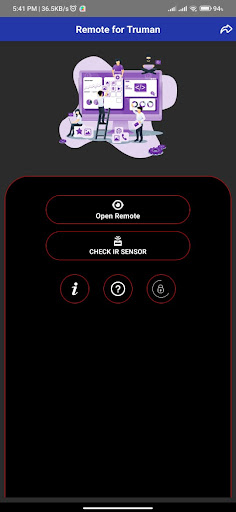
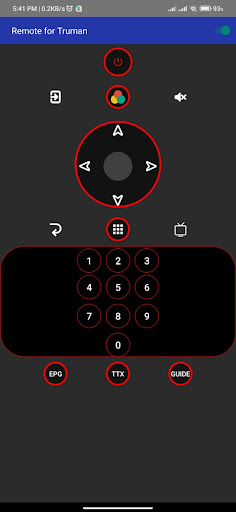
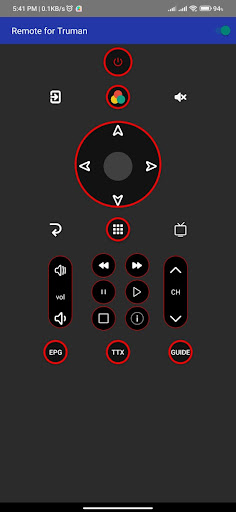
Tired of misplacing your physical remote or dealing with worn-out buttons? Meet Truman Remote, the perfect app to transform your smartphone into a fully functional remote control. Designed with user convenience in mind, this app is loaded with features that make managing your devices effortless and intuitive.
Key Features of Truman Remote
Volume Adjustment:
Control the volume with a simple swipe of your hand or by tapping on the screen.
Channel Changing:
Browse through your favorite channels using hand gestures or by entering channel numbers directly.
Power On/Off Functionality:
Turn your device on or off with just a tap, replicating the power button of your physical remote.
All-in-One Functionality:
Truman Remote includes all the essential features of a physical remote, making it a one-stop solution for your control needs.
Disclaimer
Truman Remote is designed to work with compatible devices. Ensure your device supports online remote connectivity for optimal performance. The app requires internet access for certain features. Truman Remote is a digital tool and does not physically replicate the hardware of a remote control.
Say goodbye to the hassle of searching for misplaced remotes! Download Truman Remote today and experience the ease of controlling your devices right from your phone.
Contact us: appsrara@gmail.com
App Policy: https://totalappstore.com/raraapps/policy.html
أظهر المزيد

1. قم بتنزيل برنامج MEmu واكمال تثبيته

2. قم بتشغيل برنامج MEmu وفتح Google Play على الصفحة الرئيسية

3. ابح Remote for Truman في Google Play
Install
4. تنزيل وتثبيت Remote for Truman
5. انقر على الرمز للتشغيل بعد اكتمال التثبيت

6. استخدم MEmu لتجربة Remote for Truman على جهاز الكمبيوتر الخاص بك.
تطبيق MEmuهو افضل محاكى اندرويد مجانى وبالفعل 50 مليون شخص يستمتعون حاليا بتجربه اللعب عليه. تمكّنك تقنية MEmu الافتراضية من تشغيل آلاف ألعاب Android بسلاسة على الكمبيوتر الشخصي ، حتى أكثرها استخدامًا للرسومات.
شاشة أكبر وجرافيك افضل ووقت أطول بدون حدود البطارية وباقة التليفون
لوحة مفاتيح كاملة تدعم تحكم كامل عن طريق لوحة المفاتيح و الفأره وجيم باد
عدة العاب وحسابات ومهمات علي جهاز الكمبيوتر في وقت معين عن طريق Memu متعدد النوافذ
Use Remote for Truman on PC by following steps: