Kidoodle.TV - Safe Streaming™
تم التحديث
الإصدار الحالي
يتباين بحسب الجهاز
تقديم

لا داعي للقلق بشأن الشحن الزائد عند استخدام Kidoodle.TV - Safe Streaming™ على هاتفك. تحرر من قيود الشاشة الصغيرة واستمتع به على شاشة أكبر باستخدام لوحة المفاتيح والفأرة. يوفر MEmu جميع الميزات الرائعة التي تتوقعها: تثبيت سريع، إعداد سهل، أدوات تحكم بديهية، ودون قيود على عمر البطارية، أو استخدام البيانات، أو المكالمات الواردة. يُعد MEmu 9 الجديد الخيار الأمثل لتجربة Kidoodle.TV - Safe Streaming™ على جهاز الكمبيوتر. بفضل تقنية التشفير الفريدة، يتيح لك مدير الحسابات المتعددة تشغيل حسابين أو أكثر في وقت واحد. والأهم من ذلك، أن محرك المحاكاة الفريد يستغل أداء جهاز الكمبيوتر بالكامل، مما يُحسّن تجربة التطبيق ويجعل كل شيء سلسًا للغاية.
أظهر المزيد
قم بتنزيل Kidoodle.TV - Safe Streaming™ على الكمبيوتر بإستخدام جهاز مقلد أندروز MEmu.استمتع بمتعة اللعب على الشاشة الكبيرة. Watch popular shows like PAW Patrol: Pup Tales, Peppa Pig Minis, LEGO City, My Little Pony, Talking Tom, Roblox, Masha & The Bear & more.
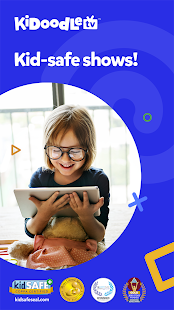
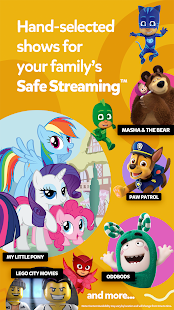
Watch popular shows like PAW Patrol: Pup Tales, Peppa Pig Minis, LEGO City, My Little Pony, Talking Tom, Roblox, Masha & The Bear & more. Stream endless hours of kid-safe videos for free.
No hidden fees, no subscription and no payment necessary. Our ad-supported plan offers unlimited access to our entire Safe Streaming™ library.
Download Kidoodle.TV® for FREE and your kids can:
- Instantly watch unlimited episodes and full series on-demand
- Easily tap to discover new shows-updated weekly!
- Search for favorites across the entire content library
- Create your own profile, customizable by color, avatar, title selection and age group
- “Like” favorites and add them to a special category and then share them with friends.
- Watch and learn with fun and educational cartoons and live-action shows
- Dance all day with musical sing-a-longs
Kidoodle.TV is available in more than 160 countries and territories, and is accessible on more than 1,000 devices.
Kidoodle.TV does not collect any personally identifiable information from your child and is a recipient of the kidSAFE+ COPPA Seal.
Winner of the Mom's Choice Award, Parent Tested, Parent Approved Award, Best Mobile App Award, and Stevie Award (Family & Kids Category)
CUSTOMER SERVICE
We're here to answer questions and hear how we can improve the Kidoodle.TV app for you and your kids. You can message us at team@kidoodle.tv.
----------------------------------
* IMPORTANT: Content and feature availability may vary or be restricted according to the country of subscription and will change from time to time.
** Requires internet connection to watch videos. Wi-Fi is highly recommended when streaming videos
Privacy Policy: https://www.kidoodle.tv/privacy-policy/
Terms of Use: https://www.kidoodle.tv/termsofuse/
أظهر المزيد

1. قم بتنزيل برنامج MEmu واكمال تثبيته

2. قم بتشغيل برنامج MEmu وفتح Google Play على الصفحة الرئيسية

3. ابح Kidoodle.TV - Safe Streaming™ في Google Play
Install
4. تنزيل وتثبيت Kidoodle.TV - Safe Streaming™
5. انقر على الرمز للتشغيل بعد اكتمال التثبيت

6. استخدم MEmu لتجربة Kidoodle.TV - Safe Streaming™ على جهاز الكمبيوتر الخاص بك.
تطبيق MEmuهو افضل محاكى اندرويد مجانى وبالفعل 50 مليون شخص يستمتعون حاليا بتجربه اللعب عليه. تمكّنك تقنية MEmu الافتراضية من تشغيل آلاف ألعاب Android بسلاسة على الكمبيوتر الشخصي ، حتى أكثرها استخدامًا للرسومات.
شاشة أكبر وجرافيك افضل ووقت أطول بدون حدود البطارية وباقة التليفون
لوحة مفاتيح كاملة تدعم تحكم كامل عن طريق لوحة المفاتيح و الفأره وجيم باد
عدة العاب وحسابات ومهمات علي جهاز الكمبيوتر في وقت معين عن طريق Memu متعدد النوافذ
Use Kidoodle.TV - Safe Streaming™ on PC by following steps: