VibeCast-VistaWave
تم التحديث
الإصدار الحالي
1.9.7
تقديم

لا داعي للقلق بشأن الشحن الزائد عند استخدام VibeCast-VistaWave على هاتفك. تحرر من قيود الشاشة الصغيرة واستمتع به على شاشة أكبر باستخدام لوحة المفاتيح والفأرة. يوفر MEmu جميع الميزات الرائعة التي تتوقعها: تثبيت سريع، إعداد سهل، أدوات تحكم بديهية، ودون قيود على عمر البطارية، أو استخدام البيانات، أو المكالمات الواردة. يُعد MEmu 9 الجديد الخيار الأمثل لتجربة VibeCast-VistaWave على جهاز الكمبيوتر. بفضل تقنية التشفير الفريدة، يتيح لك مدير الحسابات المتعددة تشغيل حسابين أو أكثر في وقت واحد. والأهم من ذلك، أن محرك المحاكاة الفريد يستغل أداء جهاز الكمبيوتر بالكامل، مما يُحسّن تجربة التطبيق ويجعل كل شيء سلسًا للغاية.
أظهر المزيد
استمتع بتجربة رائعة لاستخدام VibeCast-VistaWave على جهاز الكمبيوتر مع MEmu Play. إنه محاكي أندرويد قوي ومجاني يوفر لك آلاف تطبيقات أندرويد لإصدار سطح المكتب. استمتع بالتواصل مع أصدقائك وحسّن عملك بكفاءة أعلى! حمّل Lplayer الآن لتجربة مشاهدة فيديو رائعة تتيح لك الوصول إلى تجربة مشاهدة مريحة وشخصية ومتنوعة بشكل غير مسبوق!
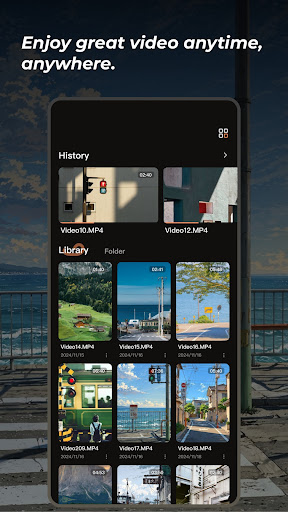
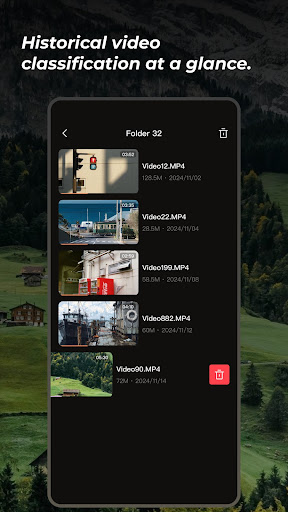
حمّل Lplayer الآن لتجربة مشاهدة فيديو رائعة تتيح لك الوصول إلى تجربة مشاهدة مريحة وشخصية ومتنوعة بشكل غير مسبوق!
إنهاء ذكي، إدارة فيديو أكثر كفاءة
يُحدث Lplayer ثورة في طريقة تنظيم الفيديو. بفضل الخوارزميات الذكية، يُمكنك تنظيم الفيديوهات وفقًا لمعايير متعددة، مثل النوع، والمدة، ووقت التحميل، وعدد المشاهدات، وغيرها، مما يُسهّل عليك الفرز السريع والدقيق. سواءً كان فيلمًا رائجًا، أو مسلسلًا كلاسيكيًا، أو فيلمًا وثائقيًا معمقًا، أو مقطع فيديو قصيرًا مضحكًا، أو إعادة عرض مباشرة رائعة، يُمكنك العثور بسرعة على محتواك المفضل من بين كم هائل من الفيديوهات، وودّع مكتبة الفيديو المزدحمة، ونظّم إدارة فيديوهاتك بسهولة.
تحسين جودة الصورة، متعة بصرية بين يديك
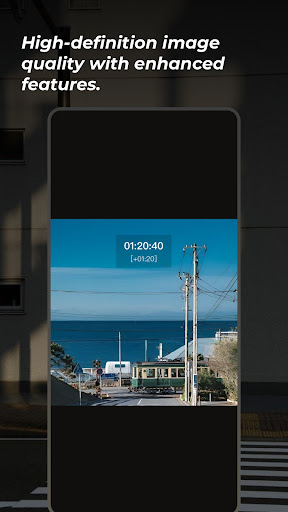
لا يدعم Lplayer خيارات جودة HD المتعددة فحسب، بل يأتي أيضًا مع تحسينات تشغيل قوية، مثل التشغيل بسرعة مضاعفة وتصحيح السطوع والألوان. سواءً كان فيلمًا كلاسيكيًا قديمًا أو فيديو بجودة رديئة، تُحسّن هذه الميزات جودة الصور بشكل ملحوظ، مما يوفر صورة أكثر وضوحًا وحيوية، لتستمتع بتجربة مشاهدة لا مثيل لها. إدارة شخصية لإنشاء مساحة فيديو حصرية
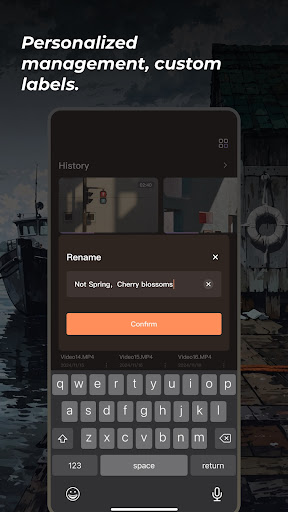
تُتيح ميزة "الإدارة الشخصية" في VIBECAST للمستخدمين تجربة تخزين وإدارة فيديو فائقة المرونة. يُمكن للمستخدمين تحميل جميع أنواع ملفات الفيديو بنقرة واحدة عبر واجهة بسيطة وسهلة الاستخدام. سواءً كان مقطعًا رائعًا تم تنزيله من الإنترنت أو فيديو قيّمًا من تصويرهم، يُمكن تخزينه بأمان في حساب شخصي، ومن خلال التصنيف والوسوم المُخصصة، يُمكن إنشاء مساحة فيديو حصرية بسهولة.
انقر لتنزيل Lplayer، وابدأ فصلًا جديدًا من إدارة الفيديو الذكية، لتُحفظ كل لحظة رائعة على أكمل وجه، ولتستمتع بتجربة مشاهدة لا تُنسى في كل مرة!
أظهر المزيد

1. قم بتنزيل برنامج MEmu واكمال تثبيته

2. قم بتشغيل برنامج MEmu وفتح Google Play على الصفحة الرئيسية

3. ابح VibeCast-VistaWave في Google Play
Install
4. تنزيل وتثبيت VibeCast-VistaWave
5. انقر على الرمز للتشغيل بعد اكتمال التثبيت

6. استخدم MEmu لتجربة VibeCast-VistaWave على جهاز الكمبيوتر الخاص بك.
تطبيق MEmuهو افضل محاكى اندرويد مجانى وبالفعل 50 مليون شخص يستمتعون حاليا بتجربه اللعب عليه. تمكّنك تقنية MEmu الافتراضية من تشغيل آلاف ألعاب Android بسلاسة على الكمبيوتر الشخصي ، حتى أكثرها استخدامًا للرسومات.
شاشة أكبر وجرافيك افضل ووقت أطول بدون حدود البطارية وباقة التليفون
لوحة مفاتيح كاملة تدعم تحكم كامل عن طريق لوحة المفاتيح و الفأره وجيم باد
عدة العاب وحسابات ومهمات علي جهاز الكمبيوتر في وقت معين عن طريق Memu متعدد النوافذ
Use VibeCast-VistaWave on PC by following steps: