Xbox
تم التحديث
الإصدار الحالي
2605.2.4
تقديم

لا داعي للقلق بشأن الشحن الزائد عند استخدام Xbox على هاتفك. تحرر من قيود الشاشة الصغيرة واستمتع به على شاشة أكبر باستخدام لوحة المفاتيح والفأرة. يوفر MEmu جميع الميزات الرائعة التي تتوقعها: تثبيت سريع، إعداد سهل، أدوات تحكم بديهية، ودون قيود على عمر البطارية، أو استخدام البيانات، أو المكالمات الواردة. يُعد MEmu 9 الجديد الخيار الأمثل لتجربة Xbox على جهاز الكمبيوتر. بفضل تقنية التشفير الفريدة، يتيح لك مدير الحسابات المتعددة تشغيل حسابين أو أكثر في وقت واحد. والأهم من ذلك، أن محرك المحاكاة الفريد يستغل أداء جهاز الكمبيوتر بالكامل، مما يُحسّن تجربة التطبيق ويجعل كل شيء سلسًا للغاية.
أظهر المزيد
قم بتنزيل Xbox على الكمبيوتر بإستخدام جهاز مقلد أندروز MEmu.استمتع بمتعة اللعب على الشاشة الكبيرة. يُبقيك Xbox على اتصال دائم بمتعة اللعب مع أصدقائك وألعابك وأجهزة الألعاب المدعومة من هاتفك أو جهازك اللوحي أثناء تنقلك.
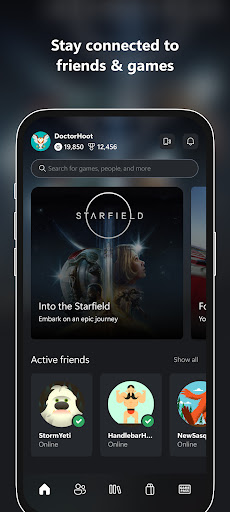
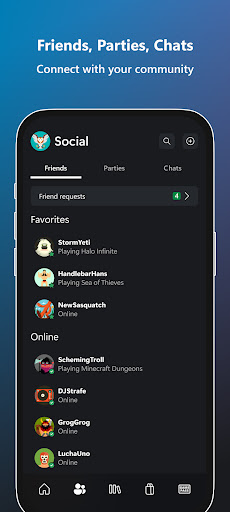
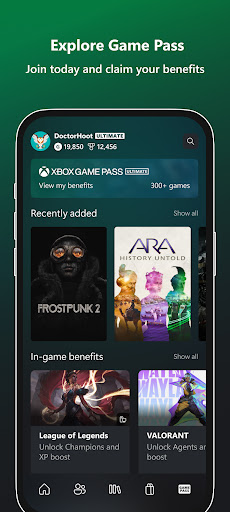
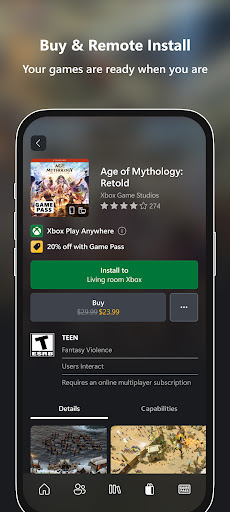
يُبقيك Xbox على اتصال دائم بمتعة اللعب مع أصدقائك وألعابك وأجهزة الألعاب المدعومة من هاتفك أو جهازك اللوحي أثناء تنقلك. اشترِ الألعاب التي تريدها دون مغادرة التطبيق. استكشف Game Pass، وأضف الألعاب إلى قائمة الانتظار، وفعّل التنبيهات للألعاب الجديدة، والمزيد. تواصل مع أصدقائك ومجموعاتك عبر الدردشة الصوتية والنصية، حتى لو كانوا يستخدمون جهاز Xbox أو الكمبيوتر. شارك قائمة أمنياتك ومقاطع اللعب ولقطات الشاشة من جهازك على شبكات الألعاب والشبكات الاجتماعية المفضلة لديك. اطلع على إشعارات دعوات الألعاب والإنجازات الخاصة بك وبأصدقائك والرسائل والمزيد. تتبع نقاط المكافآت الخاصة بك، واجمعها، واستبدلها. ابقَ على اتصال بعالم الألعاب الخاص بك مع تطبيق Xbox للهواتف المحمولة.
- يُبقيك Xbox على اتصال دائم بمتعة اللعب مع أصدقائك وألعابك وأجهزة الألعاب المدعومة من هاتفك أو جهازك اللوحي أثناء تنقلك.
- شارك مقاطع اللعب ولقطات الشاشة من جهازك على شبكات الألعاب والشبكات الاجتماعية المفضلة لديك.
- يتابعك أصدقاؤك ومجموعاتك عبر الدردشة الصوتية والنصية، حتى لو كانوا يستخدمون جهاز Xbox أو الكمبيوتر.
- ثبّت الألعاب عن بُعد على جهازك من هاتفك.
شارك مقاطع اللعب ولقطات الشاشة من جهازك على شبكات الألعاب والشبكات الاجتماعية المفضلة لديك.
تابعك أصدقاؤك ومجموعاتك عبر الدردشة الصوتية والنصية، حتى لو كانوا يستخدمون جهاز Xbox أو الكمبيوتر.
ثبّت الألعاب عن بُعد على جهازك من هاتفك. - اطلع على إشعارات دعوات الألعاب، وإنجازاتك وإنجازات أصدقائك، والرسائل، والمزيد.
- استكشف Game Pass واحصل على توصيات مخصصة، وإشعارات حول الألعاب الجديدة، وألعاب في قائمة الانتظار، والمزيد.
- اشترِ الألعاب التي تريدها دون مغادرة التطبيق.
- تتبع نقاط المكافآت الخاصة بك، واجمعها، واستبدلها.
- تطبيق Xbox للهواتف المحمولة هو أفضل طريقة للبقاء على اتصال بعالم ألعابك.
اتفاقية تطبيق Xbox
تُكمّل الشروط التالية أي شروط ترخيص برامج مصاحبة لتطبيق Xbox.
يُرجى الرجوع إلى اتفاقية ترخيص المستخدم النهائي (EULA) الخاصة بمايكروسوفت للاطلاع على شروط خدمة تطبيقات ألعاب مايكروسوفت على نظام Android. بتثبيت التطبيق، فإنك توافق على هذه الشروط والأحكام: https://support.xbox.com/help/subscriptions-billing/manage-subscriptions/microsoft-software-license-terms-mobile-gaming
التعليقات
إذا قدمتَ تعليقات حول تطبيق Xbox إلى مايكروسوفت، فإنك تمنح مايكروسوفت، مجانًا، الحق في استخدام تعليقاتك ومشاركتها وتسويقها بأي شكل ولأي غرض. كما تمنح أطرافًا ثالثة، مجانًا، أي حقوق براءات اختراع لازمة لمنتجاتها وتقنياتها وخدماتها لاستخدامها أو التفاعل مع أي أجزاء محددة من برامج أو خدمات مايكروسوفت التي تتضمن ملاحظاتك. ولن تقدم ملاحظات تخضع لترخيص يُلزم مايكروسوفت بترخيص برامجها أو وثائقها لأطراف ثالثة لمجرد تضميننا ملاحظاتك فيها. تبقى هذه الحقوق سارية المفعول بعد انتهاء هذا الاتفاق.
أظهر المزيد

1. قم بتنزيل برنامج MEmu واكمال تثبيته

2. قم بتشغيل برنامج MEmu وفتح Google Play على الصفحة الرئيسية

3. ابح Xbox في Google Play
Install
4. تنزيل وتثبيت Xbox
5. انقر على الرمز للتشغيل بعد اكتمال التثبيت

6. استخدم MEmu لتجربة Xbox على جهاز الكمبيوتر الخاص بك.
تطبيق MEmuهو افضل محاكى اندرويد مجانى وبالفعل 50 مليون شخص يستمتعون حاليا بتجربه اللعب عليه. تمكّنك تقنية MEmu الافتراضية من تشغيل آلاف ألعاب Android بسلاسة على الكمبيوتر الشخصي ، حتى أكثرها استخدامًا للرسومات.
شاشة أكبر وجرافيك افضل ووقت أطول بدون حدود البطارية وباقة التليفون
لوحة مفاتيح كاملة تدعم تحكم كامل عن طريق لوحة المفاتيح و الفأره وجيم باد
عدة العاب وحسابات ومهمات علي جهاز الكمبيوتر في وقت معين عن طريق Memu متعدد النوافذ
Use Xbox on PC by following steps: