Yamaha MyGarage
تم التحديث
الإصدار الحالي
3.1.107
تقديم

لا داعي للقلق بشأن الشحن الزائد عند استخدام Yamaha MyGarage على هاتفك. تحرر من قيود الشاشة الصغيرة واستمتع به على شاشة أكبر باستخدام لوحة المفاتيح والفأرة. يوفر MEmu جميع الميزات الرائعة التي تتوقعها: تثبيت سريع، إعداد سهل، أدوات تحكم بديهية، ودون قيود على عمر البطارية، أو استخدام البيانات، أو المكالمات الواردة. يُعد MEmu 9 الجديد الخيار الأمثل لتجربة Yamaha MyGarage على جهاز الكمبيوتر. بفضل تقنية التشفير الفريدة، يتيح لك مدير الحسابات المتعددة تشغيل حسابين أو أكثر في وقت واحد. والأهم من ذلك، أن محرك المحاكاة الفريد يستغل أداء جهاز الكمبيوتر بالكامل، مما يُحسّن تجربة التطبيق ويجعل كل شيء سلسًا للغاية.
أظهر المزيد
قم بتنزيل Yamaha MyGarage على الكمبيوتر بإستخدام جهاز مقلد أندروز MEmu.استمتع بمتعة اللعب على الشاشة الكبيرة. MyGarage offers you the chance to build your dream collection of Yamaha road motorcycles and/or scooters under one roof.
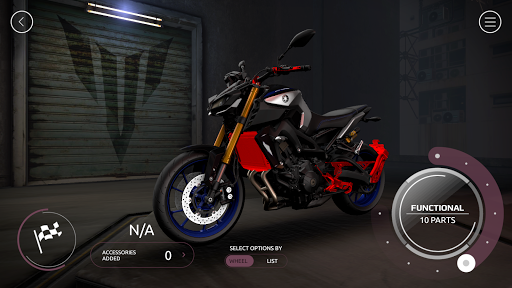
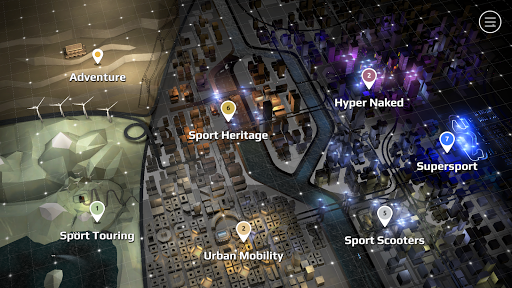
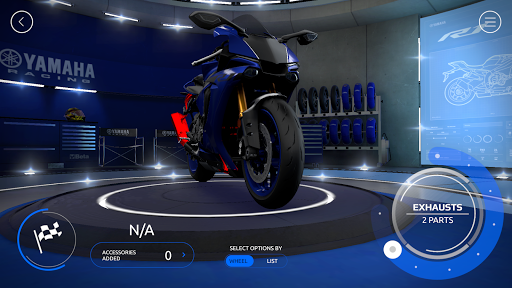
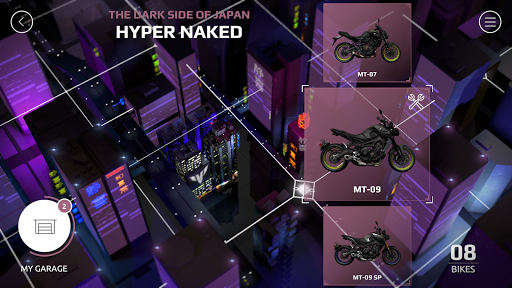
MyGarage offers you the chance to build your dream collection of Yamaha road motorcycles and/or scooters under one roof. It gives a modern and easy-to-use way to experience how your dream machines might look like with accessories fitted.
The bikes are rendered using a powerful 3D high-end-real-time-engine enabling you to see them from any angle in high-definition.
FEATURE HIGHLIGHTS
• This extensive range covers every Yamaha you could wish for; your perfect Yamaha is simply a download and a few clicks away.
• The MyGarage app will include all the new models, accessories and colors before they hit the stores.
• Fill your personal garage with your dream bikes.
• Take photos from any angle to share your bikes with your friends.
• Compare the prices of different models and configurations.
• Send your ultimate machine(s) directly to your local Yamaha Dealer to schedule a test drive, request a quote or get more information
The Award-winning Yamaha MyGarage apps have been acknowledged as one of the most popular (with 1 Million downloads since 2016) powered-two-wheeler apps on the market for motorcycle customization.
The new MyGarage app brings all MyGarage single apps together. Don't panic if you've already created your perfect Yamaha in one of the single apps, any configured machine(s) will be as saved in the new app.
Recommended: Android 4.4+*
*The apps use linear rendering, the lower end and older devices do not support this way of rendering which requires OpenGL ES 3
أظهر المزيد

1. قم بتنزيل برنامج MEmu واكمال تثبيته

2. قم بتشغيل برنامج MEmu وفتح Google Play على الصفحة الرئيسية

3. ابح Yamaha MyGarage في Google Play
Install
4. تنزيل وتثبيت Yamaha MyGarage
5. انقر على الرمز للتشغيل بعد اكتمال التثبيت

6. استخدم MEmu لتجربة Yamaha MyGarage على جهاز الكمبيوتر الخاص بك.
تطبيق MEmuهو افضل محاكى اندرويد مجانى وبالفعل 50 مليون شخص يستمتعون حاليا بتجربه اللعب عليه. تمكّنك تقنية MEmu الافتراضية من تشغيل آلاف ألعاب Android بسلاسة على الكمبيوتر الشخصي ، حتى أكثرها استخدامًا للرسومات.
شاشة أكبر وجرافيك افضل ووقت أطول بدون حدود البطارية وباقة التليفون
لوحة مفاتيح كاملة تدعم تحكم كامل عن طريق لوحة المفاتيح و الفأره وجيم باد
عدة العاب وحسابات ومهمات علي جهاز الكمبيوتر في وقت معين عن طريق Memu متعدد النوافذ
Use Yamaha MyGarage on PC by following steps: