League of Puzzle
Aktualizováno
Aktuální verze
1.0.9
Od vývojáře

With all your passion for playing League of Puzzle, you hands are not supposed to be limited on a tiny screen of your phone. Play like a pro and get full control of your game with keyboard and mouse. MEmu offers you all the things that you are expecting. Download and play League of Puzzle on PC. Play as long as you want, no more limitations of battery, mobile data and disturbing calls. The brand new MEmu 9 is the best choice of playing League of Puzzle on PC. Prepared with our expertise, the exquisite preset keymapping system makes League of Puzzle a real PC game. MEmu multi-instance manager makes playing 2 or more accounts on the same device possible. And the most important, our exclusive emulation engine can release full potential of your PC, make everything smooth.
Show more
Vychutnejte si vynikající zážitek z přehrávání League of Puzzle na PC s MEMU App Player. Je to silný bezplatný emulátor pro Android, který vám umožní hrát tisíce her v systému Android. League of Puzzle is a real-time PVP puzzle game where fast puzzle-solving and strategic play are the keys to victory.

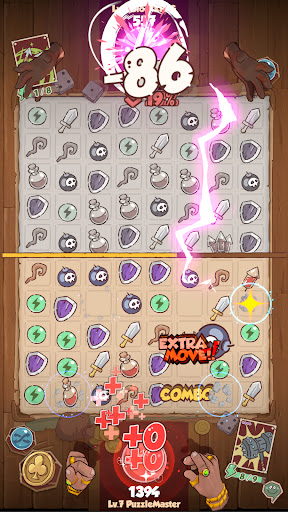
League of Puzzle is a real-time PVP puzzle game where fast puzzle-solving and strategic play are the keys to victory.
Use powerful characters and skills to outsmart your opponents and claim your victory!
★ Game Features ★
☆ Real-Time Puzzle Battles! ☆
Face off against opponents in real-time as you solve puzzles and unleash character skills to overpower them. Success requires not only quick thinking but also sharp strategic decisions!
☆ Unique Character & Skill System! ☆
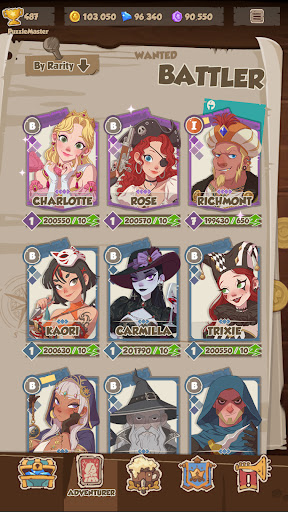
Each character comes with their own unique skills. Solve puzzles to charge up your abilities, and time your powerful skills just right to secure victory!
☆ Collect Weapon Cards and Master the Rune System! ☆
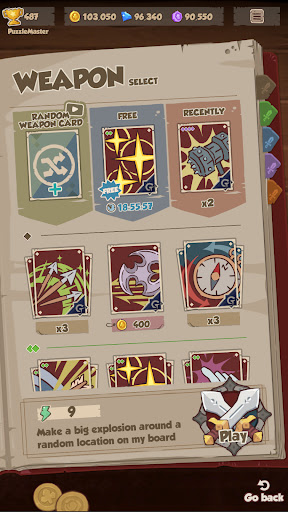
Gather a variety of weapon cards and equip runes to enhance your characters. Find the perfect combination to match your playstyle and dominate the battlefield!
☆ Multiple Game Modes! ☆
From single-player to ranked matches and special event modes, there’s always a new challenge waiting. Hone your skills and compete against players from around the world. Team up with friends for co-op modes as well!
☆ Build Your Ultimate Team and Conquer! ☆
Collect a diverse array of characters and weapon cards to create your ultimate team. Craft your strategy and take on your opponents with the best combinations to secure victory!
☆ Battle Players from Around the Globe in Real-Time! ☆
Challenge players from across the world in real-time PVP battles. Climb the leaderboards and become the ultimate puzzle master!
Show more

1. Stáhněte si instalační program MEmu a dokončete instalaci

2. Spusťte MEmu a poté otevřete Google Play na ploše

3. Vyhledejte League of Puzzle v Google Play
Install
4. Stáhněte a nainstalujte League of Puzzle
5. Po dokončení instalace klikněte na ikonu pro spuštění

6. Užijte si hraní League of Puzzle na PC s MEmu
MEmu je zdarma a ten nejlepší Android emulátor. 50 milionů lidí si užívá jeho nejlepší herní zážitky. Technologie virtualizace MEmu ti dovolí plynule hrát Android hry na PC a to i ty nejnáročnější.
Větší obrazovka s lepší grafikou; Dlouhá výdrž bez omezení baterie nebo mobilních dat.
Plná podpora mapování kláves pro přesné ovládání klávesnice a myši nebo gamepadu.
Více herních účtů nebo úkolů na jednom počítači najednou s Multi-Instance Managerem.
Play League of Puzzle on PC by following steps: