One Line: Drawing Puzzle Game
Aktualizováno
Aktuální verze
1.0.44
Od vývojáře

With all your passion for playing One Line: Drawing Puzzle Game, you hands are not supposed to be limited on a tiny screen of your phone. Play like a pro and get full control of your game with keyboard and mouse. MEmu offers you all the things that you are expecting. Download and play One Line: Drawing Puzzle Game on PC. Play as long as you want, no more limitations of battery, mobile data and disturbing calls. The brand new MEmu 9 is the best choice of playing One Line: Drawing Puzzle Game on PC. Prepared with our expertise, the exquisite preset keymapping system makes One Line: Drawing Puzzle Game a real PC game. MEmu multi-instance manager makes playing 2 or more accounts on the same device possible. And the most important, our exclusive emulation engine can release full potential of your PC, make everything smooth.
Show more
Vychutnejte si vynikající zážitek z přehrávání One Line: Drawing Puzzle Game na PC s MEMU App Player. Je to silný bezplatný emulátor pro Android, který vám umožní hrát tisíce her v systému Android. Embark on a brain-boosting journey with One Line: Drawing Puzzle Game – a mind-bending puzzle game designed to sharpen your focus and elevate cognitive skills.

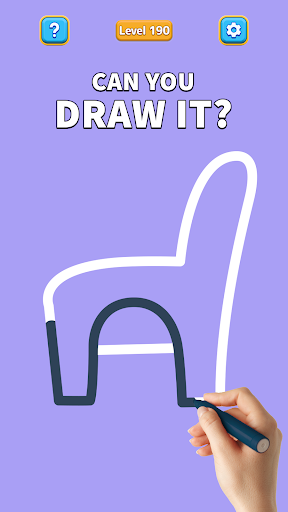
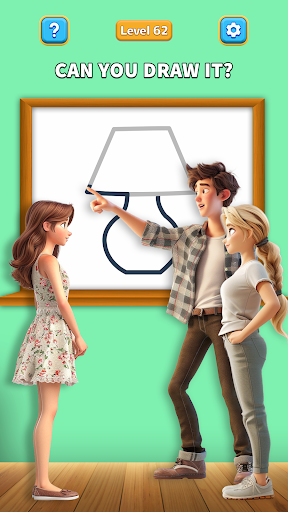

Embark on a brain-boosting journey with One Line: Drawing Puzzle Game – a mind-bending puzzle game designed to sharpen your focus and elevate cognitive skills. Spending just 20 minutes a day on this game is not only enjoyable but also beneficial for brain health.
Introducing One Line: Drawing Puzzle Game – the ultimate brain workout meticulously crafted for those seeking an exhilarating blend of challenge and joy. Immerse yourself in a world where logic dances with excitement, and one-stroke puzzles become a source of invigorating mental exercise.
Cultivating Mental Agility
Celebrate mental agility with One Line: Drawing Puzzle Game, tailored for those who value the harmonious interplay of challenge and joy. It enriches the mind and delights the senses, offering more than just a game—it's a testament to the brilliance found within diverse experiences.
A Sanctuary for Sharp Minds
In the rhythmic flow of daily life, One Line: Drawing Puzzle Game unfolds as a nurturing sanctuary for mental growth. Immerse yourself in brain-teasing puzzles and memory games designed to stimulate your intellect. This game goes beyond cognitive improvement; it's about savoring the joyous tapestry of lifelong learning.
Joyful Challenges for an Epic Adventure
Laughter intertwines with challenges in the realm of "One Line: Drawing Puzzle Game," transforming cognitive training into an uplifting pursuit. Engage in activities that combine laughter and challenges, proving that joy and learning are inseparable companions on this epic adventure.
Your Daily Ally in Cognitive Wellness
One Line: Drawing Puzzle Game is your daily companion for cognitive well-being. Tailoring personalized workouts for memory, logic, and creativity, it becomes your steadfast ally in facing life's cognitive challenges.
Elevating Every Aspect of Your Unique Journey
Elevate every facet of your unique journey with One Line: Drawing Puzzle Game. Enhance memory recall and refine problem-solving skills, contributing to a sharper, more resilient mind. It enhances capabilities in personal and professional spheres, ready to celebrate and enrich your distinctive journey.
Join the One Line: Drawing Puzzle Game Community—a gathering of brilliant minds actively seeking laughter, learning, and blooming brilliance. Secure your download today and embark on an enriching adventure celebrating life's kaleidoscope. It's time to nurture your mind, uplift your spirit, and let your cognitive prowess bloom with One Line: Drawing Puzzle Game.
One Line: Drawing Puzzle Game: Elevate your mind's journey with joyous challenges. Nurturing wisdom, laughter, and brilliance at every turn. Dive into a world where cognitive workouts are an epic adventure, tailored for daily well-being. Join the One Line: Drawing Puzzle Game community—celebrate life's brilliance. Download for a vibrant, enriching escapade!
Show more

1. Stáhněte si instalační program MEmu a dokončete instalaci

2. Spusťte MEmu a poté otevřete Google Play na ploše

3. Vyhledejte One Line: Drawing Puzzle Game v Google Play
Install
4. Stáhněte a nainstalujte One Line: Drawing Puzzle Game
5. Po dokončení instalace klikněte na ikonu pro spuštění

6. Užijte si hraní One Line: Drawing Puzzle Game na PC s MEmu
MEmu je zdarma a ten nejlepší Android emulátor. 50 milionů lidí si užívá jeho nejlepší herní zážitky. Technologie virtualizace MEmu ti dovolí plynule hrát Android hry na PC a to i ty nejnáročnější.
Větší obrazovka s lepší grafikou; Dlouhá výdrž bez omezení baterie nebo mobilních dat.
Plná podpora mapování kláves pro přesné ovládání klávesnice a myši nebo gamepadu.
Více herních účtů nebo úkolů na jednom počítači najednou s Multi-Instance Managerem.
Play One Line: Drawing Puzzle Game on PC by following steps: