Enlight Quickshot - Photo Editor
Aktualizováno
Aktuální verze
1.2.5
Od vývojáře

Přestaňte se obávat přebíjení při používání Enlight Quickshot - Photo Editor na mobilním telefonu, uvolněte se z malé obrazovky a užívejte si aplikace na mnohem větším displeji. „Společnost MEmu vám nabízí všechny překvapivé funkce, které jste očekávali: rychlá instalace a snadné nastavení, intuitivní ovládání, žádná omezení baterií, mobilní data a rušivá volání. Zcela nový přístroj MEmu 9 je nejlepší volbou použití Enlight Quickshot - Photo Editor ve vašem počítači. díky naší absorpci umožňuje správce více instancí otevření 2 nebo více účtů současně. A co je nejdůležitější, náš exkluzivní emulační modul může uvolnit plný potenciál vašeho počítače, učinit vše plynulým a příjemným.
Show more
Vychutnejte si vynikající zážitek z přehrávání Enlight Quickshot - Photo Editor na PC s MEMU App Player. Je to silný bezplatný emulátor pro Android, který vám umožní hrát tisíce her v systému Android. Finally, you can take the photo you actually meant to take!
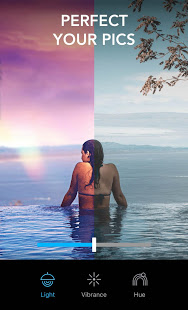
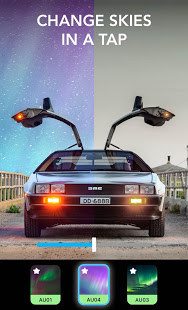
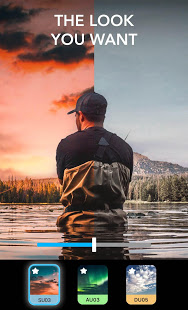
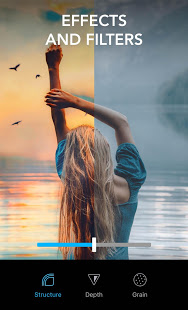
Finally, you can take the photo you actually meant to take! Lightleap (formerly Quickshot) is a photo editor that proves you no longer need to be a professional photographer to take amazing photos.
Let’s face it - your photos don't always come out the way you expected. You pull out your phone to capture something awesome, but the photo you take just doesn't do the scene justice. The background is too blurry, the lighting is just all wrong, or maybe the scenery needs a retouch – something only an experienced editor can do, right?
The Lightleap app is here to change that! With this editor app, you can capture the beauty and magic you see with your own eyes – or enhance it. You become the editor with filters, effects, and retouch tools at your fingertips.
There’s no need to spend hours pulling your hair out as you learn how to use professional editor software. The Lightleap image editor app takes moments to retouch your photos into eye-catching images with professional vibes, using stunning pre-set filters and effects.
With unique, easy-to-use features like background Sky, Heal, Effects, Filters and Looks, every photo you take from now on will be picture perfect. If you’ve dreamed of taking Instagram-worthy images to inspire the world, this is your chance.
Brought to you by Lightricks, the award-winning app developer, Lightleap photo editor app is part of the Enlight Creativity Suite, including Pixaloop. We help you harness your creativity in every photo.
App user favourite features from Lightleap include:
Sky
Replace the background in your photos with a brand-new sky!
- With one tap, you can change the background with a new sky.
- Select from 60+ high-quality sky backgrounds.
- Choose from sunny, dusk, sunset, storm, and even fantasy skies!
Heal
Remove unwanted people, background smudges, and easily retouch your image with the heal function, like a true editor.
- Select and erase items in the forefront and background of your image.
- Smooth over bumps and quickly correct photo mistakes.
- Undo retouches with a single tap to restore your image!
Filters
No photo is complete without one of Lightleap's gorgeous filters - one of our top features.
- Find filters by theme, whether you’re looking for warm, black and white, urban, fade and many other filters.
- Easily adjust the intensity of your filters over your image.
- Achieve the effects you desire in moments!
Looks
Change the vibe of your photo like a true editor in one tap.
- Choose a predefined look as filters for your image.
- Create a signature style for your Instagram feed with our designer editor looks.
- Give your images a golden hour glow, or set the mood with dusk, black and white, shadows and fantasy looks.
Effects
Add tons of special effects to retouch dull areas and bring your background to life.
- Overlay shadow effects, sparkles, lens flares and more to enhance your photo.
- Change the weather effects and add seasonal themes.
- Access our extremely popular mood elements and adjust the magic level of your photo effects!
Adjust
The full collection of essential editor tools is at your fingertips.
- Every minor retouch adjustment can be made, including light and contrast to temperature, tint and hue editors.
- Crop your photo, retouch, and edit all within the app.
- Sharpen, adjust the depth, structure, and grain as a professional photography editor!
With Lightleap, you become a photo editor in moments. Fix and retouch your photos with filters and effects to truly capture the magic of the moment you experienced. Download the app to discover how you can become a pro photo editor!
- Terms of use: https://static.lightricks.com/legal/terms-of-use.pdf
- Privacy policy: https://static.lightricks.com/legal/privacy-policy.pdf
Show more

1. Stáhněte si instalační program MEmu a dokončete instalaci

2. Spusťte MEmu a poté otevřete Google Play na ploše

3. Vyhledejte Enlight Quickshot - Photo Editor v Google Play
Install
4. Stáhněte a nainstalujte Enlight Quickshot - Photo Editor
5. Po dokončení instalace klikněte na ikonu pro spuštění

6. Užívejte si používání Enlight Quickshot - Photo Editor na PC s MEmu
MEmu je bezplatný a vynikající emulátor Androidu s 50 miliony uživatelů, který poskytuje vynikající zážitek z aplikací. Virtualizační technologie MEmu 9 vám umožňuje plynule spouštět aplikace pro Android na vašem počítači, a to i ty nejnáročnější.
Větší obrazovka s lepší grafikou; Dlouhá výdrž bez omezení baterie nebo mobilních dat.
Plná podpora mapování kláves pro přesné ovládání klávesnice a myši nebo gamepadu.
Více herních účtů nebo úkolů na jednom počítači najednou s Multi-Instance Managerem.
Use Enlight Quickshot - Photo Editor on PC by following steps: