Zoomerang - Short Videos
Aktualizováno
Aktuální verze
2.7.2.9
Od vývojáře

Přestaňte se obávat přebíjení při používání Zoomerang - Short Videos na mobilním telefonu, uvolněte se z malé obrazovky a užívejte si aplikace na mnohem větším displeji. „Společnost MEmu vám nabízí všechny překvapivé funkce, které jste očekávali: rychlá instalace a snadné nastavení, intuitivní ovládání, žádná omezení baterií, mobilní data a rušivá volání. Zcela nový přístroj MEmu 9 je nejlepší volbou použití Zoomerang - Short Videos ve vašem počítači. díky naší absorpci umožňuje správce více instancí otevření 2 nebo více účtů současně. A co je nejdůležitější, náš exkluzivní emulační modul může uvolnit plný potenciál vašeho počítače, učinit vše plynulým a příjemným.
Show more
Vychutnejte si vynikající zážitek z přehrávání Zoomerang - Short Videos na PC s MEMU App Player. Je to silný bezplatný emulátor pro Android, který vám umožní hrát tisíce her v systému Android. Zoomerang is the simplest video creator with ONE-BUTTON step by step tutorials.
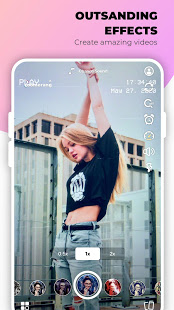
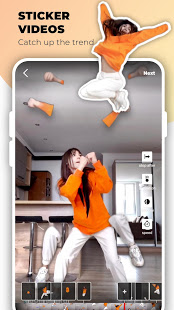
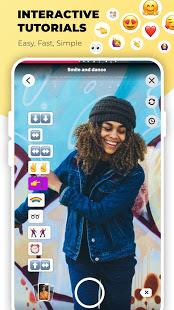
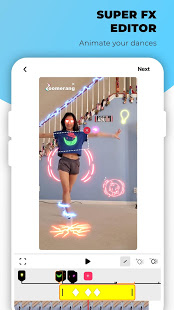
Zoomerang is the simplest video creator with ONE-BUTTON step by step tutorials. It will help you make your musical video the star of TikTok and Instagram. Use our 100+ tutorials to make amazing videos by just following the simple steps. Download and start capturing immediately. No sign up or account required. Share it on TikTok, Likee, Instagram, Snapchat or other platforms right from the app, or save your video to your camera roll to share later.
Step by step TUTORIALS
You can find the most trending tutorials featuring famous songs. We regularly add new tutorials to help you shoot the hardest videos. Choose the video from tutorials page and recreate your favorite one in seconds. In the tutorial section we post videos with hard transitions, with emojis on screen and the trending text videos. Don’t hesitate to send us your favorite challenge from TikTok or Likee, and we will make a tutorial with it.
EFFECTS
You will find 100+ special effects connected with awesome music. Just add your favorite song to the video and let the app analyze it to add special effects. Video clips having our eye-catching effects are always on top of TikTok and Instagram.
Zoomerang Pro Subscription:
Get Zoomerang Pro account and start applying the best effects and transitions to your videos. Shoot the coolest PRO tutorials and stand out in TikTok and Instagram. Enjoy an ad-free shooting and editing experience. You will have a free trial of Zoomerang PRO subscription at the beginning. You have one free trial limit per account. After this period you will be charged a nominal subscription fee.
EXTRA BENEFITS
We have very active and engaging TikTok (1.3 M+) and Instagram (1.4 M+) accounts, where we post your videos regularly. We check every post mentioning Zoomerang and there's a high chance to get featured on our Instagram story and the best ones will be posted on the page permanently.
Show more

1. Stáhněte si instalační program MEmu a dokončete instalaci

2. Spusťte MEmu a poté otevřete Google Play na ploše

3. Vyhledejte Zoomerang - Short Videos v Google Play
Install
4. Stáhněte a nainstalujte Zoomerang - Short Videos
5. Po dokončení instalace klikněte na ikonu pro spuštění

6. Užívejte si používání Zoomerang - Short Videos na PC s MEmu
MEmu je bezplatný a vynikající emulátor Androidu s 50 miliony uživatelů, který poskytuje vynikající zážitek z aplikací. Virtualizační technologie MEmu 9 vám umožňuje plynule spouštět aplikace pro Android na vašem počítači, a to i ty nejnáročnější.
Větší obrazovka s lepší grafikou; Dlouhá výdrž bez omezení baterie nebo mobilních dat.
Plná podpora mapování kláves pro přesné ovládání klávesnice a myši nebo gamepadu.
Více herních účtů nebo úkolů na jednom počítači najednou s Multi-Instance Managerem.
Use Zoomerang - Short Videos on PC by following steps: