Live TV: Live Sports Streaming
تاریخ بهروزرسانی
نسخه کنونی
1.0.1
ارائهکننده

در مورد استفاده بیش از حد در هنگام استفاده از Live TV: Live Sports Streaming بر روی تلفن همراه خود ، نگران نباشید ، خود را از صفحه ریز رها کنید و از استفاده از برنامه در یک صفحه نمایش بسیار بزرگتر لذت ببرید. از این پس ، تجربه تمام صفحه برنامه خود را با صفحه کلید و ماوس دریافت کنید .Mmu تمام ویژگی های شگفت انگیز مورد نظر شما را ارائه می دهد: نصب سریع و نصب آسان ، کنترل های بصری ، محدودیت بیشتر باتری ، داده های تلفن همراه و تماس های مزاحم. نام تجاری جدید MEmu 9 بهترین انتخاب برای استفاده از Live TV: Live Sports Streaming در رایانه شما است. با جذب ما ، مدیر چند نمونه باعث می شود همزمان 2 یا چند حساب را باز کنید. و از همه مهمتر ، موتور انحصاری منحصر به فرد ما می تواند پتانسیل کامل کامپیوتر شما را آزاد کند ، همه چیز را صاف و لذت بخش کند.
بیشتر نشان بده
از تجربه فوقالعاده استفاده از Live TV: Live Sports Streaming در کامپیوتر با MEmu Play لذت ببرید. این یک شبیهساز اندروید رایگان و قدرتمند است که هزاران برنامه اندروید را برای نسخه دسکتاپ در اختیار شما قرار میدهد. Live TV: Live Sports Streaming is an all-in-one live TV streaming app that lets you watch TV channels, movies, and TV shows anytime.
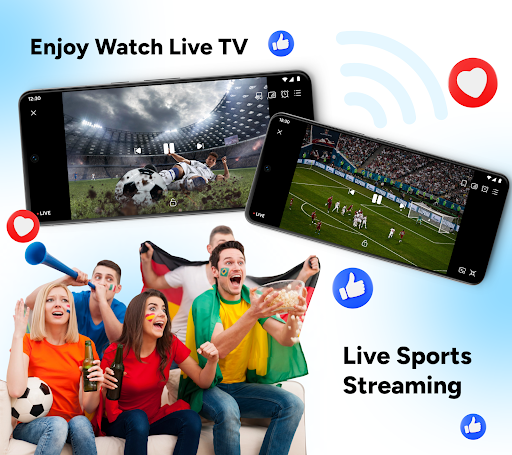
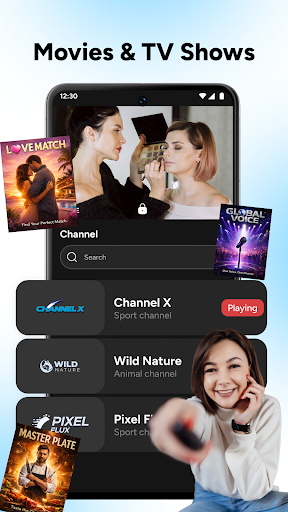
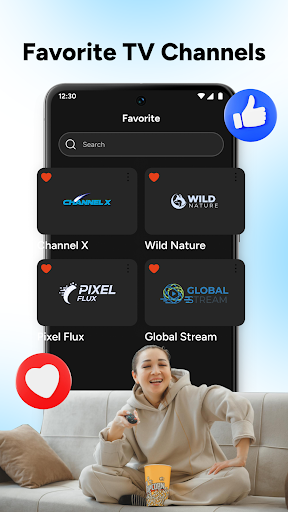
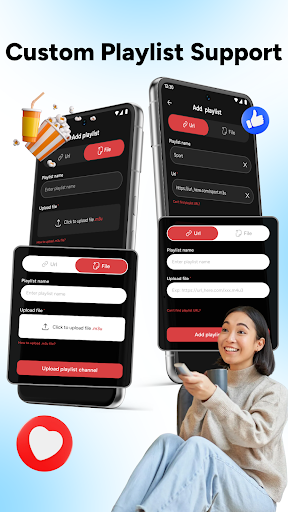
Live TV: Live Sports Streaming is an all-in-one live TV streaming app that lets you watch TV channels, movies, and TV shows anytime. From daily entertainment to exciting live sports streaming, this app brings your favorite content together in one simple TV live experience.
Enjoy smooth playback, organized categories, and full control over how you watch TV and movies on your device.
Key Features of this Live Movies and TV Shows App:
Smart Live TV Categories
Browse live TV channels easily with clear categories like sports, drama, reality, cooking, travel, and more. This layout helps you quickly find what you want to watch TV without wasting time searching.
Live Sports Streaming Experience
Watch live sports TV with stable playback and fast channel access. Follow football and other sports events live, making it easy to watch sports wherever you are.
Movies And TV Shows Hub
Enjoy a wide collection of movies and TV shows in one movies app. Switch smoothly between TV and movies without changing platforms.
Playlist And Channel Manager
Add your own playlists via URL or file and organize channels your way. Rename, delete, or manage channels easily using the built-in live player.
⭐ Favorites And Viewing History
Save your favorite TV channels for quick access and revisit recently watched content anytime. Your TV live streaming history helps you continue watching without interruption.
Fast Search And Simple Player
Use quick search to find channels instantly and enjoy a clean live TV streaming player. The interface is designed for comfortable viewing and easy control.
Live TV: Live Sports Streaming is the perfect choice if you want to watch live TV, enjoy movies and TV, and follow live sports streaming in one powerful app. Everything is designed to give you a simple, flexible, and enjoyable viewing experience.
Download Live TV: Live Sports Streaming today, explore unlimited TV channels, and don’t forget to rate and review the app to help us improve your TV live experience even more!
بیشتر نشان بده

1. نصب کننده Memu را دانلود کرده و راه اندازی را تمام کنید

2. Memu را اجرا کنید و سپس گوگل پلی را بر روی دستکتاپ باز کنید

3. Live TV: Live Sports Streaming را بر روی گوگل پلی جستجو کنید
Install
4. Live TV: Live Sports Streaming را دانلود و نصب کنید
5. پس از اتمام نصب روی آیکون کلیک کنید تا اجرا شود

6. با استفاده از MEmu، Live TV: Live Sports Streaming را روی کامپیوتر خود تجربه کنید.
MEmu در حال حاضر بهترین شبیهساز رایگان اندروید است که ۵۰ میلیون کاربر از تجربه استثنایی برنامههای اندروید لذت میبرند. فناوری مجازیسازی MEmu به شما امکان میدهد هزاران برنامه اندروید، حتی بازیهای با گرافیک بالا را به راحتی روی رایانه خود اجرا کنید.
صفحه نمایش بزرگتر با گرافیک بهتر؛ زمان طولانی تر، بدون محدودیت باتری یا داده تلفن همراه.
پشتیبانی کامل از Keymapping برای کنترل دقیق صفحه کلید و ماوس یا گیم پد.
چندین حساب بازی یا وظایف در یک رایانه شخصی در یک زمان با مدیریت همزمان همه
Use Live TV: Live Sports Streaming on PC by following steps: