NetMirror
تاریخ بهروزرسانی
نسخه کنونی
1.0.0
ارائهکننده

در مورد استفاده بیش از حد در هنگام استفاده از NetMirror بر روی تلفن همراه خود ، نگران نباشید ، خود را از صفحه ریز رها کنید و از استفاده از برنامه در یک صفحه نمایش بسیار بزرگتر لذت ببرید. از این پس ، تجربه تمام صفحه برنامه خود را با صفحه کلید و ماوس دریافت کنید .Mmu تمام ویژگی های شگفت انگیز مورد نظر شما را ارائه می دهد: نصب سریع و نصب آسان ، کنترل های بصری ، محدودیت بیشتر باتری ، داده های تلفن همراه و تماس های مزاحم. نام تجاری جدید MEmu 9 بهترین انتخاب برای استفاده از NetMirror در رایانه شما است. با جذب ما ، مدیر چند نمونه باعث می شود همزمان 2 یا چند حساب را باز کنید. و از همه مهمتر ، موتور انحصاری منحصر به فرد ما می تواند پتانسیل کامل کامپیوتر شما را آزاد کند ، همه چیز را صاف و لذت بخش کند.
بیشتر نشان بده
از تجربه فوقالعاده استفاده از NetMirror در کامپیوتر با MEmu Play لذت ببرید. این یک شبیهساز اندروید رایگان و قدرتمند است که هزاران برنامه اندروید را برای نسخه دسکتاپ در اختیار شما قرار میدهد. NetMirror suits moments when you need quick guidance on what to watch next.
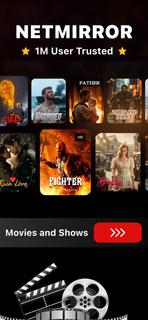


NetMirror suits moments when you need quick guidance on what to watch next. It focuses on discovery and planning, so you can scan current trends and keep track of titles in one place. The app presents essential details in a clear layout and leaves viewing decisions to you. It provides information only and does not host or stream videos. If you plan to download NetMirror, check that its information-focused approach fits your viewing habits. NetMirror featuresBrowse charts for fast discoveryNetMirror lets you look through curated lists such as popular, top-rated, and upcoming. This view helps you spot trending films and series in seconds. It is a quick way to scan highlights before you dive into details.Filter by genre and categoryAfter checking the main charts, you can narrow results with simple category and genre filters. Choose the types you like to reduce noise and surface titles that match your taste. This keeps browsing focused when the catalog feels large.Search with keywords and criteriaYou can find specific titles by typing keywords and combining basic filters. The search helps when you remember only part of a name or want to explore by theme. Results refresh quickly, so you can refine terms as you go.Open rich title pagesWhen a title stands out, open its page to read a short synopsis and see release and rating info. Cast and creator sections add context, and series entries include episode or season structure where available. Scroll further to view similar recommendations that relate to what you are checking.Multiple language options and historyTo support daily use, NetMirror includes multiple language choices in its interface. A simple history keeps a record of what you viewed, which makes it easier to revisit items and continue planning later. This helps maintain a consistent watch shortlist over time. NetMirror's scopeNetMirror is designed as an information and discovery tool. It does not provide video playback, file hosting, or content downloads. Always choose lawful viewing options in your region and use the app to research titles, compare basic facts, and plan a watchlist. How to use NetMirror on AndroidAfter the NetMirror APK is installed, the home screen presents charts and categories for quick access. You can move between sections to explore before opening any title for details.Open the app and look over the charts on the home screen to get an overview of what is trending.Tap a chart like Popular or Upcoming to see the full list, then swipe between sections to compare options.Use the filter or category controls to pick genres and adjust the sort so results match your preferences.Select a title to open its page, read the synopsis, check the cast and ratings, and scroll to similar suggestions.Return to the main view to continue browsing, then open the history section to revisit recent titles and refine your plan. Start exploring todayNetMirror helps you browse film and series information, compare basics, and build a personal shortlist without video playback. To keep features current, consider downloading the NetMirror latest version APK from APKPure when it becomes available. Open the app and start exploring titles that match your interests.
بیشتر نشان بده

1. نصب کننده Memu را دانلود کرده و راه اندازی را تمام کنید

2. Memu را اجرا کنید و سپس گوگل پلی را بر روی دستکتاپ باز کنید

3. NetMirror را بر روی گوگل پلی جستجو کنید
Install
4. NetMirror را دانلود و نصب کنید
5. پس از اتمام نصب روی آیکون کلیک کنید تا اجرا شود

6. با استفاده از MEmu، NetMirror را روی کامپیوتر خود تجربه کنید.
MEmu در حال حاضر بهترین شبیهساز رایگان اندروید است که ۵۰ میلیون کاربر از تجربه استثنایی برنامههای اندروید لذت میبرند. فناوری مجازیسازی MEmu به شما امکان میدهد هزاران برنامه اندروید، حتی بازیهای با گرافیک بالا را به راحتی روی رایانه خود اجرا کنید.
صفحه نمایش بزرگتر با گرافیک بهتر؛ زمان طولانی تر، بدون محدودیت باتری یا داده تلفن همراه.
پشتیبانی کامل از Keymapping برای کنترل دقیق صفحه کلید و ماوس یا گیم پد.
چندین حساب بازی یا وظایف در یک رایانه شخصی در یک زمان با مدیریت همزمان همه
Use NetMirror on PC by following steps: