AetherSX2 Emulator
Mise à jour
Version actuelle
7
Proposée par

Avec toute la passion que vous avez à jouer AetherSX2 Emulator, vos mains ne sont pas sensées se limiter à l’infime écran de votre téléphone. Jouez comme un pro et ayez le contrôle total de votre jeu à l’aide du clavier et de la souris. MEmu satisfait toutes vos attentes. Téléchargez et jouez AetherSX2 Emulator sur PC. Jouez aussi longtemps que vous souhaitez sans aucune limitation de batterie, de données mobiles et d’appels embêtants. La toute nouvelle version de MEmu 9 est la meilleure option de jouer AetherSX2 Emulator sur PC. Réalisé par nos experts, l’e magnifique système d’affectation de touches prédéfini fait de AetherSX2 Emulator un jeu réaliste sur PC. Le gestionnaire multi-instances de MEmu permet 2 ou plusieurs comptes de jeu sur le même appareil. Et le plus important, le moteur d’émulation exclusif peut libérer le plein potentiel de votre PC, ce qui facilite tout.
Afficher plus
Téléchargez AetherSX2 Emulator avec le simulateur d’Android MEmu sur votre PC. Profitez de jouer sur un grand écran. AetherSX2 Emulator is a full-featured PlayStation 2 emulator for Android, built around a cover-art library, deep per-title configuration and a control system that adapts to how you like to play.
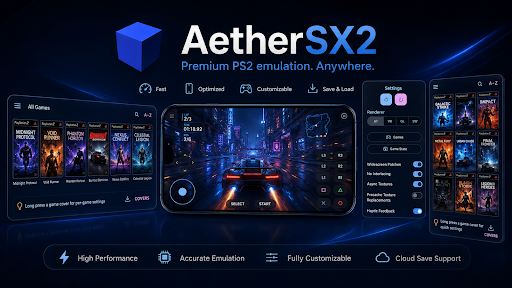
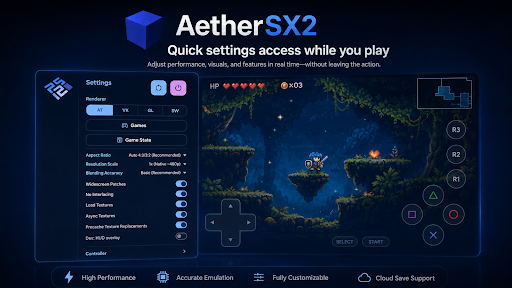
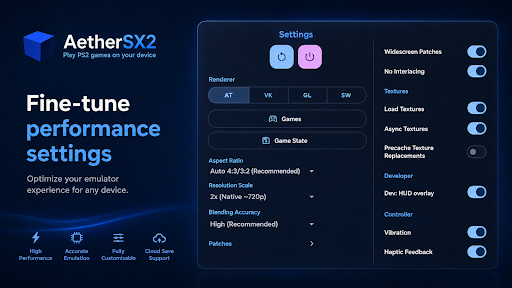
AetherSX2 Emulator is a full-featured PlayStation 2 emulator for Android, built around a cover-art library, deep per-title configuration and a control system that adapts to how you like to play.
EVERYTHING IN ONE PLACE
aethersx2 ps2 emulator for android keeps the whole experience on a single screen. The library, your settings, save states, memory cards, texture packs and achievements are all reachable without leaving what you are doing, through a side drawer and a quick-actions panel rather than a maze of nested menus.
A LIBRARY, NOT A FILE PICKER
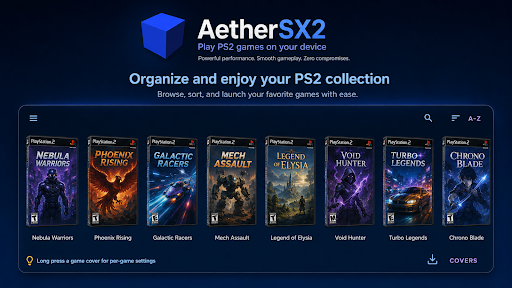
Point the app at a folder and it builds a proper library. Titles appear as a coverflow of box art you can swipe through, with the artwork downloaded automatically and cached on device. Search by name, sort alphabetically or by most recently opened, and long-press any title to jump straight into its own settings or set a custom cover of your own.
SAVE STATES AND MEMORY CARDS
Save state slots let you capture the exact moment you are in and return to it instantly - useful for tricky sections, or just for stopping mid-way without hunting for a save point. Alongside them, AetherSX2 Emulator gives you full virtual memory card management: create cards, switch between them, assign a separate card per title, and browse what is stored on each one.
GRAPHICS YOU CONTROL
Choose between Vulkan and OpenGL rendering, or let the app pick automatically. Scale the original output up to a resolution that suits your display, adjust blending accuracy, pick an aspect ratio, and toggle vertical sync. Widescreen patches stretch supported titles to a modern 16:9 frame, and a no-interlacing option cleans up the shimmer that older output produces on flat panels.
TEXTURE PACKS
Browse and install community-made HD texture packs from inside the app. Downloads are handled in the background with progress you can watch, and installed packs are managed from one screen - load them, precache them, or turn them off per title.
CONTROLS THAT FIT YOU
Connect a gamepad over Bluetooth or USB and it is picked up automatically, with a built-in tester so you can confirm every button and stick maps correctly. Prefer touch? The on-screen layout is fully adjustable, including an optional right-stick joystick. A quick-actions panel puts save states, settings and the library one gesture away, and controller users can open it with Select and Start together.
PER-TITLE SETTINGS
Every configuration option can be set globally or overridden for a single title, so a game that needs a different renderer or a specific blending mode keeps those settings on its own without disturbing anything else. AetherSX2 Emulator remembers your changes and reapplies them automatically next time.
CHEATS AND ACHIEVEMENTS
Load cheat files for supported titles and toggle individual codes on and off. AetherSX2 Emulator also includes achievement tracking, with progress, unlocked badges and a hardcore mode for anyone who wants the stricter ruleset.
ORGANISING YOUR COLLECTION
Add as many folders as you like and the library merges them into one view. Missing artwork can be fetched for the whole collection in a single tap, and anything that cannot be matched automatically can be given a cover you choose yourself. A refresh option rescans folders whenever you add something new.
EXTRAS WORTH KNOWING
Picture-in-picture keeps things running in a floating window while you use other apps. Custom GPU driver loading is available for devices that benefit from it. Arcade titles built on the same hardware family are supported alongside standard ones. A guided three-step setup walks you through first-run configuration, and a dark interface designed for the screen keeps everything readable in one hand.
AetherSX2 Emulator is free, has no subscription, and puts every setting in front of you rather than hiding it behind defaults
Afficher plus

1. Téléchargez l'installateur MEmu et terminez l'installation

2. Démarrez MEmu puis ouvrez Google Play sur la page d'accueil

3. Recherchez AetherSX2 Emulator dans Google Play
Install
4. Téléchargez et installez AetherSX2 Emulator
5. Une fois l'installation terminée, cliquez sur l'icône pour démarrer

6. Profitez de jouer AetherSX2 Emulator sur PC avec MEmu
Le lecteur d'application MEmu est le meilleur émulateur Android gratuit, et 50 millions de personnes profitent déjà de sa fantastique expérience de jeu Android. La technologie de virtualisation MEmu vous donne la possibilité de jouer à des milliers de jeux Android sur votre PC sans aucune difficulté, même aux plus gourmands.
L’écran plus grand avec de meilleurs graphismes; Une longue durée, sans limitation de batterie ou de données mobiles.
Soutien du Keymapping pour un contrôle précis du clavier et de la souris ou de la manette de jeu
Plusieurs comptes de jeu ou tâches sur un seul PC en même temps avec le gestionnaire de multi-instance.
Play AetherSX2 Emulator on PC by following steps: