Bunker Life: Tidy Up & Sort
Mise à jour
Version actuelle
Proposée par

Avec toute la passion que vous avez à jouer Bunker Life: Tidy Up & Sort, vos mains ne sont pas sensées se limiter à l’infime écran de votre téléphone. Jouez comme un pro et ayez le contrôle total de votre jeu à l’aide du clavier et de la souris. MEmu satisfait toutes vos attentes. Téléchargez et jouez Bunker Life: Tidy Up & Sort sur PC. Jouez aussi longtemps que vous souhaitez sans aucune limitation de batterie, de données mobiles et d’appels embêtants. La toute nouvelle version de MEmu 9 est la meilleure option de jouer Bunker Life: Tidy Up & Sort sur PC. Réalisé par nos experts, l’e magnifique système d’affectation de touches prédéfini fait de Bunker Life: Tidy Up & Sort un jeu réaliste sur PC. Le gestionnaire multi-instances de MEmu permet 2 ou plusieurs comptes de jeu sur le même appareil. Et le plus important, le moteur d’émulation exclusif peut libérer le plein potentiel de votre PC, ce qui facilite tout.
Afficher plus
Téléchargez Bunker Life: Tidy Up & Sort avec le simulateur d’Android MEmu sur votre PC. Profitez de jouer sur un grand écran. Welcome to Tidy Up Bunker game, the relaxing organizing game where you tidy up a messy survival bunker one shelf at a time!
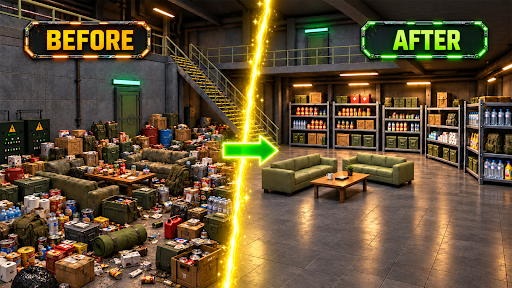
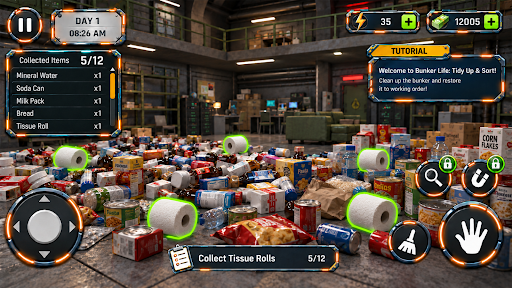
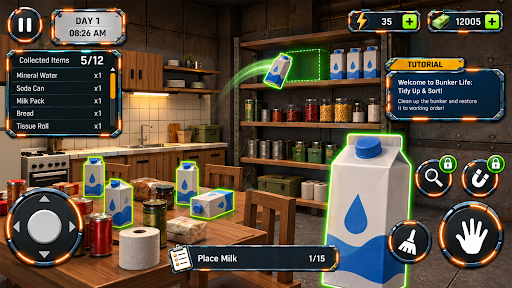
Welcome to Tidy Up Bunker game, the relaxing organizing game where you tidy up a messy survival bunker one shelf at a time!
The world above is quiet, but your underground shelter is a mess. Boxes of canned food, medicine, tools, batteries, and books are scattered everywhere. Your job is simple and deeply satisfying: sort every item, stack the shelves, and turn chaos into a perfectly organized bunker.
No timers. No pressure. Just you, your shelves, and the calm joy of putting everything in its place.
WHY YOU'LL LOVE IT
Relaxing tidy up gameplay
Play at your own pace with no time limits. Perfect for unwinding after a long day or a few calm minutes on a break.
Satisfying sorting puzzles
Every item has a logical home. Group supplies by category, fill shelves neatly, and enjoy that oddly satisfying feeling when everything clicks into place.
Organize a survival bunker
Stock your doomsday shelter with food, water, first aid kits, tools, and more. Build the ultimate prepper stockpile.
Cozy atmosphere
Detailed 3D graphics, soft lighting, and calming ASMR-style sound effects make every session peaceful.
Easy to play, hard to put down
Simple one-finger controls make it perfect for all ages. Casual players and organizing game fans will feel right at home.
PERFECT FOR FANS OF
- Sorting games and organizing games
- Cleaning and declutter games
- Relaxing puzzle games
- Survival and post-apocalyptic themes
- Cozy, stress-free casual games
HOW TO PLAY
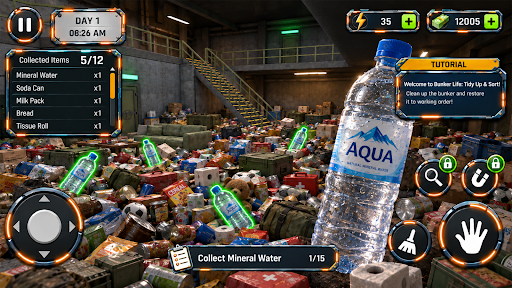
1. Explore the cluttered bunker
2. Pick up supplies and find where they belong
3. Sort items by type onto shelves and storage
4. Tidy up every room and complete your shelter
If you enjoy satisfying cleaning games, sorting puzzles, or cozy organizing games, tidy up bunker is your new favorite way to relax.
Download now and start tidying up your bunker today!
Afficher plus

1. Téléchargez l'installateur MEmu et terminez l'installation

2. Démarrez MEmu puis ouvrez Google Play sur la page d'accueil

3. Recherchez Bunker Life: Tidy Up & Sort dans Google Play
Install
4. Téléchargez et installez Bunker Life: Tidy Up & Sort
5. Une fois l'installation terminée, cliquez sur l'icône pour démarrer

6. Profitez de jouer Bunker Life: Tidy Up & Sort sur PC avec MEmu
Le lecteur d'application MEmu est le meilleur émulateur Android gratuit, et 50 millions de personnes profitent déjà de sa fantastique expérience de jeu Android. La technologie de virtualisation MEmu vous donne la possibilité de jouer à des milliers de jeux Android sur votre PC sans aucune difficulté, même aux plus gourmands.
L’écran plus grand avec de meilleurs graphismes; Une longue durée, sans limitation de batterie ou de données mobiles.
Soutien du Keymapping pour un contrôle précis du clavier et de la souris ou de la manette de jeu
Plusieurs comptes de jeu ou tâches sur un seul PC en même temps avec le gestionnaire de multi-instance.
Play Bunker Life: Tidy Up & Sort on PC by following steps: