Chronicles: Medieval
Mise à jour
Version actuelle
Proposée par

Avec toute la passion que vous avez à jouer Chronicles: Medieval, vos mains ne sont pas sensées se limiter à l’infime écran de votre téléphone. Jouez comme un pro et ayez le contrôle total de votre jeu à l’aide du clavier et de la souris. MEmu satisfait toutes vos attentes. Téléchargez et jouez Chronicles: Medieval sur PC. Jouez aussi longtemps que vous souhaitez sans aucune limitation de batterie, de données mobiles et d’appels embêtants. La toute nouvelle version de MEmu 9 est la meilleure option de jouer Chronicles: Medieval sur PC. Réalisé par nos experts, l’e magnifique système d’affectation de touches prédéfini fait de Chronicles: Medieval un jeu réaliste sur PC. Le gestionnaire multi-instances de MEmu permet 2 ou plusieurs comptes de jeu sur le même appareil. Et le plus important, le moteur d’émulation exclusif peut libérer le plein potentiel de votre PC, ce qui facilite tout.
Afficher plus
Téléchargez Chronicles: Medieval avec le simulateur d’Android MEmu sur votre PC. Profitez de jouer sur un grand écran. Chronicles: Medieval is an immersive open-world game that plunges players into a rich and detailed medieval environment.
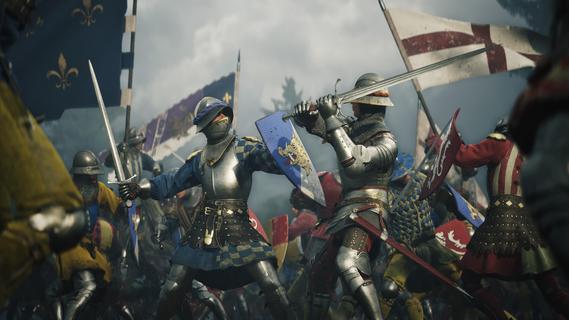

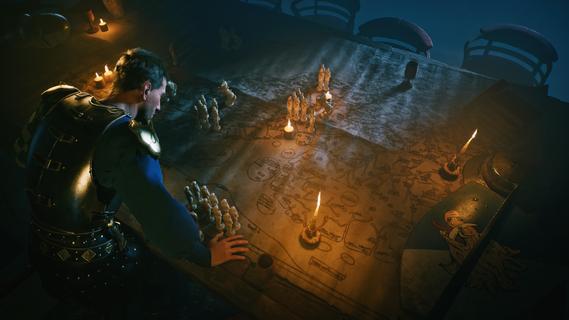
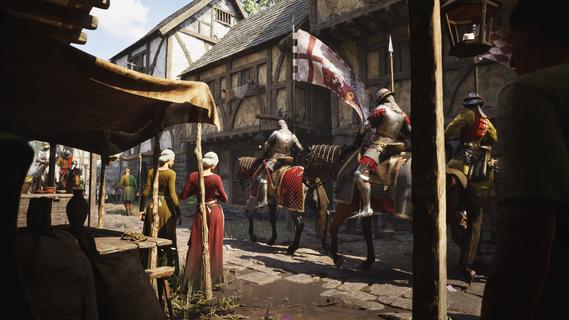
Chronicles: Medieval is an immersive open-world game that plunges players into a rich and detailed medieval environment. From the moment you enter the game, you have the freedom to create your own unique character, crafting your appearance, background, and skills to suit your preferred playstyle. This personalized protagonist is your gateway to a sprawling sandbox filled with opportunity, danger, and adventure. The game’s world is vast and alive, populated by towns, villages, castles, and untamed wilderness teeming with all manner of NPCs, enemies, and wildlife. Players can explore countless locations, discover hidden secrets, and interact with a dynamic society that evolves and reacts to the passage of time and player choices. Whether you want to live as a humble trader, a skilled craftsman, a wandering mercenary, or an ambitious noble aiming to claim your own kingdom, Chronicles: Medieval provides the tools and setting to make it happen. One of the core elements of the game is its combat system, which brings a high level of intensity and realism to every encounter. Battles are tactical and visceral, requiring skill, timing, and strategy. You can engage in duels that test your individual prowess or join larger skirmishes that escalate into full-scale confrontations between armies. Mastery of various medieval weapons—including swords, axes, bows, and polearms—is crucial, and defensive techniques such as blocking and parrying play a significant role in survival. As you progress, you gain experience, wealth, and influence. This allows you to upgrade your equipment, train specialized troops, and develop your settlements. The game has a deep progression system that encourages players to expand their power and economic base. Acquiring land is a key milestone, as it grants resources and strategic advantages, serving as a foundation to establish your legacy. You can build and upgrade structures, manage resources, and fortify your holdings against rival factions. Perhaps the most compelling aspect of Chronicles: Medieval is its large-scale battles. Unlike many games where combat is limited to small groups, this game lets you command armies featuring hundreds of soldiers. Leading these forces in epic clashes requires tactical acumen and quick decision-making. Terrain, unit types, morale, and formations all come into play, creating a thrilling and dynamic battlefield experience. Victories in these battles can dramatically shift the political landscape, changing alliances and paving the way for new conquests. The social and political layers of Chronicles: Medieval add further depth. Players can engage in diplomacy, forging alliances or declaring war against other factions. Political intrigue and negotiation are just as important as brute force, and your reputation among nobles, merchants, and peasants alike will influence how the world treats you. Your decisions have weight and long-lasting consequences, shaping the narrative and your personal story. Overall, Chronicles: Medieval offers a compelling blend of role-playing, strategy, and action all set against the backdrop of a vivid medieval world. Its freedom of choice, detailed combat, large-scale warfare, and evolving political dynamics provide countless hours of engaging gameplay. Whether you strive to build an empire, become a legendary warrior, or carve out your own fiefdom, the game immerses you in a living medieval tapestry where every decision matters and every battle writes a new chapter in your chronicle.
Afficher plus

1. Téléchargez l'installateur MEmu et terminez l'installation

2. Démarrez MEmu puis ouvrez Google Play sur la page d'accueil

3. Recherchez Chronicles: Medieval dans Google Play
Install
4. Téléchargez et installez Chronicles: Medieval
5. Une fois l'installation terminée, cliquez sur l'icône pour démarrer

6. Profitez de jouer Chronicles: Medieval sur PC avec MEmu
Le lecteur d'application MEmu est le meilleur émulateur Android gratuit, et 50 millions de personnes profitent déjà de sa fantastique expérience de jeu Android. La technologie de virtualisation MEmu vous donne la possibilité de jouer à des milliers de jeux Android sur votre PC sans aucune difficulté, même aux plus gourmands.
L’écran plus grand avec de meilleurs graphismes; Une longue durée, sans limitation de batterie ou de données mobiles.
Soutien du Keymapping pour un contrôle précis du clavier et de la souris ou de la manette de jeu
Plusieurs comptes de jeu ou tâches sur un seul PC en même temps avec le gestionnaire de multi-instance.
Play Chronicles: Medieval on PC by following steps: