SIM: National Football Manager
Mise à jour
Version actuelle
2.6
Proposée par

Avec toute la passion que vous avez à jouer SIM: National Football Manager, vos mains ne sont pas sensées se limiter à l’infime écran de votre téléphone. Jouez comme un pro et ayez le contrôle total de votre jeu à l’aide du clavier et de la souris. MEmu satisfait toutes vos attentes. Téléchargez et jouez SIM: National Football Manager sur PC. Jouez aussi longtemps que vous souhaitez sans aucune limitation de batterie, de données mobiles et d’appels embêtants. La toute nouvelle version de MEmu 9 est la meilleure option de jouer SIM: National Football Manager sur PC. Réalisé par nos experts, l’e magnifique système d’affectation de touches prédéfini fait de SIM: National Football Manager un jeu réaliste sur PC. Le gestionnaire multi-instances de MEmu permet 2 ou plusieurs comptes de jeu sur le même appareil. Et le plus important, le moteur d’émulation exclusif peut libérer le plein potentiel de votre PC, ce qui facilite tout.
Afficher plus
Téléchargez SIM: National Football Manager avec le simulateur d’Android MEmu sur votre PC. Profitez de jouer sur un grand écran. Free to play through your first world tournament — then one simple purchase unlocks the full game forever.
Free to play through your first world tournament — then one simple purchase unlocks the full game forever. No subscription, no ads.
Take charge of your country and chase international glory.
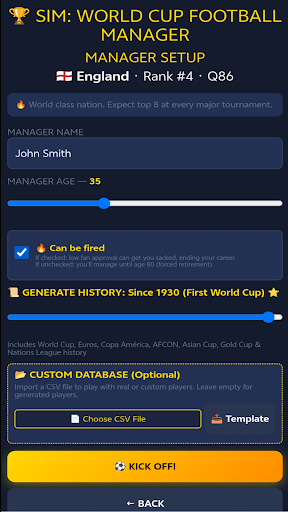
Most football managers put you in the dugout at a club. SIM: National Football Manager is different — you take over a NATIONAL team and build a squad capable of conquering the world's biggest international stage.
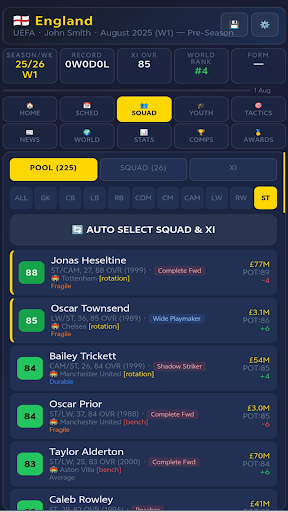
Pick from 212 national teams, from powerhouses to underdogs, and lead them through qualifiers, friendlies, continental championships and the summer's global showpiece tournament. Every decision is yours.
BE THE BOSS
Choose any nation on the planet — every confederation, every level.
Select your squad, name your starting XI, and set your formation and tactics.
Live match engine with running commentary — make subs and change your approach as it unfolds.
Direct play in real time with live manager shouts — tell your team to shoot, cross, dribble, press or hold possession, and even get in the referee's ear.
Battle through qualifying campaigns, continental cups and the showpiece world tournament.
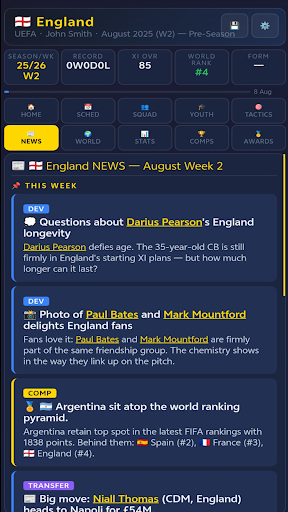
CLIMB THE WORLD RANKINGS
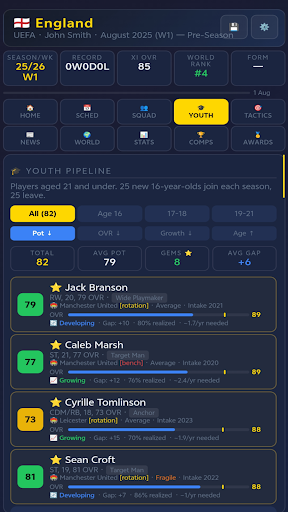
Win matches to rise up the global rankings — and as your nation climbs, stronger young talent starts coming through.
Turn an underdog side into a powerhouse over a long career, one result at a time.
Manage injuries, suspensions and rotation across a packed calendar.
Keep the board and the fans onside — perform, or face the sack.
A LIVING FOOTBALL WORLD
AI-managed nations, evolving world rankings and a transfer market with player values.
Decades of generated history, records, a Hall of Fame and end-of-season awards.
Every save is its own unique football universe.
MAKE IT YOURS
Import your own custom player database — play with real squads or create your own.
Multiple save slots and a choice of display currency.
SIMPLE & FAIR
Free to play all the way to your first world tournament — then a single one-time purchase unlocks the full game forever.
No subscription. No ads.
Play offline anywhere — no connection needed for the game itself.
Your saves stay on your device.
Afficher plus

1. Téléchargez l'installateur MEmu et terminez l'installation

2. Démarrez MEmu puis ouvrez Google Play sur la page d'accueil

3. Recherchez SIM: National Football Manager dans Google Play
Install
4. Téléchargez et installez SIM: National Football Manager
5. Une fois l'installation terminée, cliquez sur l'icône pour démarrer

6. Profitez de jouer SIM: National Football Manager sur PC avec MEmu
Le lecteur d'application MEmu est le meilleur émulateur Android gratuit, et 50 millions de personnes profitent déjà de sa fantastique expérience de jeu Android. La technologie de virtualisation MEmu vous donne la possibilité de jouer à des milliers de jeux Android sur votre PC sans aucune difficulté, même aux plus gourmands.
L’écran plus grand avec de meilleurs graphismes; Une longue durée, sans limitation de batterie ou de données mobiles.
Soutien du Keymapping pour un contrôle précis du clavier et de la souris ou de la manette de jeu
Plusieurs comptes de jeu ou tâches sur un seul PC en même temps avec le gestionnaire de multi-instance.
Play SIM: National Football Manager on PC by following steps: