BWeather Forecast
Mise à jour
Version actuelle
2.4
Proposée par

Ne vous inquiétez plus des surcharges lorsque vous utilisez BWeather Forecast sur votre téléphone portable, libérez-vous de l'écran minuscule et profitez de l'application sur un écran beaucoup plus grand. Désormais, vous pouvez utiliser votre application en plein écran avec le clavier et la souris. MEmu vous offre toutes les fonctionnalités surprenantes que vous attendiez : installation rapide et configuration facile, commandes intuitives, plus de limitations de batterie, de données mobiles et d'appels dérangeants. Le tout nouveau MEmu 9 est le meilleur choix pour utiliser BWeather Forecast sur votre ordinateur. Codé avec notre absorption, le gestionnaire multi-instance permet d'ouvrir 2 ou plusieurs comptes en même temps. Et le plus important, notre moteur d'émulation exclusif peut libérer tout le potentiel de votre PC, rendre tout cela fluide et agréable.
Afficher plus
Téléchargez BWeather Forecast avec le simulateur d’Android MEmu sur votre PC. Profitez de jouer sur un grand écran. BWeather Forecast provides users with reliable and accurate weather information at their fingertips.
BWeather Forecast provides users with reliable and accurate weather information at their fingertips. With a sleek and modern design, BWeather Forecast is easy to use and navigate, making it a must-have app for anyone looking to stay informed about the weather.
Here are some functions:
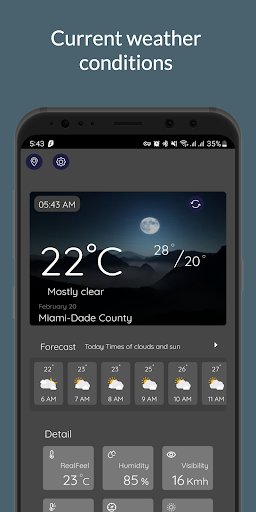
- Current weather conditions: Temperature, humidity, wind speed and direction, and precipitation information for the user's location or a chosen location.
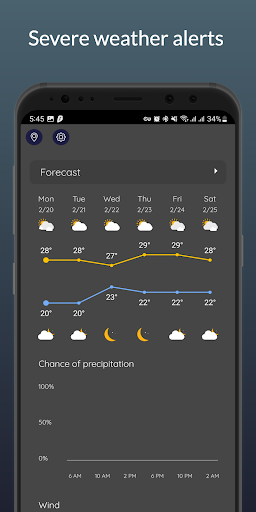
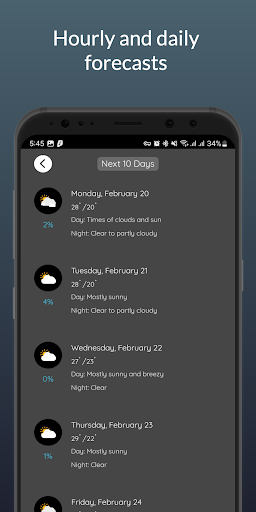
- Hourly and daily forecasts: Weather predictions for the next few hours or several days, including temperature highs and lows, expected precipitation, and weather conditions.
- Severe weather alerts: Notifications for severe weather events, such as thunderstorms, tornadoes, or hurricanes, to help users stay safe and prepared.
- Radar maps: Interactive maps that show the user's location and nearby weather patterns, including precipitation and storm movements.
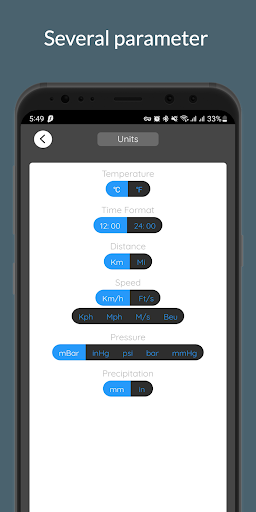
- Customizable settings: Options to adjust temperature units, weather data sources, and notification preferences to suit individual needs and preferences.
- Sunrise and sunset times: Information about when the sun will rise and set for the user's location or chosen location.
- Air quality index: Information about air quality and pollutants in the air.
- UV index: Information about the strength of the sun's ultraviolet rays and recommendations for sun protection.
- Historical weather data: Access to historical weather data for a particular location, which can be useful for trip planning or research purposes.
- Weather widgets, allowing users to access important weather information directly from their home screen, saving time and enhancing convenience.
Afficher plus

1. Téléchargez l'installateur MEmu et terminez l'installation

2. Démarrez MEmu puis ouvrez Google Play sur la page d'accueil

3. Recherchez BWeather Forecast dans Google Play
Install
4. Téléchargez et installez BWeather Forecast
5. Une fois l'installation terminée, cliquez sur l'icône pour démarrer

6. Utiliser MEmu pour utiliser BWeather Forecast sur votre ordinateur
MEmu Play est actuellement le meilleur émulateur Android gratuit, avec 50 millions d'utilisateurs qui profitent d'une expérience Android exceptionnelle. La technologie de virtualisation de MEmu vous permet de jouer facilement à des milliers d'applications Android sur votre ordinateur, même les plus gourmandes en ressources.
L’écran plus grand avec de meilleurs graphismes; Une longue durée, sans limitation de batterie ou de données mobiles.
Soutien du Keymapping pour un contrôle précis du clavier et de la souris ou de la manette de jeu
Plusieurs comptes de jeu ou tâches sur un seul PC en même temps avec le gestionnaire de multi-instance.
Use BWeather Forecast on PC by following steps: