Electric Scooter Universal App
Mise à jour
Version actuelle
4.3.1
Proposée par

Ne vous inquiétez plus des surcharges lorsque vous utilisez Electric Scooter Universal App sur votre téléphone portable, libérez-vous de l'écran minuscule et profitez de l'application sur un écran beaucoup plus grand. Désormais, vous pouvez utiliser votre application en plein écran avec le clavier et la souris. MEmu vous offre toutes les fonctionnalités surprenantes que vous attendiez : installation rapide et configuration facile, commandes intuitives, plus de limitations de batterie, de données mobiles et d'appels dérangeants. Le tout nouveau MEmu 9 est le meilleur choix pour utiliser Electric Scooter Universal App sur votre ordinateur. Codé avec notre absorption, le gestionnaire multi-instance permet d'ouvrir 2 ou plusieurs comptes en même temps. Et le plus important, notre moteur d'émulation exclusif peut libérer tout le potentiel de votre PC, rendre tout cela fluide et agréable.
Afficher plus
Téléchargez Electric Scooter Universal App avec le simulateur d’Android MEmu sur votre PC. Profitez de jouer sur un grand écran. The app is a universal app for electric scooter owners made by EScooterNerds (the biggest electric scooter blog in the world), with many different features.
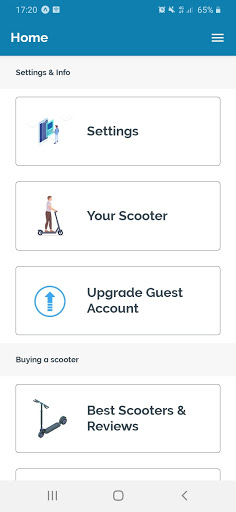
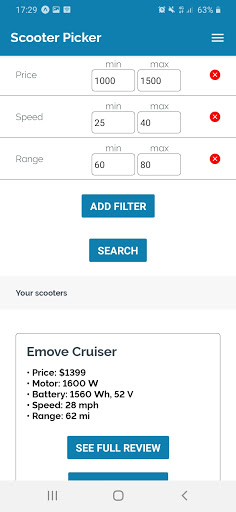
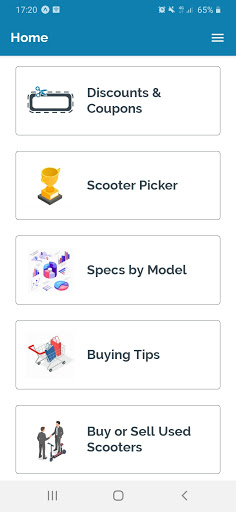
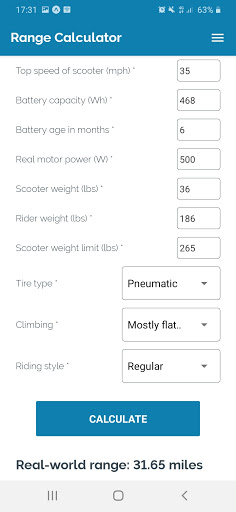
The app is a universal app for electric scooter owners made by EScooterNerds (the biggest electric scooter blog in the world), with many different features.
It includes tools, tips, calculators, checklists, guides, picker tools, specifications for every scooter models, reviews, a platform for buying and selling used scooters, scooter gear and equipment reviews including locks and accessories, and much, much more.
NOTE: the app still does not have bluetooth connectivity options, and it is not meant to be a replacement for the specific scooter apps like the Xiaomi, the Segway Ninebot, and the Kugoo apps. Rather, it should be used together with your basic scooter app, to help you know and take care of your scooter better.
The app will be especially useful for the most popular electric scooter models like the Xiaomi M365, Xiaomi M365 Pro, Ninebot ES2, Ninebot ES4, Ninebot Max, GoTrax XR Ultra, GoTrax GXL Commuter, GoTrax G4, Glion Dolly, Hiboy Max, Hiboy S2, Kugoo S1 Pro, Kugoo M4 Pro, Kugoo G-Booster, Razor E100, Razor E300, Razor EcoSmart, EMove Cruiser, Inokim OX & OXO, Kaabo Wolf Warrior, Zero, Dualtron, Speedway, NanRobot, Turbowheel, Apollo, EcoReco, Unagi, Swagtron, and many other popular models.
In future versions, bluetooth connection, customizations and custom firmware, and hacks for various popular models like the Xiaomi M365 Pro, the Ninebot ES2 and the Ninebot Max, and many others, will be available. For now, those options are still being developed.
Whether you already own an electric scooter or you are looking to buy one, the app offers many buying tools and resources:
- Electric Scooter Reviews
- Best Electric Scooter Stores
- Discounts, Coupons, and Promotions at the Best Electric Scooter Stores
- Electric Scooter Picker Tool
- Specifications and Parameters for Every Scooter Model
- Platform for Buying and Selling Used Electric Scooters
- Best Helmets For Electric Scooters
- Best Locks For Electric Scooters
- Best Accessories For Electric Scooters
There are several important guides for your electric scooter:
- Electric scooter buying guide
- Traffic Laws & Legal Guide
- Electric Scooter Riding Tips
- Safety Tips
- Night Riding Tips
- Repair Tips
- Waterproofing Tips
- Winter Tips
- Troubleshooting Tips
- Electric Scooter FAQ
Also, you can use and modify the checklists for the common tasks associated with your scooter:
- Maintenance Checklist
- Cleaning Checklist
- Charging Checklist
- Storing Checklist
On top of that, you can also use many tools and calculators:
- Range Calculator
- Commute Calculator
- Power Calculator
- Charge Cost Calculator
- Charge Time Calculator
- Voltage Calculator
- Amp Hours Calculator
- Watt Hours Calculator
- Angle Converter
- Pressure Converter
- Handlebar Height Calculator
Coming in future versions:
- Custom firmware and hacks for popular scooter models
- Platform for buying and selling used scooters
- Measuring trip distance
- Trip planner
- Best repair shops based on your location
- Forum and community (integrated with the EScooterNerds forum)
- Riding groups
- Test drive offers
- Electric scooter ride sharing helper
Afficher plus

1. Téléchargez l'installateur MEmu et terminez l'installation

2. Démarrez MEmu puis ouvrez Google Play sur la page d'accueil

3. Recherchez Electric Scooter Universal App dans Google Play
Install
4. Téléchargez et installez Electric Scooter Universal App
5. Une fois l'installation terminée, cliquez sur l'icône pour démarrer

6. Utiliser MEmu pour utiliser Electric Scooter Universal App sur votre ordinateur
MEmu Play est actuellement le meilleur émulateur Android gratuit, avec 50 millions d'utilisateurs qui profitent d'une expérience Android exceptionnelle. La technologie de virtualisation de MEmu vous permet de jouer facilement à des milliers d'applications Android sur votre ordinateur, même les plus gourmandes en ressources.
L’écran plus grand avec de meilleurs graphismes; Une longue durée, sans limitation de batterie ou de données mobiles.
Soutien du Keymapping pour un contrôle précis du clavier et de la souris ou de la manette de jeu
Plusieurs comptes de jeu ou tâches sur un seul PC en même temps avec le gestionnaire de multi-instance.
Use Electric Scooter Universal App on PC by following steps: