HD STREAMZ - LIVE FOOTBALL TV
Mise à jour
Version actuelle
2.0
Proposée par

Ne vous inquiétez plus des surcharges lorsque vous utilisez HD STREAMZ - LIVE FOOTBALL TV sur votre téléphone portable, libérez-vous de l'écran minuscule et profitez de l'application sur un écran beaucoup plus grand. Désormais, vous pouvez utiliser votre application en plein écran avec le clavier et la souris. MEmu vous offre toutes les fonctionnalités surprenantes que vous attendiez : installation rapide et configuration facile, commandes intuitives, plus de limitations de batterie, de données mobiles et d'appels dérangeants. Le tout nouveau MEmu 9 est le meilleur choix pour utiliser HD STREAMZ - LIVE FOOTBALL TV sur votre ordinateur. Codé avec notre absorption, le gestionnaire multi-instance permet d'ouvrir 2 ou plusieurs comptes en même temps. Et le plus important, notre moteur d'émulation exclusif peut libérer tout le potentiel de votre PC, rendre tout cela fluide et agréable.
Afficher plus
Profitez d'une expérience HD STREAMZ - LIVE FOOTBALL TV exceptionnelle sur PC grâce à MEmu Play. Cet émulateur Android gratuit et performant vous donne accès à des milliers d'applications Android pour votre ordinateur. Restez en contact avec vos amis et travaillez plus efficacement ! Your ultimate hub for real-time football action.
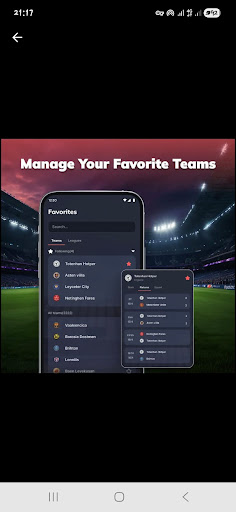
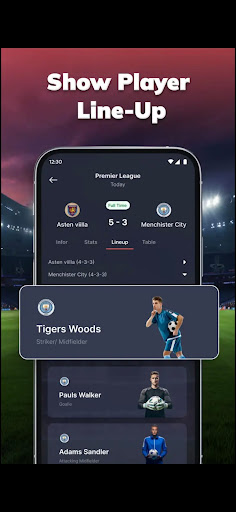
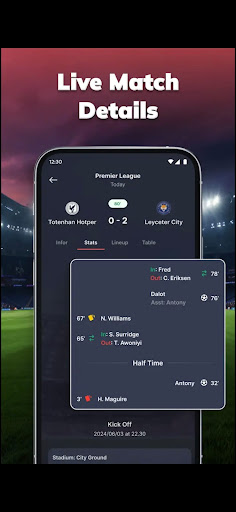
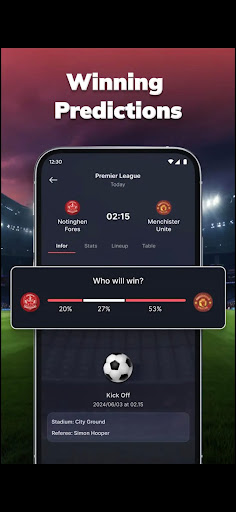
Your ultimate hub for real-time football action. Stay connected to every moment with instant scores, match insights, and updates—perfect for die-hard fans and casual followers alike.
Key Features
Live Score Updates
Get instant alerts for goals, cards, substitutions, and match highlights.
In-Depth Match Stats
Explore detailed live stats like possession, shots, passes, and more.
Player Lineups
Check full starting lineups to understand each team’s match strategy.
League Details
Browse schedules, team info, and history from leagues worldwide.
Tables & Fixtures
Track standings, past results, and upcoming matches with ease.
⭐ Favorite Teams
Follow your teams closely with personalized updates and notifications.
Download MatchLive: Football Live Score and elevate your football experience today—stay in sync with every score, stat, and schedule from around the world. Ready, set, goal!
Disclaimer: MatchLive provides football information only and does not endorse any tournaments, teams, or betting activities.
Afficher plus

1. Téléchargez l'installateur MEmu et terminez l'installation

2. Démarrez MEmu puis ouvrez Google Play sur la page d'accueil

3. Recherchez HD STREAMZ - LIVE FOOTBALL TV dans Google Play
Install
4. Téléchargez et installez HD STREAMZ - LIVE FOOTBALL TV
5. Une fois l'installation terminée, cliquez sur l'icône pour démarrer

6. Utiliser MEmu pour utiliser HD STREAMZ - LIVE FOOTBALL TV sur votre ordinateur
MEmu Play est actuellement le meilleur émulateur Android gratuit, avec 50 millions d'utilisateurs qui profitent d'une expérience Android exceptionnelle. La technologie de virtualisation de MEmu vous permet de jouer facilement à des milliers d'applications Android sur votre ordinateur, même les plus gourmandes en ressources.
L’écran plus grand avec de meilleurs graphismes; Une longue durée, sans limitation de batterie ou de données mobiles.
Soutien du Keymapping pour un contrôle précis du clavier et de la souris ou de la manette de jeu
Plusieurs comptes de jeu ou tâches sur un seul PC en même temps avec le gestionnaire de multi-instance.
Use HD STREAMZ - LIVE FOOTBALL TV on PC by following steps: