
Honey Jar - Voice Chat & Party
Mise à jour
Version actuelle
1.39.5
Proposée par

Ne vous inquiétez plus des surcharges lorsque vous utilisez Honey Jar - Voice Chat & Party sur votre téléphone portable, libérez-vous de l'écran minuscule et profitez de l'application sur un écran beaucoup plus grand. Désormais, vous pouvez utiliser votre application en plein écran avec le clavier et la souris. MEmu vous offre toutes les fonctionnalités surprenantes que vous attendiez : installation rapide et configuration facile, commandes intuitives, plus de limitations de batterie, de données mobiles et d'appels dérangeants. Le tout nouveau MEmu 9 est le meilleur choix pour utiliser Honey Jar - Voice Chat & Party sur votre ordinateur. Codé avec notre absorption, le gestionnaire multi-instance permet d'ouvrir 2 ou plusieurs comptes en même temps. Et le plus important, notre moteur d'émulation exclusif peut libérer tout le potentiel de votre PC, rendre tout cela fluide et agréable.
Afficher plus
Téléchargez Honey Jar - Voice Chat & Party avec le simulateur d’Android MEmu sur votre PC. Profitez de jouer sur un grand écran. Connect with like-minded individuals on Honey Jar.
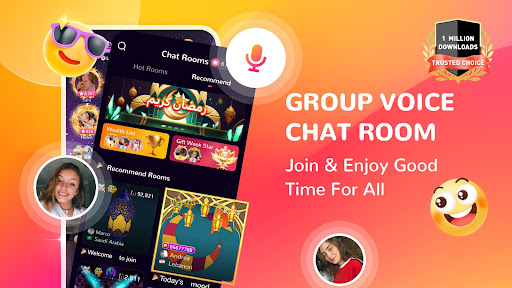



Connect with like-minded individuals on Honey Jar. Enjoy group voice chat, real-time interaction, a vibrant community that makes every moment enjoyable.
With Honey Jar you can:
• Share your life and join chat room of theirs. Enjoy real-time broadcasting and connect with global users.
• Connect with individuals from diverse backgrounds. Expand your social network and discover new cultures.
• Participate in live events, challenges, and activities that keep you entertained and engaged.
Why You'll love Honey Jar:
VOICE CHAT ROOM
• Follow your favourite chat rooms and be the first to join the topic when they started.
• Discover New Horizons! Always uncover fresh and exciting content with our wide array of hosts and topics. Every interaction is meaningful and memorable.
LUXURIOUS DESIGNED GIFTS
• Honey Jar brings you more options with stunning animated designed gift to express your feelings each other. You can have eye-catching entrance effects when you enter a chat room. Sleek design!
• Gifts and Rewards! Support your favorite hosts with gifts and get rewards.
CUSTOMER SUPPORT
• Honey Jar provides dedicated customer service support, if you face any problem in the app, you can send a feedback, your problem will be resolved as soon as possible.
• We do not tolerate any kind of inappropriate behaviours and respect our community guidelines.
Honey Jar is FREE to download and explore. To experience more fancy features, you could check out our service of Nobility and VIP. Or purchasing Honey Coins to send gifts to have more fun!
For questions, please contact our team at feedback@honeyjar.live
To work with Honey Jar (Agencies/Business Partners), please mail to business@honeyjar.live
Afficher plus

1. Téléchargez l'installateur MEmu et terminez l'installation

2. Démarrez MEmu puis ouvrez Google Play sur la page d'accueil

3. Recherchez Honey Jar - Voice Chat & Party dans Google Play
Install
4. Téléchargez et installez Honey Jar - Voice Chat & Party
5. Une fois l'installation terminée, cliquez sur l'icône pour démarrer

6. Utiliser MEmu pour utiliser Honey Jar - Voice Chat & Party sur votre ordinateur
MEmu Play est actuellement le meilleur émulateur Android gratuit, avec 50 millions d'utilisateurs qui profitent d'une expérience Android exceptionnelle. La technologie de virtualisation de MEmu vous permet de jouer facilement à des milliers d'applications Android sur votre ordinateur, même les plus gourmandes en ressources.
L’écran plus grand avec de meilleurs graphismes; Une longue durée, sans limitation de batterie ou de données mobiles.
Soutien du Keymapping pour un contrôle précis du clavier et de la souris ou de la manette de jeu
Plusieurs comptes de jeu ou tâches sur un seul PC en même temps avec le gestionnaire de multi-instance.
Use Honey Jar - Voice Chat & Party on PC by following steps: