InoxTV IPTV Player
Mise à jour
Version actuelle
1.0.7
Proposée par

Ne vous inquiétez plus des surcharges lorsque vous utilisez InoxTV IPTV Player sur votre téléphone portable, libérez-vous de l'écran minuscule et profitez de l'application sur un écran beaucoup plus grand. Désormais, vous pouvez utiliser votre application en plein écran avec le clavier et la souris. MEmu vous offre toutes les fonctionnalités surprenantes que vous attendiez : installation rapide et configuration facile, commandes intuitives, plus de limitations de batterie, de données mobiles et d'appels dérangeants. Le tout nouveau MEmu 9 est le meilleur choix pour utiliser InoxTV IPTV Player sur votre ordinateur. Codé avec notre absorption, le gestionnaire multi-instance permet d'ouvrir 2 ou plusieurs comptes en même temps. Et le plus important, notre moteur d'émulation exclusif peut libérer tout le potentiel de votre PC, rendre tout cela fluide et agréable.
Afficher plus
Profitez d'une expérience InoxTV IPTV Player exceptionnelle sur PC grâce à MEmu Play. Cet émulateur Android gratuit et performant vous donne accès à des milliers d'applications Android pour votre ordinateur. Restez en contact avec vos amis et travaillez plus efficacement ! InoxTV – Your Ultimate IPTV Streaming Experience.
InoxTV – Your Ultimate IPTV Streaming Experience
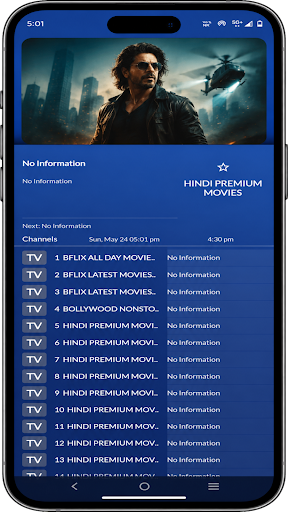
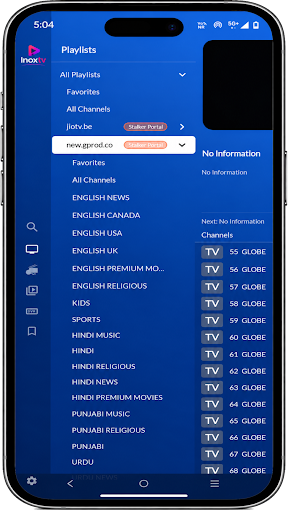
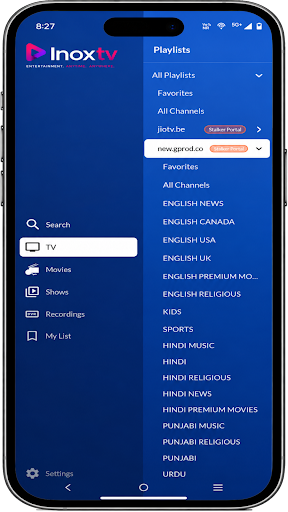
Transform your Android device into a powerful entertainment hub. InoxTV lets you stream live TV channels, movies, and TV shows from your IPTV playlists with a sleek, intuitive interface designed for both Android phones and Android TV.
▶ LIVE TV & ON-DEMAND CONTENT
Watch thousands of live TV channels and browse an extensive catalog of movies and TV shows — all from your own IPTV playlists. Enjoy buffer-free, high-quality streaming with adaptive playback.
▶ MULTIPLE PLAYLIST FORMATS
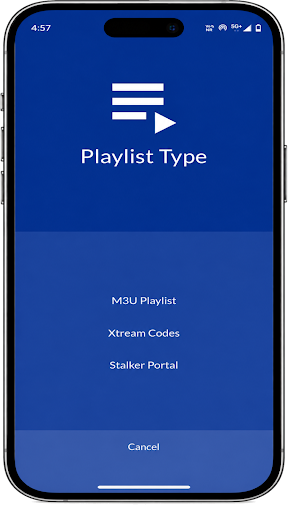
Add and manage your playlists effortlessly. InoxTV supports all major IPTV playlist formats:
• M3U / M3U8 playlists (URL or local file)
• Xtream Codes (server URL, username & password)
• Stalker Portal (portal URL & MAC address)
▶ TV GUIDE (EPG)
Never miss your favorite programs. The built-in Electronic Program Guide shows you what's on now, what's coming up next, and lets you browse past and future schedules with ease.
▶ MULTIVIEW & PICTURE-IN-PICTURE
Watch multiple channels at the same time with Multiview mode. Or use Picture-in-Picture to keep watching while you browse other apps — true multitasking for TV lovers.
▶ POWERFUL PLAYER
Enjoy a feature-rich player with:
• Multiple audio track selection
• Subtitle track support
• Video quality selection
• Seek and playback controls
• Hardware-accelerated decoding
▶ SMART SEARCH
Find what you want to watch in seconds. Search across all your channels, movies, and shows with text or voice search.
▶ FAVORITES & REMINDERS
Mark your favorite channels and shows for quick access. Set reminders so you never miss a program.
▶ ANDROID TV OPTIMIZED
Designed from the ground up for the big screen. Navigate effortlessly with your TV remote — no touch required. Full DPAD support with smooth, focused navigation.
▶ BACKUP & RESTORE
Keep your playlists and settings safe. Back up your configuration and restore it anytime — perfect when switching devices.
▶ MULTI-LANGUAGE SUPPORT
Available in 18 languages including English, Spanish, French, German, Hindi, Arabic, Russian, Portuguese, Italian, Dutch, Polish, Turkish, Ukrainian, Swedish, Danish, Bulgarian, Greek, Slovak, and Indonesian.
▶ BEAUTIFUL DARK THEME
A premium dark blue interface designed for comfortable viewing in any lighting. Smooth animations and a polished design make InoxTV a joy to use.
▶ KEY FEATURES AT A GLANCE
Live TV streaming
Movies & TV shows catalog
M3U, Xtream Codes & Stalker Portal support
Electronic Program Guide (EPG)
Multiview – watch multiple channels
Picture-in-Picture mode
Voice & text search
Favorites & reminders
Multiple audio & subtitle tracks
Backup & restore
18 languages supported
Android TV & mobile optimized
Premium dark theme
NOTE: InoxTV is a media player application. It does not provide any content, channels, or playlists. You must supply your own IPTV playlists to use the app. The developers are not responsible for any third-party content accessed through user-provided playlists.
Download InoxTV now and enjoy the ultimate IPTV experience on your Android device!
Afficher plus

1. Téléchargez l'installateur MEmu et terminez l'installation

2. Démarrez MEmu puis ouvrez Google Play sur la page d'accueil

3. Recherchez InoxTV IPTV Player dans Google Play
Install
4. Téléchargez et installez InoxTV IPTV Player
5. Une fois l'installation terminée, cliquez sur l'icône pour démarrer

6. Utiliser MEmu pour utiliser InoxTV IPTV Player sur votre ordinateur
MEmu Play est actuellement le meilleur émulateur Android gratuit, avec 50 millions d'utilisateurs qui profitent d'une expérience Android exceptionnelle. La technologie de virtualisation de MEmu vous permet de jouer facilement à des milliers d'applications Android sur votre ordinateur, même les plus gourmandes en ressources.
L’écran plus grand avec de meilleurs graphismes; Une longue durée, sans limitation de batterie ou de données mobiles.
Soutien du Keymapping pour un contrôle précis du clavier et de la souris ou de la manette de jeu
Plusieurs comptes de jeu ou tâches sur un seul PC en même temps avec le gestionnaire de multi-instance.
Use InoxTV IPTV Player on PC by following steps: