
LOLA SPEAK: English Practice
Mise à jour
Version actuelle
8.6.0
Proposée par

Ne vous inquiétez plus des surcharges lorsque vous utilisez LOLA SPEAK: English Practice sur votre téléphone portable, libérez-vous de l'écran minuscule et profitez de l'application sur un écran beaucoup plus grand. Désormais, vous pouvez utiliser votre application en plein écran avec le clavier et la souris. MEmu vous offre toutes les fonctionnalités surprenantes que vous attendiez : installation rapide et configuration facile, commandes intuitives, plus de limitations de batterie, de données mobiles et d'appels dérangeants. Le tout nouveau MEmu 9 est le meilleur choix pour utiliser LOLA SPEAK: English Practice sur votre ordinateur. Codé avec notre absorption, le gestionnaire multi-instance permet d'ouvrir 2 ou plusieurs comptes en même temps. Et le plus important, notre moteur d'émulation exclusif peut libérer tout le potentiel de votre PC, rendre tout cela fluide et agréable.
Afficher plus
Téléchargez LOLA SPEAK: English Practice avec le simulateur d’Android MEmu sur votre PC. Profitez de jouer sur un grand écran. Practice speaking English in real life situations!

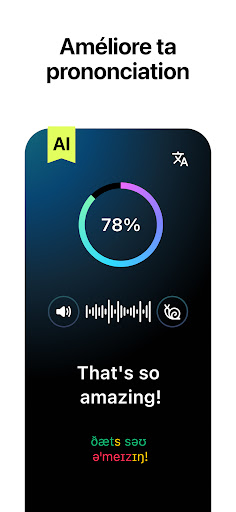

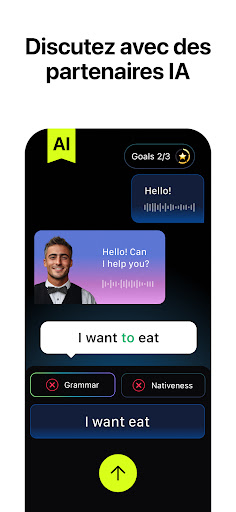
Practice speaking English in real life situations! Be the hero in our interactive series. Move the story forward by speaking English.
—
How does Lola Speak help me learn English?
Many English learners already know a lot of grammar and vocabulary, but are afraid to actually speak English. Why? Many are embarrassed to make mistakes, or mispronounce words.
Lola Speak provides a safe environment to practice real life conversations. You can repeat as many times as you like. You can practice communicating in a life-like setting, but without the pressure and stress. You can build confidence to communicate in English.
—
How will I know if I am speaking correctly?
Our AI provides instant feedback on your pronunciation.
Also, you can listen to your own audio and recordings by native speakers to learn to sound more like a native.
—
Is this going to be fun?
From plot driven stories (Welcome to Hollywood) to series helping you navigate specific situations (Job Interview) you will be immersed in American English and culture. We think you won't want to stop - all while speaking English to move the stories forward!
—
How often is the content updated?
We expect to release new series monthly covering different topics & English speaker levels from basic to advanced.
Read the terms and privacy policy here:
https://lolaspeak.com/terms
Afficher plus

1. Téléchargez l'installateur MEmu et terminez l'installation

2. Démarrez MEmu puis ouvrez Google Play sur la page d'accueil

3. Recherchez LOLA SPEAK: English Practice dans Google Play
Install
4. Téléchargez et installez LOLA SPEAK: English Practice
5. Une fois l'installation terminée, cliquez sur l'icône pour démarrer

6. Utiliser MEmu pour utiliser LOLA SPEAK: English Practice sur votre ordinateur
MEmu Play est actuellement le meilleur émulateur Android gratuit, avec 50 millions d'utilisateurs qui profitent d'une expérience Android exceptionnelle. La technologie de virtualisation de MEmu vous permet de jouer facilement à des milliers d'applications Android sur votre ordinateur, même les plus gourmandes en ressources.
L’écran plus grand avec de meilleurs graphismes; Une longue durée, sans limitation de batterie ou de données mobiles.
Soutien du Keymapping pour un contrôle précis du clavier et de la souris ou de la manette de jeu
Plusieurs comptes de jeu ou tâches sur un seul PC en même temps avec le gestionnaire de multi-instance.
Use LOLA SPEAK: English Practice on PC by following steps: