MAN Driver
Mise à jour
Version actuelle
5.1.1
Proposée par

Ne vous inquiétez plus des surcharges lorsque vous utilisez MAN Driver sur votre téléphone portable, libérez-vous de l'écran minuscule et profitez de l'application sur un écran beaucoup plus grand. Désormais, vous pouvez utiliser votre application en plein écran avec le clavier et la souris. MEmu vous offre toutes les fonctionnalités surprenantes que vous attendiez : installation rapide et configuration facile, commandes intuitives, plus de limitations de batterie, de données mobiles et d'appels dérangeants. Le tout nouveau MEmu 9 est le meilleur choix pour utiliser MAN Driver sur votre ordinateur. Codé avec notre absorption, le gestionnaire multi-instance permet d'ouvrir 2 ou plusieurs comptes en même temps. Et le plus important, notre moteur d'émulation exclusif peut libérer tout le potentiel de votre PC, rendre tout cela fluide et agréable.
Afficher plus
Téléchargez MAN Driver avec le simulateur d’Android MEmu sur votre PC. Profitez de jouer sur un grand écran. The MAN Driver App supports you as a truck or bus driver with a variety of information and smart features.
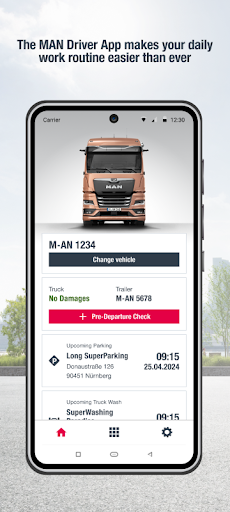
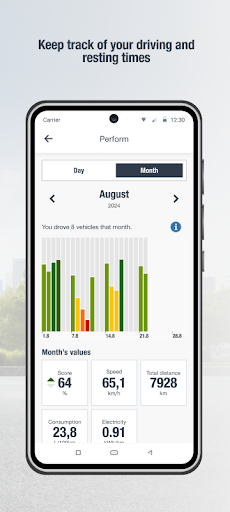
The MAN Driver App supports you as a truck or bus driver with a variety of information and smart features. The all-round assistant on your smartphone helps simplify your daily driving routine.
At a Glance
• Free to download in many languages*
• Many useful functions for drivers of MAN trucks and buses as well as NEOPLAN buses**
• Also supports drivers of other vehicle brands with selected functions**
• Provides drivers access to digital services on the RIO platform***
• Connects drivers, fleet managers, and the MAN workshop
• Regular upgrades and expansions
• More information about the MAN Driver App at www.digital.man/driverapp
Features for Truck Drivers
• Guided digital pre-departure check including damage reporting*
• View driving and rest times*
• Individual driving style analysis*
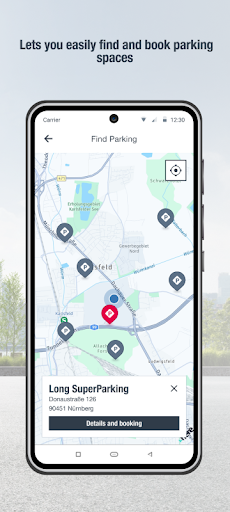
• Display of points of interest such as parking spaces****
• Booking and cancellation of parking spaces as well as contactless handling of parking transactions****
• Display of the state of charge for MAN eTrucks
• MAN workshop search
• MAN Mobile24 breakdown call with automatic location and VIN transmission
• Access to the Trucker’s World website
Features for Bus Drivers
• Guided digital pre-departure check including damage reporting*
• View driving and rest times*
• Individual driving style analysis*
• MAN workshop search
• MAN Mobile24 breakdown call with automatic location and VIN transmission
*The download of the MAN Driver App and the basic functions are free of charge. The use of certain functions requires registration on the RIO platform and the booking of corresponding, partially chargeable digital services at www.man.eu/marketplace. For example, to view driving and rest times for the vehicle, the chargeable service Timed must be booked, and for individual driving style analysis, the chargeable service Perform must be booked. For the fleet manager to view the data of the digital pre-departure check and damage report on the RIO platform, registration on the RIO platform is also required. For forwarding the damage report to the MAN workshop, the booking of the free service MAN ServiceCare S is also necessary. Details on registering in the app and creating a RIO account for using the aforementioned services can be viewed by drivers at www.digital.man/driverapp. The costs for these services can be found at www.man.eu/marketplace. Fees may be charged by the mobile service provider for calling the MAN Mobile24 breakdown service and using mobile internet.
** The availability of individual functions may vary depending on the vehicle. Only selected functions are available for drivers of other vehicle brands.
*** Operated by TB Digital Services GmbH.
**** The points of interest search, parking space booking and cancellation, and contactless transaction require the booking of the chargeable service MAN SimplePay at www.man.eu/marketplace. Additionally, a UTA Edenred fuel card must be stored in MAN SimplePay on the RIO platform. The contactless transaction is possible at selected UTA Edenred acceptance points and requires an internet connection.
Afficher plus

1. Téléchargez l'installateur MEmu et terminez l'installation

2. Démarrez MEmu puis ouvrez Google Play sur la page d'accueil

3. Recherchez MAN Driver dans Google Play
Install
4. Téléchargez et installez MAN Driver
5. Une fois l'installation terminée, cliquez sur l'icône pour démarrer

6. Utiliser MEmu pour utiliser MAN Driver sur votre ordinateur
MEmu Play est actuellement le meilleur émulateur Android gratuit, avec 50 millions d'utilisateurs qui profitent d'une expérience Android exceptionnelle. La technologie de virtualisation de MEmu vous permet de jouer facilement à des milliers d'applications Android sur votre ordinateur, même les plus gourmandes en ressources.
L’écran plus grand avec de meilleurs graphismes; Une longue durée, sans limitation de batterie ou de données mobiles.
Soutien du Keymapping pour un contrôle précis du clavier et de la souris ou de la manette de jeu
Plusieurs comptes de jeu ou tâches sur un seul PC en même temps avec le gestionnaire de multi-instance.
Use MAN Driver on PC by following steps: