AZ+
Mise à jour
Version actuelle
1.0.2
Proposée par

Ne vous inquiétez plus des surcharges lorsque vous utilisez AZ+ sur votre téléphone portable, libérez-vous de l'écran minuscule et profitez de l'application sur un écran beaucoup plus grand. Désormais, vous pouvez utiliser votre application en plein écran avec le clavier et la souris. MEmu vous offre toutes les fonctionnalités surprenantes que vous attendiez : installation rapide et configuration facile, commandes intuitives, plus de limitations de batterie, de données mobiles et d'appels dérangeants. Le tout nouveau MEmu 9 est le meilleur choix pour utiliser AZ+ sur votre ordinateur. Codé avec notre absorption, le gestionnaire multi-instance permet d'ouvrir 2 ou plusieurs comptes en même temps. Et le plus important, notre moteur d'émulation exclusif peut libérer tout le potentiel de votre PC, rendre tout cela fluide et agréable.
Afficher plus
Téléchargez AZ+ avec le simulateur d’Android MEmu sur votre PC. Profitez de jouer sur un grand écran. Welcome to AZ+, Madagascar's Premier Super App.
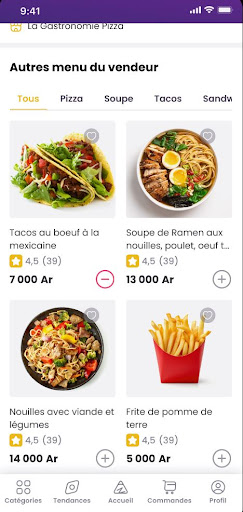
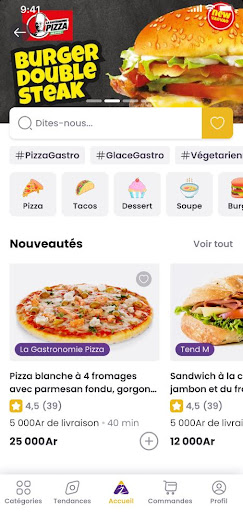
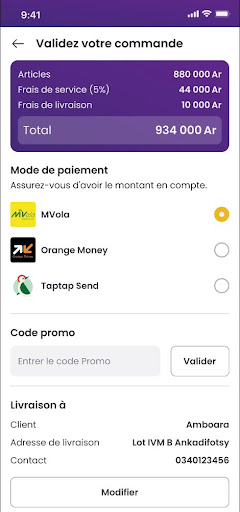

Welcome to AZ+, Madagascar's Premier Super App
AZ+ is Madagascar's all-in-one super app, offering convenient food delivery and a comprehensive e-commerce platform.
Gastronomic Delights at Your Fingertips
With AZ+, embark on a culinary journey like no other. Our platform connects you with a diverse array of local restaurants, offering everything from traditional Malagasy dishes to international cuisine. Whether you're in the mood for a hearty meal or a light snack, AZ+ ensures that your cravings are just a few taps away. Our intuitive interface, real-time order tracking, and dedicated delivery network work together to bring your favorite meals directly to your doorstep.
Comprehensive Food Delivery Services: Dive into a world of culinary exploration with AZ+. Whether you're craving traditional Malagasy cuisine or international dishes, our platform connects you with a vast selection of restaurants across Madagascar.
Expansive E-commerce Platform: Shop till you drop with AZ+'s extensive e-commerce marketplace. From daily groceries to electronics, fashion, and more, find everything you need in one place.
A Marketplace Tailored for Madagascar
Beyond food, AZ+ serves as your gateway to a vast e-commerce landscape, tailored to the needs and preferences of the Malagasy people. From daily essentials to electronics, fashion, and more, find everything you need on AZ+. We've created a shopping experience that's not just about convenience but also about discovery. Explore new products, compare prices, read reviews, and take advantage of exclusive deals, all within a secure and user-friendly environment.
Seamless and Secure Transactions
At AZ+, we prioritize your convenience and security. Our integrated payment system supports a variety of payment methods, ensuring your transactions are smooth and secure.
Sustainability at Heart
We're committed to not just serving our community but also protecting our beautiful island. AZ+ is proud to implement eco-friendly delivery options, reducing our carbon footprint and contributing to a greener Madagascar.
Effortless Payment Solutions: Embrace the convenience of cashless transactions with AZ+, as well as all available payment method in the country: Mobile Money and Visa or MasterCard
Dedicated to Your Satisfaction
Our mission is to make your life easier and more enjoyable. If you ever need assistance, our dedicated customer support team is just a tap away, ready to help with any questions or concerns.
Join the AZ+ Community
Contact Us at contact@azplus.mg
Afficher plus

1. Téléchargez l'installateur MEmu et terminez l'installation

2. Démarrez MEmu puis ouvrez Google Play sur la page d'accueil

3. Recherchez AZ+ dans Google Play
Install
4. Téléchargez et installez AZ+
5. Une fois l'installation terminée, cliquez sur l'icône pour démarrer

6. Utiliser MEmu pour utiliser AZ+ sur votre ordinateur
MEmu Play est actuellement le meilleur émulateur Android gratuit, avec 50 millions d'utilisateurs qui profitent d'une expérience Android exceptionnelle. La technologie de virtualisation de MEmu vous permet de jouer facilement à des milliers d'applications Android sur votre ordinateur, même les plus gourmandes en ressources.
L’écran plus grand avec de meilleurs graphismes; Une longue durée, sans limitation de batterie ou de données mobiles.
Soutien du Keymapping pour un contrôle précis du clavier et de la souris ou de la manette de jeu
Plusieurs comptes de jeu ou tâches sur un seul PC en même temps avec le gestionnaire de multi-instance.
Use AZ+ on PC by following steps: