RBTV
Mise à jour
Version actuelle
Proposée par

Ne vous inquiétez plus des surcharges lorsque vous utilisez RBTV sur votre téléphone portable, libérez-vous de l'écran minuscule et profitez de l'application sur un écran beaucoup plus grand. Désormais, vous pouvez utiliser votre application en plein écran avec le clavier et la souris. MEmu vous offre toutes les fonctionnalités surprenantes que vous attendiez : installation rapide et configuration facile, commandes intuitives, plus de limitations de batterie, de données mobiles et d'appels dérangeants. Le tout nouveau MEmu 9 est le meilleur choix pour utiliser RBTV sur votre ordinateur. Codé avec notre absorption, le gestionnaire multi-instance permet d'ouvrir 2 ou plusieurs comptes en même temps. Et le plus important, notre moteur d'émulation exclusif peut libérer tout le potentiel de votre PC, rendre tout cela fluide et agréable.
Afficher plus
Profitez d'une expérience RBTV exceptionnelle sur PC grâce à MEmu Play. Cet émulateur Android gratuit et performant vous donne accès à des milliers d'applications Android pour votre ordinateur. Restez en contact avec vos amis et travaillez plus efficacement ! RBTV – Explore Television and Entertainment.
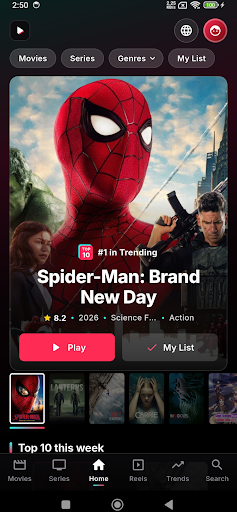
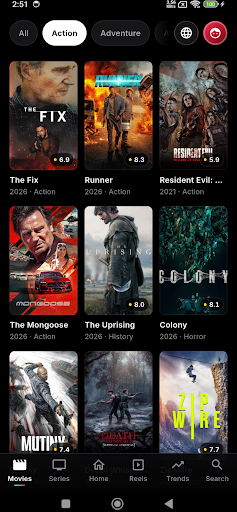
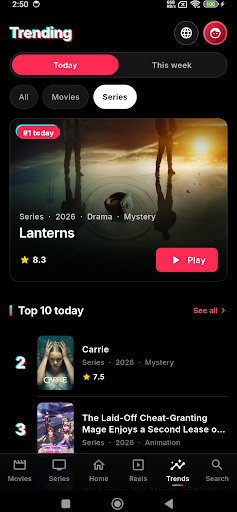
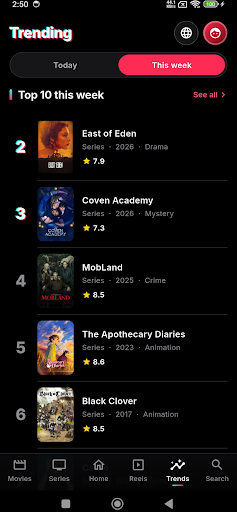
RBTV – Explore Television and Entertainment
RBTV is an entertainment discovery experience designed for users interested in television programming, available channel information and entertainment categories. Explore supported features, browse available listings and discover content that matches your interests.
Discover TV Channels
Explore supported TV channel listings and browse available channel categories. Discover channel information and navigate programming options where supported by the app.
Movies and Entertainment
Explore movie-related content and entertainment categories. Discover different genres, including action, comedy, drama, romance, thriller and adventure, where available through supported features.
Explore Television Programming
Browse available television listings and program information where supported. Discover different categories and explore programming that interests you.
Simple Content Navigation
RBTV provides a convenient way to explore supported television information and entertainment categories. Navigate available listings, discover content and explore the app's features through a straightforward interface.
⭐ RBTV Features
• Explore supported TV channel listings
• Browse available programming information
• Discover entertainment categories
• Explore movie-related content
• Navigate channel categories
• Find programming information where available
• Enjoy convenient entertainment discovery
Your TV Entertainment Companion
Whether you are interested in television listings, entertainment categories or available programming information, RBTV brings supported features together in one place. Explore the app and discover available content through a convenient interface.
Explore Entertainment with RBTV
Discover television-related information and explore available entertainment features at your convenience. Channel access and playback depend on supported features, regional availability and authorized sources.
Only access content you have permission to view.
RBTV – Explore television, discover programming and browse entertainment in one place.
Afficher plus

1. Téléchargez l'installateur MEmu et terminez l'installation

2. Démarrez MEmu puis ouvrez Google Play sur la page d'accueil

3. Recherchez RBTV dans Google Play
Install
4. Téléchargez et installez RBTV
5. Une fois l'installation terminée, cliquez sur l'icône pour démarrer

6. Utiliser MEmu pour utiliser RBTV sur votre ordinateur
MEmu Play est actuellement le meilleur émulateur Android gratuit, avec 50 millions d'utilisateurs qui profitent d'une expérience Android exceptionnelle. La technologie de virtualisation de MEmu vous permet de jouer facilement à des milliers d'applications Android sur votre ordinateur, même les plus gourmandes en ressources.
L’écran plus grand avec de meilleurs graphismes; Une longue durée, sans limitation de batterie ou de données mobiles.
Soutien du Keymapping pour un contrôle précis du clavier et de la souris ou de la manette de jeu
Plusieurs comptes de jeu ou tâches sur un seul PC en même temps avec le gestionnaire de multi-instance.
Use RBTV on PC by following steps: