RivalN: Find Gaming Friends
Mise à jour
Version actuelle
3.6.0
Proposée par

Ne vous inquiétez plus des surcharges lorsque vous utilisez RivalN: Find Gaming Friends sur votre téléphone portable, libérez-vous de l'écran minuscule et profitez de l'application sur un écran beaucoup plus grand. Désormais, vous pouvez utiliser votre application en plein écran avec le clavier et la souris. MEmu vous offre toutes les fonctionnalités surprenantes que vous attendiez : installation rapide et configuration facile, commandes intuitives, plus de limitations de batterie, de données mobiles et d'appels dérangeants. Le tout nouveau MEmu 9 est le meilleur choix pour utiliser RivalN: Find Gaming Friends sur votre ordinateur. Codé avec notre absorption, le gestionnaire multi-instance permet d'ouvrir 2 ou plusieurs comptes en même temps. Et le plus important, notre moteur d'émulation exclusif peut libérer tout le potentiel de votre PC, rendre tout cela fluide et agréable.
Afficher plus
Téléchargez RivalN: Find Gaming Friends avec le simulateur d’Android MEmu sur votre PC. Profitez de jouer sur un grand écran. RivalN is more than just a platform for esports tournaments; it's a comprehensive gaming hub where you can play together, make friends, and elevate your gaming journey.
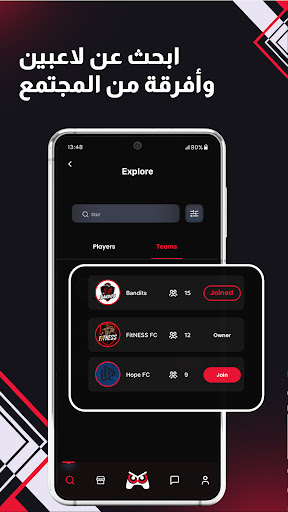
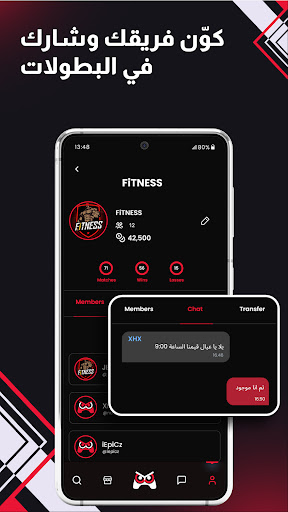
RivalN is more than just a platform for esports tournaments; it's a comprehensive gaming hub where you can play together, make friends, and elevate your gaming journey.
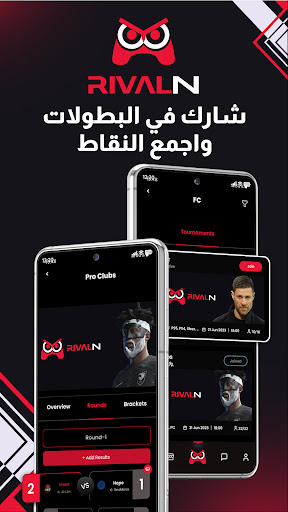
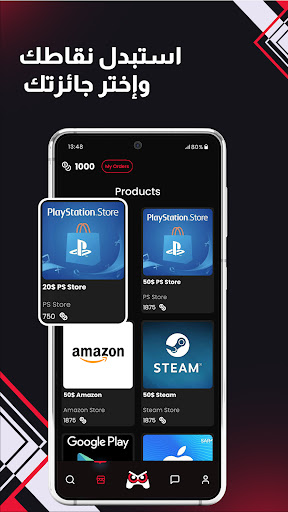
Dive into a world of weekly esports tournaments, gaming leagues, and esports competitions, earn valuable points, and redeem them for exciting prizes in the RivalN Store.
WHY CHOOSE RivalN?
• Extensive Tournament & Competition Selection: RivalN hosts a wide variety of weekly online tournaments and esports competitions across various popular gaming titles. Whether you're a mobile, console, or PC gamer, there's a tournament or esports competition for everyone.
• Points & Rewards System: Earn points by participating in tournaments and sharing gaming content. Collect points to unlock a vast collection of rewards in the RivalN Store, featuring gaming gear, gift cards, exclusive merchandise, and more.
• Team Up & Conquer: find gaming friends and team up with fellow gamers to compete in tournaments and crush the competition! Play together and strategize your way to victory.
• Seamless User Experience: RivalN provides a user-friendly interface that makes it easy to navigate, track your progress, and redeem your well-earned rewards.
• Community & Connection: Meet new people and join forces with your gaming friends in the RivalN community! Share gaming content, learn about the latest gaming news, and earn points as you socialize.
• Find gaming friends and Make Friends: RivalN is the perfect place to find gamers who share your passion. Connect with like-minded individuals, make new friends, and build lasting bonds through the thrill of competition.
• Play Together and Connect: Join forces with friends and other gamers to play together and crush the competition!
• Find Friends and Build Your Squad: Find friends with similar gaming interests and team up to conquer the competition.
• Expand Your Gaming Friends Network: RivalN makes it easy to find friends and expand your gaming friends network. Connect with players of all skill levels and backgrounds.
More Than Just a Game!
RivalN is a vibrant gaming hub designed to enhance your overall gaming experience. Meet new people, find friends, and share your love for gaming. find gaming friends and forge lasting friendships with fellow gamers. Make new friends and create memories that will last a lifetime. Whether you're a casual player seeking friendly competition or a seasoned esports gaming enthusiast aiming for the top, RivalN provides the tools and opportunities to fuel your passion.
Your Gaming Hub for Connection: RivalN is more than just a game; it's a thriving gaming hub where you can make new friends and connect with gamers worldwide.
Download RivalN today and embark on an unforgettable esports gaming journey filled with thrilling competitions, valuable rewards, and a vibrant community of fellow gamers.
Afficher plus

1. Téléchargez l'installateur MEmu et terminez l'installation

2. Démarrez MEmu puis ouvrez Google Play sur la page d'accueil

3. Recherchez RivalN: Find Gaming Friends dans Google Play
Install
4. Téléchargez et installez RivalN: Find Gaming Friends
5. Une fois l'installation terminée, cliquez sur l'icône pour démarrer

6. Utiliser MEmu pour utiliser RivalN: Find Gaming Friends sur votre ordinateur
MEmu Play est actuellement le meilleur émulateur Android gratuit, avec 50 millions d'utilisateurs qui profitent d'une expérience Android exceptionnelle. La technologie de virtualisation de MEmu vous permet de jouer facilement à des milliers d'applications Android sur votre ordinateur, même les plus gourmandes en ressources.
L’écran plus grand avec de meilleurs graphismes; Une longue durée, sans limitation de batterie ou de données mobiles.
Soutien du Keymapping pour un contrôle précis du clavier et de la souris ou de la manette de jeu
Plusieurs comptes de jeu ou tâches sur un seul PC en même temps avec le gestionnaire de multi-instance.
Use RivalN: Find Gaming Friends on PC by following steps: