RodCaller: Smart Caller ID
Mise à jour
Version actuelle
1.0.21
Proposée par

Ne vous inquiétez plus des surcharges lorsque vous utilisez RodCaller: Smart Caller ID sur votre téléphone portable, libérez-vous de l'écran minuscule et profitez de l'application sur un écran beaucoup plus grand. Désormais, vous pouvez utiliser votre application en plein écran avec le clavier et la souris. MEmu vous offre toutes les fonctionnalités surprenantes que vous attendiez : installation rapide et configuration facile, commandes intuitives, plus de limitations de batterie, de données mobiles et d'appels dérangeants. Le tout nouveau MEmu 9 est le meilleur choix pour utiliser RodCaller: Smart Caller ID sur votre ordinateur. Codé avec notre absorption, le gestionnaire multi-instance permet d'ouvrir 2 ou plusieurs comptes en même temps. Et le plus important, notre moteur d'émulation exclusif peut libérer tout le potentiel de votre PC, rendre tout cela fluide et agréable.
Afficher plus
Profitez d'une expérience RodCaller: Smart Caller ID exceptionnelle sur PC grâce à MEmu Play. Cet émulateur Android gratuit et performant vous donne accès à des milliers d'applications Android pour votre ordinateur. Restez en contact avec vos amis et travaillez plus efficacement ! Welcome to RodCaller, the smart community-based caller identification platform designed to keep you informed, connected, and in control of your privacy.
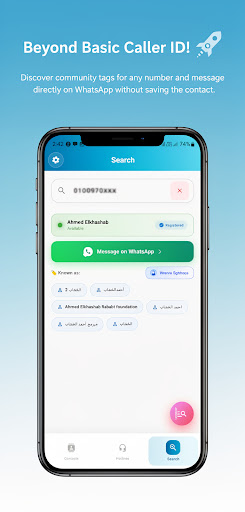
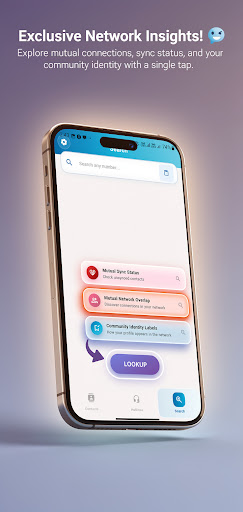
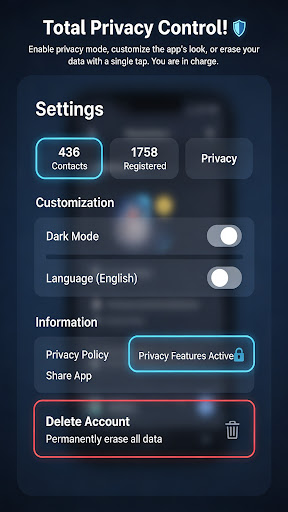
Welcome to RodCaller, the smart community-based caller identification platform designed to keep you informed, connected, and in control of your privacy.
Whether you want to identify an unknown number, discover how your local network interacts, or quickly find essential service numbers, RodCaller is your reliable tool. We built this app with a strong focus on community sourcing and user privacy.
Key Features:
• Smart Caller Identification: Instantly search and identify unknown numbers using our growing community-driven database.
• Mutual Connections: Explore network overlaps to see if a searched number is already connected to your local network.
• Community Labels: Discover the tags and names associated with numbers within the community to better understand who is calling.
• Advanced Privacy Lock: Your privacy matters. With our built-in Privacy Lock feature, you can completely hide your sync data and network overlaps from others. When activated, your profile remains strictly confidential, limiting your daily searches to ensure fair community usage.
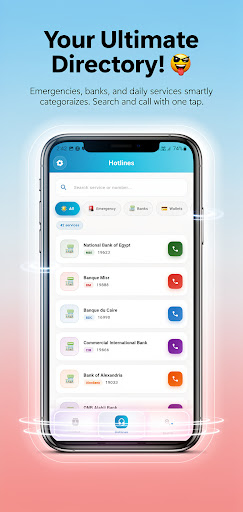
• Comprehensive Hotlines Directory: Instantly access verified emergency numbers, banks, telecom services, and health facilities in your region without needing an internet connection.
• Direct WhatsApp Messaging: Start a WhatsApp conversation with any unsaved number directly from the app.
How RodCaller Works:
RodCaller operates on a crowdsourced model. The caller identification data and tags are generated and verified by the community of users who choose to participate and sync their data. We do not sell data to third parties; the information is strictly used to provide the app's core identification features.
Take control of your phone calls today with RodCaller. Identify, connect, and protect your privacy!
Afficher plus

1. Téléchargez l'installateur MEmu et terminez l'installation

2. Démarrez MEmu puis ouvrez Google Play sur la page d'accueil

3. Recherchez RodCaller: Smart Caller ID dans Google Play
Install
4. Téléchargez et installez RodCaller: Smart Caller ID
5. Une fois l'installation terminée, cliquez sur l'icône pour démarrer

6. Utiliser MEmu pour utiliser RodCaller: Smart Caller ID sur votre ordinateur
MEmu Play est actuellement le meilleur émulateur Android gratuit, avec 50 millions d'utilisateurs qui profitent d'une expérience Android exceptionnelle. La technologie de virtualisation de MEmu vous permet de jouer facilement à des milliers d'applications Android sur votre ordinateur, même les plus gourmandes en ressources.
L’écran plus grand avec de meilleurs graphismes; Une longue durée, sans limitation de batterie ou de données mobiles.
Soutien du Keymapping pour un contrôle précis du clavier et de la souris ou de la manette de jeu
Plusieurs comptes de jeu ou tâches sur un seul PC en même temps avec le gestionnaire de multi-instance.
Use RodCaller: Smart Caller ID on PC by following steps: