Speed Camera Radar (Light)
Mise à jour
Version actuelle
2.1.28-light
Proposée par

Ne vous inquiétez plus des surcharges lorsque vous utilisez Speed Camera Radar (Light) sur votre téléphone portable, libérez-vous de l'écran minuscule et profitez de l'application sur un écran beaucoup plus grand. Désormais, vous pouvez utiliser votre application en plein écran avec le clavier et la souris. MEmu vous offre toutes les fonctionnalités surprenantes que vous attendiez : installation rapide et configuration facile, commandes intuitives, plus de limitations de batterie, de données mobiles et d'appels dérangeants. Le tout nouveau MEmu 9 est le meilleur choix pour utiliser Speed Camera Radar (Light) sur votre ordinateur. Codé avec notre absorption, le gestionnaire multi-instance permet d'ouvrir 2 ou plusieurs comptes en même temps. Et le plus important, notre moteur d'émulation exclusif peut libérer tout le potentiel de votre PC, rendre tout cela fluide et agréable.
Afficher plus
Téléchargez Speed Camera Radar (Light) avec le simulateur d’Android MEmu sur votre PC. Profitez de jouer sur un grand écran. This application is used to detect hazards on the road, such as speed cameras (mobile ambush, static speed cameras, red light cameras), speed bumps, bad roads and etc.
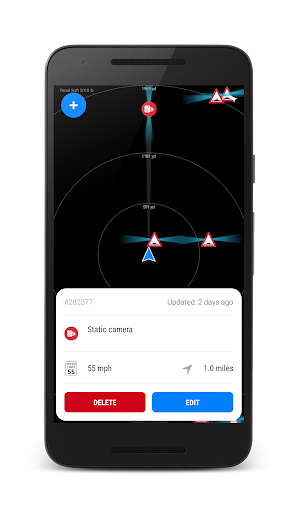
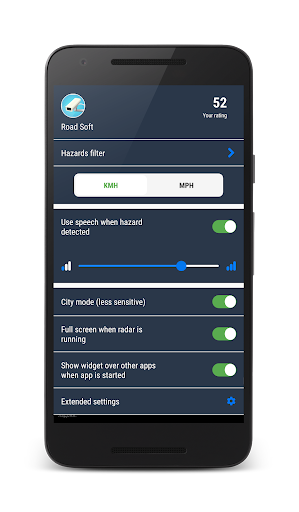
This application is used to detect hazards on the road, such as speed cameras (mobile ambush, static speed cameras, red light cameras), speed bumps, bad roads and etc.
This application uses database of hazards previously detected by other users.
The latest version supports all the countries of the world!
GETTING STARTED WITH LIGHT VERSION
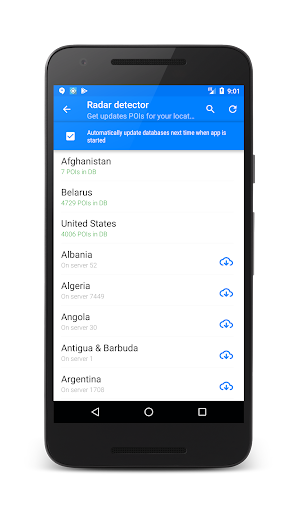
1. If you just installed the app and launch it, application will try automatically update needed POI's databases for your country(neeeded enabled GPS).
If application won't automatically update POI's for your country, you need to go to menu "Update databased" to download and install the latest database of speed camera for your region (country).
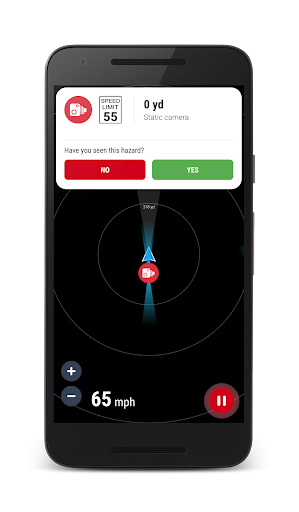
2. By default LIGHT version automatically start hazard redection mode. To explicity start or stop hazard detection mode press the circle button at the bottom right of the screen (with icon play or stop).
3. The application notifies only the dangers that are along your route direction.
4. You can call main setting, swiping from the left edge of the screen to the right.
5. You can call hazards filter that you want to discover swiping from the right edge of the screen to the left.
6. To add a new danger, tap on the left-top icon (+) of the screen. Pay attention, this button available only for authenticated users.
HOW DOES IT WORK?
The workflow of the application differs from the hardware radar detector.
Hardware radar detector - is a passive receiver that does not block the signal to which it is set, but simply notify the driver of the presence in the field of the radar radio interference.
This application works differently, it uses you current geo position (with GPS) and database of hazards previously detected by other users. For example, if the application is informed about mobile ambush, it means that at this point can probably be mobile ambush.
Any user can add new hazard to shared database. Also user can influence on rating of hazard (when user get danger alert he can define whether danger exists or not in fact).
The application plays the sound and shows hazard on the map and distance to this hazard.
The application may run in the background (even when the screen is off), just enable this feature in settings ("Show widget over other apps when app is started")
=================================================================
Be careful on the road and good luck!
=================================================================
Afficher plus

1. Téléchargez l'installateur MEmu et terminez l'installation

2. Démarrez MEmu puis ouvrez Google Play sur la page d'accueil

3. Recherchez Speed Camera Radar (Light) dans Google Play
Install
4. Téléchargez et installez Speed Camera Radar (Light)
5. Une fois l'installation terminée, cliquez sur l'icône pour démarrer

6. Utiliser MEmu pour utiliser Speed Camera Radar (Light) sur votre ordinateur
MEmu Play est actuellement le meilleur émulateur Android gratuit, avec 50 millions d'utilisateurs qui profitent d'une expérience Android exceptionnelle. La technologie de virtualisation de MEmu vous permet de jouer facilement à des milliers d'applications Android sur votre ordinateur, même les plus gourmandes en ressources.
L’écran plus grand avec de meilleurs graphismes; Une longue durée, sans limitation de batterie ou de données mobiles.
Soutien du Keymapping pour un contrôle précis du clavier et de la souris ou de la manette de jeu
Plusieurs comptes de jeu ou tâches sur un seul PC en même temps avec le gestionnaire de multi-instance.
Use Speed Camera Radar (Light) on PC by following steps: