
WPS Office-PDF,Word,Sheet,PPT
Mise à jour
Version actuelle
26.10.2
Proposée par

Ne vous inquiétez plus des surcharges lorsque vous utilisez WPS Office-PDF,Word,Sheet,PPT sur votre téléphone portable, libérez-vous de l'écran minuscule et profitez de l'application sur un écran beaucoup plus grand. Désormais, vous pouvez utiliser votre application en plein écran avec le clavier et la souris. MEmu vous offre toutes les fonctionnalités surprenantes que vous attendiez : installation rapide et configuration facile, commandes intuitives, plus de limitations de batterie, de données mobiles et d'appels dérangeants. Le tout nouveau MEmu 9 est le meilleur choix pour utiliser WPS Office-PDF,Word,Sheet,PPT sur votre ordinateur. Codé avec notre absorption, le gestionnaire multi-instance permet d'ouvrir 2 ou plusieurs comptes en même temps. Et le plus important, notre moteur d'émulation exclusif peut libérer tout le potentiel de votre PC, rendre tout cela fluide et agréable.
Afficher plus
Téléchargez WPS Office-PDF,Word,Sheet,PPT avec le simulateur d’Android MEmu sur votre PC. Profitez de jouer sur un grand écran. WPS Office – Office Suite, PDF Editor & Document Reader.
WPS Office – Office Suite, PDF Editor & Document Reader
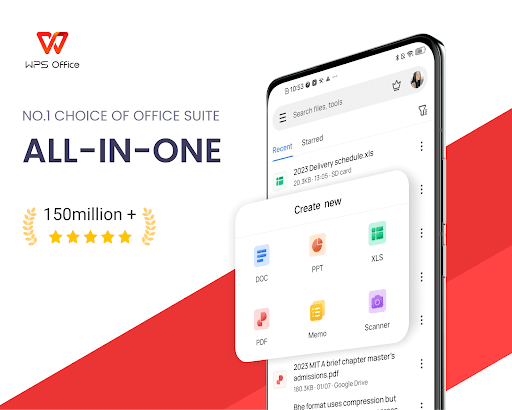
WPS Office is a powerful office suite designed to help you create, edit, read and manage documents efficiently. It supports Word documents, PDF files, Excel spreadsheets and PowerPoint presentations, making it a reliable document editor and document reader for work, school, and business.
With professional tools for PDF editing, document processing and file conversion, WPS Office helps you handle everyday office tasks on your mobile device with ease.
Complete Office Suite for Documents & Files
WPS Office works as an all-in-one solution for document creation and file management:
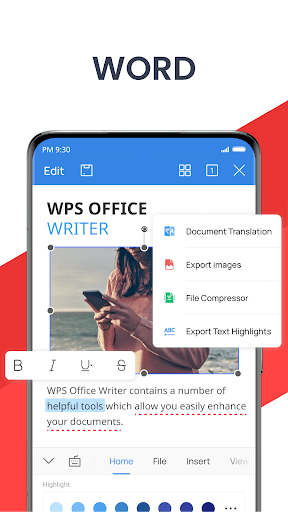
• Create, edit and read Word documents, docs and text files
• Format and revise documents with professional editing tools
• Open and edit Word documents, PDFs, spreadsheets and presentations created by other office tools.
• Manage files with a reliable file reader and file editor
Whether you are writing reports, reviewing files or sharing documents, WPS Office supports a smooth workflow.
PDF Editor & PDF Reader – Designed for Daily PDF Work
WPS Office provides a complete set of tools for working with PDF documents, from reading to advanced editing:
• Open, view and read PDF files with a smooth PDF reader
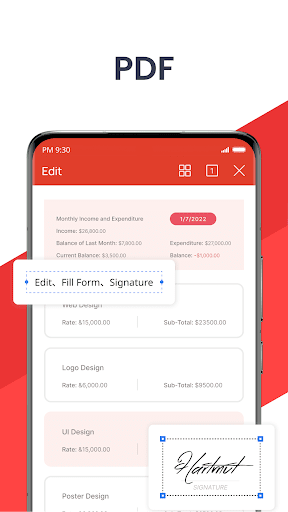
• Annotate PDFs with highlights, comments and notes
• Edit PDF text and manage PDF pages
• Convert PDF to Word, images to PDF and text to PDF
• Merge, split and organise PDF documents
• Add signatures, watermarks and page adjustments
As a professional PDF editor, WPS Office supports both everyday PDF reading and advanced PDF processing needs.
PDF Converter & Document Processing Tools
Handle document conversion efficiently:
• Convert Word documents to PDF
• Export PDF files to Word documents
• Create PDFs from images and scanned files
• Process documents with reliable PDF converter tools
WPS Office helps streamline document workflows across different file formats.
Document Scanner & PDF Scanner with OCR
Digitise paper documents quickly with built-in scanning tools:
• Scan documents and save them as PDF files
• Use PDF scanner tools to capture contracts, receipts and notes
• Extract text accurately using OCR
• Manage scanned documents in editable formats
An efficient solution for users who need document scanning and digital archiving.
Word, Excel, Spreadsheet & Presentation Editing
Work across all major office formats:
• Edit and read Word documents and DOC files
• Create and manage Excel spreadsheets
• Open and edit tables, formulas and charts
• View and edit PowerPoint presentations, PPT and slides
WPS Office ensures compatibility with various Office software for consistent document editing.
Smart Tools to Enhance Document Productivity
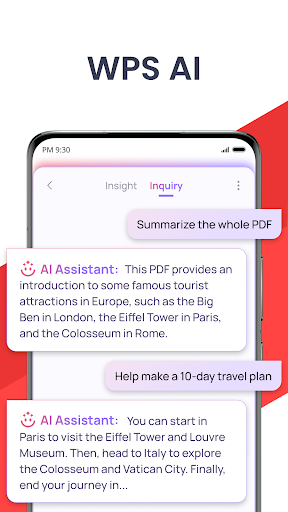
WPS Office includes intelligent tools that enhance document workflows:
• Writing assistance for document drafting and revision
• PDF content summaries and document analysis
• Smart scanning and text recognition features
These tools are designed to support efficient document handling without interrupting your workflow.
Cloud Storage & Collaboration
• Secure cloud storage for documents and PDF files
• Sync files across mobile, PC and Mac
• Share documents and collaborate online in real time
• Support Google Drive, Dropbox, OneDrive and more
WPS Office combines document editing, PDF reading, file conversion and office productivity in one professional app.
Manage documents, PDFs, spreadsheets and presentations with confidence using WPS Office.
Now available on PC and Mac for free, please visit the following link: https://www.wps.com/download/
Support page: https://www.wps.com/support/
Afficher plus

1. Téléchargez l'installateur MEmu et terminez l'installation

2. Démarrez MEmu puis ouvrez Google Play sur la page d'accueil

3. Recherchez WPS Office-PDF,Word,Sheet,PPT dans Google Play
Install
4. Téléchargez et installez WPS Office-PDF,Word,Sheet,PPT
5. Une fois l'installation terminée, cliquez sur l'icône pour démarrer

6. Utiliser MEmu pour utiliser WPS Office-PDF,Word,Sheet,PPT sur votre ordinateur
MEmu Play est actuellement le meilleur émulateur Android gratuit, avec 50 millions d'utilisateurs qui profitent d'une expérience Android exceptionnelle. La technologie de virtualisation de MEmu vous permet de jouer facilement à des milliers d'applications Android sur votre ordinateur, même les plus gourmandes en ressources.
L’écran plus grand avec de meilleurs graphismes; Une longue durée, sans limitation de batterie ou de données mobiles.
Soutien du Keymapping pour un contrôle précis du clavier et de la souris ou de la manette de jeu
Plusieurs comptes de jeu ou tâches sur un seul PC en même temps avec le gestionnaire de multi-instance.
Use WPS Office-PDF,Word,Sheet,PPT on PC by following steps: