
Yandex Pro (Taximeter)
Mise à jour
Version actuelle
12.89
Proposée par

Ne vous inquiétez plus des surcharges lorsque vous utilisez Yandex Pro (Taximeter) sur votre téléphone portable, libérez-vous de l'écran minuscule et profitez de l'application sur un écran beaucoup plus grand. Désormais, vous pouvez utiliser votre application en plein écran avec le clavier et la souris. MEmu vous offre toutes les fonctionnalités surprenantes que vous attendiez : installation rapide et configuration facile, commandes intuitives, plus de limitations de batterie, de données mobiles et d'appels dérangeants. Le tout nouveau MEmu 9 est le meilleur choix pour utiliser Yandex Pro (Taximeter) sur votre ordinateur. Codé avec notre absorption, le gestionnaire multi-instance permet d'ouvrir 2 ou plusieurs comptes en même temps. Et le plus important, notre moteur d'émulation exclusif peut libérer tout le potentiel de votre PC, rendre tout cela fluide et agréable.
Afficher plus
Téléchargez Yandex Pro (Taximeter) avec le simulateur d’Android MEmu sur votre PC. Profitez de jouer sur un grand écran. Work when you want to.

Work when you want to
Yandex Pro (Taximeter) lets you work every day or make some side money in the evening. You drive the car, the app gets the orders.
Get started fast
Download the app and register. Go through a few formalities with a taxi company and start working. Yandex Pro (Taximeter) will direct to where you can make the most money and send you orders.
Get clients automatically
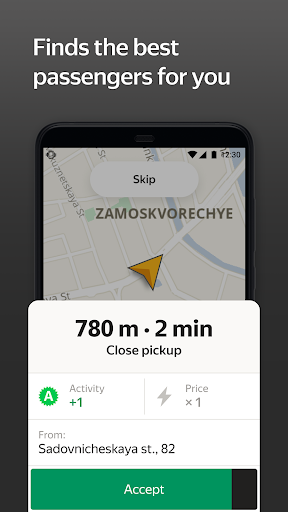
No need to search for clients — you automatically get orders from the clients closest to you. Yandex Pro (Taximeter) distributes orders so that you spend the least time running empty and the most time earning.
Free Yandex.Navigator
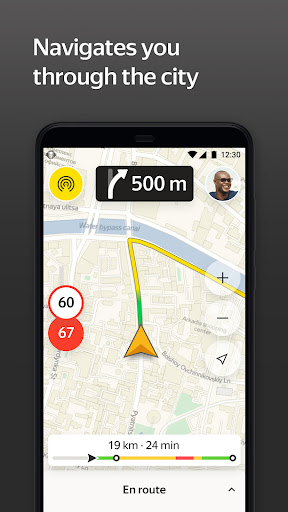
Find clients and get them to their destination quickly thanks to Yandex.Navigator. You don’t need to do anything – it will automatically get directions and guide you on your way. For you, Navigator is absolutely free.
See high-paying orders on the map
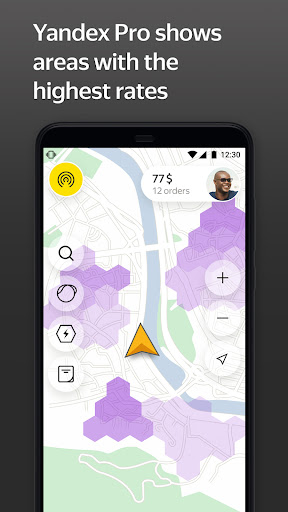
See where the most orders are. Yandex Pro (Taximeter) displays a map that highlights the places with the highest demand. High demand means higher rates, so orders originating from those places pay more.
Transparent earnings
Start working and get paid the very next day. Yandex Pro (Taximeter) will show you how much you’re making on an order, how much money is in your account, and how much you’ve earned on a given day.
Yandex Pro (Taximeter) works in large cities in Russia, Armenia, Belarus, Georgia, Kazakhstan, Kyrgyzstan, Uzbekistan, Moldova, Lithuania and Serbia.
Afficher plus

1. Téléchargez l'installateur MEmu et terminez l'installation

2. Démarrez MEmu puis ouvrez Google Play sur la page d'accueil

3. Recherchez Yandex Pro (Taximeter) dans Google Play
Install
4. Téléchargez et installez Yandex Pro (Taximeter)
5. Une fois l'installation terminée, cliquez sur l'icône pour démarrer

6. Utiliser MEmu pour utiliser Yandex Pro (Taximeter) sur votre ordinateur
MEmu Play est actuellement le meilleur émulateur Android gratuit, avec 50 millions d'utilisateurs qui profitent d'une expérience Android exceptionnelle. La technologie de virtualisation de MEmu vous permet de jouer facilement à des milliers d'applications Android sur votre ordinateur, même les plus gourmandes en ressources.
L’écran plus grand avec de meilleurs graphismes; Une longue durée, sans limitation de batterie ou de données mobiles.
Soutien du Keymapping pour un contrôle précis du clavier et de la souris ou de la manette de jeu
Plusieurs comptes de jeu ou tâches sur un seul PC en même temps avec le gestionnaire de multi-instance.
Use Yandex Pro (Taximeter) on PC by following steps: