AniWatch
Ενημερώθηκε
Τρέχουσα έκδοση
1.0.2
Προσφέρεται από

Σταματήστε να ανησυχείτε για υπερβολικές χρεώσεις όταν χρησιμοποιείτε το AniWatch στο κινητό σας, απελευθερώστε τον εαυτό σας από τη μικροσκοπική οθόνη και απολαύστε τη χρήση της εφαρμογής σε μια πολύ μεγαλύτερη οθόνη. Από τώρα και στο εξής, αποκτήστε εμπειρία πλήρους οθόνης της εφαρμογής σας με πληκτρολόγιο και ποντίκι. Το MEmu σας προσφέρει όλες τις εκπληκτικές δυνατότητες που περιμένατε: γρήγορη εγκατάσταση και εύκολη εγκατάσταση, διαισθητικά χειριστήρια, όχι περισσότερους περιορισμούς μπαταρίας, δεδομένα κινητής τηλεφωνίας και ενοχλητικές κλήσεις. Το ολοκαίνουργιο MEmu 9 είναι η καλύτερη επιλογή για χρήση του AniWatch στον υπολογιστή σας. Κωδικοποιημένο με την απορρόφηση μας, ο διαχειριστής πολλαπλών παρουσιών καθιστά δυνατό το άνοιγμα 2 ή περισσότερων λογαριασμών ταυτόχρονα. Και το πιο σημαντικό, ο αποκλειστικός κινητήρας εξομοίωσης μπορεί να απελευθερώσει όλες τις δυνατότητες του υπολογιστή σας, να κάνει τα πάντα ομαλά και ευχάριστα.
Show more
Απολαύστε την υπέροχη εμπειρία αναπαραγωγής του AniWatch σε υπολογιστή με το MEMU Play. Πρόκειται για έναν ισχυρό δωρεάν εξομοιωτή Android που σας επιτρέπει να παίζετε χιλιάδες παιχνίδια Android. AniWatch helps users follow favorites and find working streams without jumping between different sites.

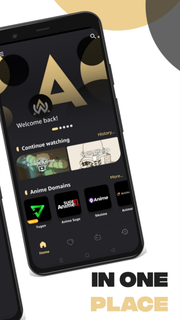
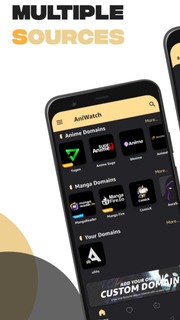
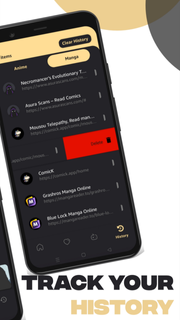
AniWatch helps users follow favorites and find working streams without jumping between different sites. It is built for mobile use, so navigation stays simple and episodes load in a straightforward way. Because it combines several popular sources, it presents choices that suit subbed or dubbed preferences. As a result, users can keep up with new releases while on the go. For those comparing versions, installing the AniWatch APK offers a direct way to try the app experience. AniWatch features for mobile viewingExtensive catalog coverageAniWatch organizes TV series, movies, specials, and OVAs and ONAs into clear sections. You can browse by genre or use an A to Z list to scan titles quickly. Both subbed and dubbed options appear where available, which helps you choose the format you prefer.Multi-source episode finderAniWatch searches across multiple domains, including sources such as YugenAnime, 9Anime, AniWatch, AnimeSuge, AnimixPlay, and AnimeDao. If one source is slow or down, you can switch to another option and continue watching. This approach helps users find a working stream faster, especially during peak hours.Search and navigation designed for quick discoveryThe search tool handles direct titles and common name variations, so finding a show is straightforward. Filters and clear menus guide you to specific types of content without extra taps. As you move between seasons and episodes, the layout keeps progress and choices easy to follow.Playback optimized for mobileAniWatch focuses on smooth, high-quality playback designed to reduce buffering on typical mobile connections. The player responds well to scrubbing and quick jumps, keeping control simple on small screens. This helps users watch episodes with fewer interruptions.Updates and seasonal trackingContent updates regularly, so new episodes and seasonal releases appear as sources provide them. AniWatch keeps sections fresh, which makes it easier to check what just arrived. For ongoing series, returning to your show list offers a quick way to resume. Important notes for AniWatch usersAniWatch links to media hosted on third-party services, so availability and stream quality can vary by source and region. At times, a title may show up with missing episodes until the linked host updates or returns. The website includes extra sections such as Most Popular, Random, and Watch2gether, which some users prefer for broader discovery. If the AniWatch app feels limited compared with the site, open the mobile website and use the “Aniwatch App” footer link or add it to your home screen for quick access.Version names may change over time; confirm the AniWatch latest version on the APKPure page before installing. Users searching for AniWatch TV APK often compare the app and site experience, and it is normal to see small differences between them. If content looks different on AniWatch Android versus the website, try switching sources within the app or use the site to verify episodes. Troubleshooting common issuesIf images are not showing, start by refreshing the page, then check your connection and try opening a different source. Thumbnails may take time to load when the host is slow, so waiting a moment and reloading can help. When a show appears but no episodes are listed, review filters and language options, then switch to another source and check again. If issues persist, clear app cache and data, or update to the AniWatch latest version for potential fixes.When streams stall or buffer frequently, pick another source within the same episode and test playback. If a particular host is down, the episode may work on a different host. For discovery problems, use genre pages and the A to Z list to find titles even when a source index is incomplete. Many users also check the site when troubleshooting, then return to the AniWatch app once availability improves. How to use AniWatch on AndroidTo get started, download AniWatch and open it on your phone. The app helps you search across sources and watch episodes in subbed or dubbed formats. Use the steps below to move from install to playback quickly. Download and install the AniWatch APK on your Android device, then open the app from your home screen. Allow permissions if prompted, and wait for the home content to load so you can browse sections. Use the search bar for a title or browse by categories, then pick subbed or dubbed and select a show. Open an episode, choose a source, and tap play; if playback stalls, switch to another source and try again. For quick web access, open the AniWatch website in your mobile browser, then add it to your home screen from the browser menu to create a shortcut. Start watching with AniWatchAniWatch combines multi-source streaming and manga reading with simple navigation and stable playback. To begin, install the AniWatch latest version and explore titles across different sources on mobile.
Show more

1. Κατεβάστε το πρόγραμμα εγκατάστασης MEmu και ολοκληρώστε την εγκατάσταση

2. Ξεκινήστε το MEmu και στη συνέχεια ανοίξτε το Google Play στην επιφάνεια εργασίας

3. Αναζητήστε τον AniWatch στο Google Play
Install
4. Λήψη και εγκατάσταση του AniWatch
5. Μόλις ολοκληρωθεί η εγκατάσταση, κάντε κλικ στο εικονίδιο για να ξεκινήσετε

6. Απολαύστε τη χρήση του AniWatch σε υπολογιστή με το MEmu
Το MEmu Play είναι ο καλύτερος δωρεάν εξομοιωτής Android, που χρησιμοποιείται αυτήν τη στιγμή από πάνω από 50 εκατομμύρια χρήστες που απολαμβάνουν την εμπειρία εφαρμογών που προσφέρει. Μέσω της τεχνολογίας εικονικοποίησης MEmu 9, οι χρήστες μπορούν να δοκιμάσουν εφαρμογές Android στους υπολογιστές τους, ακόμα και σε εκείνους που απαιτούν υψηλή ισχύ επεξεργασίας γραφικών, οι οποίες λειτουργούν ομαλά σαν να λειτουργούν στα κινητά τηλέφωνα τελευταίας γενιάς, χωρίς να θυσιάζεται η ποιότητα της εικόνας και η εμπειρία χρήστη.
Μεγαλύτερη οθόνη με καλύτερα γραφικά. Μεγάλη διάρκεια ζωής, χωρίς περιορισμό μπαταρίας ή δεδομένων κινητής τηλεφωνίας.
Πλήρης υποστήριξη αντιστοίχισης πλήκτρων για ακριβή έλεγχο του πληκτρολογίου και του ποντικιού ή του gamepad.
Πολλαπλοί λογαριασμοί παιχνιδιών ή εργασίες σε έναν υπολογιστή ταυτόχρονα με τον διαχειριστή πολλαπλών περιπτώσεων.
Use AniWatch on PC by following steps: