Find Fun Difference: Spot it!
Ενημερώθηκε
Τρέχουσα έκδοση
1.21.0
Προσφέρεται από

Με όλο το πάθος σας για το παιχνίδι Find Fun Difference: Spot it!, τα χέρια σας δεν πρέπει να περιορίζονται σε μια μικροσκοπική οθόνη του τηλεφώνου σας. Παίξτε σαν επαγγελματίας και αποκτήστε τον πλήρη έλεγχο του παιχνιδιού σας με πληκτρολόγιο και ποντίκι. Το MEmu σας προσφέρει όλα όσα περιμένετε. Κατεβάστε και παίξτε Find Fun Difference: Spot it! σε υπολογιστή. Παίξτε όσο θέλετε, χωρίς άλλους περιορισμούς μπαταρίας, δεδομένων κινητής τηλεφωνίας και ενοχλητικών κλήσεων. Το ολοκαίνουργιο MEmu 9 είναι η καλύτερη επιλογή για να παίξετε Find Fun Difference: Spot it! σε υπολογιστή. Ετοιμασμένο με την εμπειρία μας, το εξαιρετικό σύστημα προκαθορισμένης αντιστοίχισης πλήκτρων καθιστά το Find Fun Difference: Spot it! ένα πραγματικό παιχνίδι υπολογιστή. Ο διαχειριστής πολλαπλών περιπτώσεων MEmu καθιστά δυνατό το παιχνίδι με 2 ή περισσότερους λογαριασμούς στην ίδια συσκευή. Και το πιο σημαντικό, η αποκλειστική μηχανή εξομοίωσης μας μπορεί να απελευθερώσει πλήρως τις δυνατότητες του υπολογιστή σας, κάνοντας τα πάντα ομαλά.
Show more
Απολαύστε την υπέροχη εμπειρία αναπαραγωγής του Find Fun Difference: Spot it! σε υπολογιστή με το MEMU App Player. Πρόκειται για έναν ισχυρό δωρεάν εξομοιωτή Android που σας επιτρέπει να παίζετε χιλιάδες παιχνίδια Android. Looking for the ultimate spot the difference game?



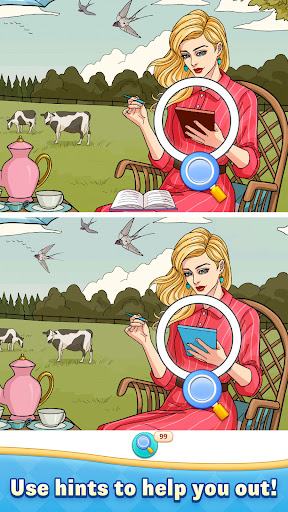
Looking for the ultimate spot the difference game? You've found it! Find Fun Difference: Spot It! challenges you to spot differences between two seemingly identical images. This brain-teasing game puts your observation skills to the test while helping you relax and unwind. Spot differences in thousands of beautiful pictures and enjoy hours of engaging gameplay!
Spot the difference games have never been more fun! Compare two pictures and train your eyes to spot all the differences between them. Each level brings challenges to master. Whether you're a casual gamer or a dedicated enthusiast, our game offers the perfect balance of entertainment and challenge.
Spot the difference puzzles are great for your brain! As you search for differences between images, you're actually improving your concentration and observation skills. Our game provides the perfect mental workout while being completely stress-free.
HOW TO PLAY:
1. Compare two pictures and spot all the differences between them.
2. Tap to mark the differences you've spotted.
3. Pinch to zoom in when you need a closer look at potential differences.
4. Use hints when you're stuck spotting those tricky differences.
FEATURES:
• Thousands of Beautiful Images with cleverly hidden differences across multiple categories: Animals & Landscapes & Foods & more
• Intuitive Controls making it easy to spot and mark differences with just a tap
• Helpful Hint System when you're stuck
• No Time Pressure so you can enjoy spotting differences at your own pace
• Just-Right Difficulty suitable for you
• Brain Training that improves your observation skills while you spot differences
• Regular Updates with fresh content and spot the difference puzzles to solve
Spot the difference games are perfect for you! Players appreciate the relaxing yet stimulating gameplay. Find Fun Difference: Spot It! is designed to be enjoyable for you who loves a good challenge.
Ready to test your eyes and spot differences in beautiful images? Download our game now and start your adventure! Every picture hides multiple differences waiting to be discovered. Can you spot them all? The ultimate spot the difference experience is just one tap away!
CONTACT US:
We're always adding content and improving our game! Got questions or suggestions? We'd love to hear from you!
Email: CustomerService.HipposBro@outlook.com
EULA: https://sites.google.com/view/eula-infinitejoy
Tel: +1 213-398-9184
Show more

1. Κατεβάστε το πρόγραμμα εγκατάστασης MEmu και ολοκληρώστε την εγκατάσταση

2. Ξεκινήστε το MEmu και στη συνέχεια ανοίξτε το Google Play στην επιφάνεια εργασίας

3. Αναζητήστε τον Find Fun Difference: Spot it! στο Google Play
Install
4. Λήψη και εγκατάσταση του Find Fun Difference: Spot it!
5. Μόλις ολοκληρωθεί η εγκατάσταση, κάντε κλικ στο εικονίδιο για να ξεκινήσετε

6. Enjoy playing Find Fun Difference: Spot it! on PC with MEmu
Το MEmu Play, αποτελεί την ιδανικότερη δωρεάν λύση για την εξομοίωση του λειτουργικού Android, και χρησιμοποιείται ήδη από περισσότερους από 50 εκατομμύρια χρήστες, ο οποίοι απολαμβάνουν, την καταπληκτική εμπειρία παιχνιδιού που προσφέρεται μέσω της εφαρμογής. Με τη χρήση του MEmu Virtualization, είναι δυνατή η αναπαραγωγή παιχνιδιών Android στον υπολογιστή, ακόμη και εκείνων που απαιτούν μεγάλη επεξεργαστική ισχύ γραφικών, δίχως συμβιβασμούς στην ποιότητα και στην εμπειρία χρήσης, ακριβώς όπως ένα τελευταίας γενιάς κινητό τηλέφωνο.
Μεγαλύτερη οθόνη με καλύτερα γραφικά. Μεγάλη διάρκεια ζωής, χωρίς περιορισμό μπαταρίας ή δεδομένων κινητής τηλεφωνίας.
Πλήρης υποστήριξη αντιστοίχισης πλήκτρων για ακριβή έλεγχο του πληκτρολογίου και του ποντικιού ή του gamepad.
Πολλαπλοί λογαριασμοί παιχνιδιών ή εργασίες σε έναν υπολογιστή ταυτόχρονα με τον διαχειριστή πολλαπλών περιπτώσεων.
Play Find Fun Difference: Spot it! on PC by following steps: