Revving: Engine Simulator
Ενημερώθηκε
Τρέχουσα έκδοση
1.2.0
Προσφέρεται από

Με όλο το πάθος σας για το παιχνίδι Revving: Engine Simulator, τα χέρια σας δεν πρέπει να περιορίζονται σε μια μικροσκοπική οθόνη του τηλεφώνου σας. Παίξτε σαν επαγγελματίας και αποκτήστε τον πλήρη έλεγχο του παιχνιδιού σας με πληκτρολόγιο και ποντίκι. Το MEmu σας προσφέρει όλα όσα περιμένετε. Κατεβάστε και παίξτε Revving: Engine Simulator σε υπολογιστή. Παίξτε όσο θέλετε, χωρίς άλλους περιορισμούς μπαταρίας, δεδομένων κινητής τηλεφωνίας και ενοχλητικών κλήσεων. Το ολοκαίνουργιο MEmu 9 είναι η καλύτερη επιλογή για να παίξετε Revving: Engine Simulator σε υπολογιστή. Ετοιμασμένο με την εμπειρία μας, το εξαιρετικό σύστημα προκαθορισμένης αντιστοίχισης πλήκτρων καθιστά το Revving: Engine Simulator ένα πραγματικό παιχνίδι υπολογιστή. Ο διαχειριστής πολλαπλών περιπτώσεων MEmu καθιστά δυνατό το παιχνίδι με 2 ή περισσότερους λογαριασμούς στην ίδια συσκευή. Και το πιο σημαντικό, η αποκλειστική μηχανή εξομοίωσης μας μπορεί να απελευθερώσει πλήρως τις δυνατότητες του υπολογιστή σας, κάνοντας τα πάντα ομαλά.
Show more
Απολαύστε την υπέροχη εμπειρία αναπαραγωγής του Revving: Engine Simulator σε υπολογιστή με το MEMU App Player. Πρόκειται για έναν ισχυρό δωρεάν εξομοιωτή Android που σας επιτρέπει να παίζετε χιλιάδες παιχνίδια Android. Turn the key, feel the starter catch, and bring an engine to its redline.
Turn the key, feel the starter catch, and bring an engine to its redline. Revving is an engine simulator you drive: every sound it makes is computed live from the physics of the engine turning in front of you.
REAL PHYSICS, REAL SOUND
• Every engine is simulated in real time: pistons, connecting rods, crankshaft, cams and valves, gas flowing through intake and exhaust, fuel burning in each cylinder.
• The sound is synthesized from the simulated exhaust pulses, so it changes with everything you do: throttle, load, gear, rpm, the rev limiter cutting in, VTEC crossing over.
• Each engine drives what it really drove, car, motorcycle, aircraft or locomotive, with its gearing, weight, aerodynamics, redline, rev limiter and top speed.
DRIVE IT YOURSELF
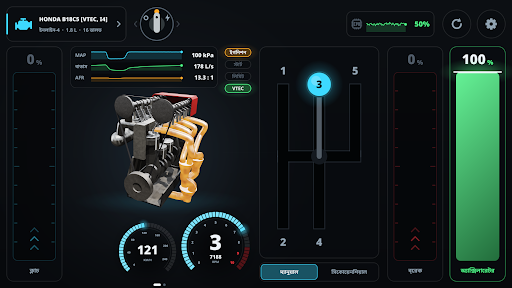
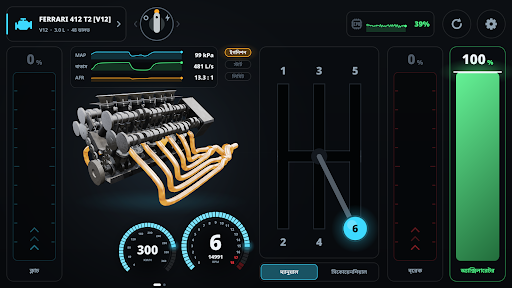
• Swipe the ignition key to switch on and hold it to crank until the engine fires.
• Three pedals, clutch, brake and gas, each worked by its own finger. Slide up for more; pressure-sensitive screens feel how hard you press.
• Drag the H-pattern lever through the gate. Forget the clutch and the gears grind.
• Stall it, bog it, bounce it off the limiter, launch it: the engine answers like the real one.
• Gamepads work too: triggers for gas and brake, the right stick for the lever, the D-pad to shift.
WATCH IT RUN
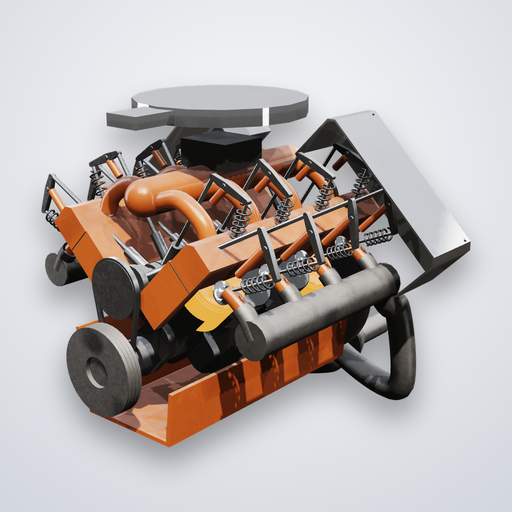
• The engine is drawn in 3D, turning in step with what you hear: pistons, crank, cams, valve springs, headers.
• Hold a finger on any part to see its name.
• Coded colors show the intake and exhaust flow at a glance.
• A driving-game HUD: rev counter with shift lights, a speedometer scaled to the car, live charts of manifold pressure, air flow and air/fuel ratio, plus VTEC and limiter lamps.
• Tap the stage for the full gauge cluster, with a firing lamp for every cylinder.
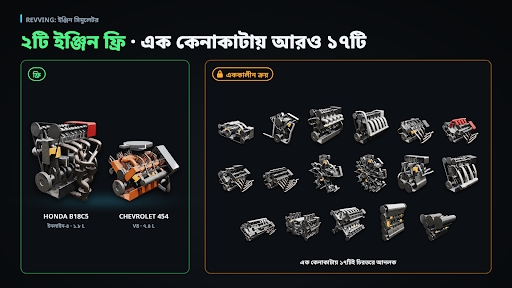
19 ENGINES, EVERY LAYOUT, EACH IN WHAT IT DROVE
• Honda B18C5 inline-4: VTEC to 8,400 rpm, in an Integra Type R (free)
• Chevrolet 454 big-block V8: 7.4 liters, in a 1978 C20 pickup (free)
• Subaru EJ25 flat-4: the boxer rumble, in an Impreza WRX STI
• Harley-Davidson Shovelhead V-twin: the potato-potato idle, in an Electra Glide
• Audi inline-5: the five-cylinder warble, in a Coupe quattro 20V
• Toyota 2JZ inline-6: the smooth straight six, in a Supra
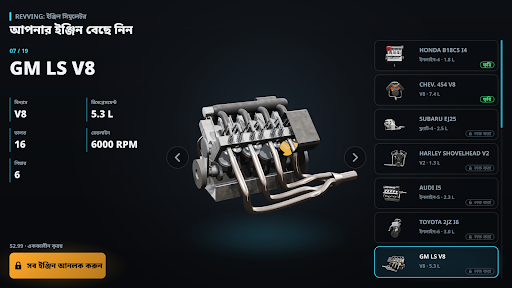
• GM LS V8: in a C5 Corvette
• Ferrari F136 V8: the flat-plane scream to 9,000 rpm, in a 458 Italia
• Lexus LFA V10: 9,000 rpm and one of the great exhaust notes
• Ferrari 412 T2 V12: a 1995 Formula 1 engine that revs to 17,000 rpm
• Radial 5 and Radial 9: aero engines on a propeller
• Ariel Square Four: two twins geared together, in the 1950s motorcycle
• Volkswagen VR6: six cylinders in one narrow head, in a Golf VR6
• Volkswagen W12: two VR6 banks on one crankshaft, in a Phaeton
• BRM H16: two flat-eights geared together, in the 1966 P83 Formula 1 car
• Rolls-Royce Vulture X24: four banks of six, on an Avro Manchester's propeller
• Junkers Jumo 205: an opposed-piston two-stroke diesel aero engine
• Napier Deltic: eighteen cylinders in a triangle, as in the British Rail Class 55
FREE TO START
The Honda B18C5 and the Chevrolet 454 are free. One purchase unlocks the other seventeen, for good.
A GARAGE TO CHOOSE FROM
Every engine turns on its own turntable in the selector, with its layout, displacement, valves, redline and gears. Tap one to drive it; switch any time.
SETTINGS
• Audio quality from Low to Ultra: more detail in the simulation for more detail in the sound, as far as your phone allows. A load meter shows how hard it works.
• Graphics from Low to High, with worn metal, shadows and smooth edges at the top.
• 75 languages, and metric or imperial units.
• Manual, up/down or automatic gearbox.
Low-latency audio, landscape play, no internet needed. Headphones recommended.
Engine simulation ported from Engine Simulator by Ange Yaghi (AngeTheGreat), MIT license.
All product names, logos and brands are the property of their respective owners. Revving is not affiliated with or endorsed by any of the manufacturers named.
Show more

1. Κατεβάστε το πρόγραμμα εγκατάστασης MEmu και ολοκληρώστε την εγκατάσταση

2. Ξεκινήστε το MEmu και στη συνέχεια ανοίξτε το Google Play στην επιφάνεια εργασίας

3. Αναζητήστε τον Revving: Engine Simulator στο Google Play
Install
4. Λήψη και εγκατάσταση του Revving: Engine Simulator
5. Μόλις ολοκληρωθεί η εγκατάσταση, κάντε κλικ στο εικονίδιο για να ξεκινήσετε

6. Enjoy playing Revving: Engine Simulator on PC with MEmu
Το MEmu Play, αποτελεί την ιδανικότερη δωρεάν λύση για την εξομοίωση του λειτουργικού Android, και χρησιμοποιείται ήδη από περισσότερους από 50 εκατομμύρια χρήστες, ο οποίοι απολαμβάνουν, την καταπληκτική εμπειρία παιχνιδιού που προσφέρεται μέσω της εφαρμογής. Με τη χρήση του MEmu Virtualization, είναι δυνατή η αναπαραγωγή παιχνιδιών Android στον υπολογιστή, ακόμη και εκείνων που απαιτούν μεγάλη επεξεργαστική ισχύ γραφικών, δίχως συμβιβασμούς στην ποιότητα και στην εμπειρία χρήσης, ακριβώς όπως ένα τελευταίας γενιάς κινητό τηλέφωνο.
Μεγαλύτερη οθόνη με καλύτερα γραφικά. Μεγάλη διάρκεια ζωής, χωρίς περιορισμό μπαταρίας ή δεδομένων κινητής τηλεφωνίας.
Πλήρης υποστήριξη αντιστοίχισης πλήκτρων για ακριβή έλεγχο του πληκτρολογίου και του ποντικιού ή του gamepad.
Πολλαπλοί λογαριασμοί παιχνιδιών ή εργασίες σε έναν υπολογιστή ταυτόχρονα με τον διαχειριστή πολλαπλών περιπτώσεων.
Play Revving: Engine Simulator on PC by following steps: