Open Chat GBT - AI Chatbot App
Ενημερώθηκε
Τρέχουσα έκδοση
1.2.3
Προσφέρεται από

Σταματήστε να ανησυχείτε για υπερβολικές χρεώσεις όταν χρησιμοποιείτε το Open Chat GBT - AI Chatbot App στο κινητό σας, απελευθερώστε τον εαυτό σας από τη μικροσκοπική οθόνη και απολαύστε τη χρήση της εφαρμογής σε μια πολύ μεγαλύτερη οθόνη. Από τώρα και στο εξής, αποκτήστε εμπειρία πλήρους οθόνης της εφαρμογής σας με πληκτρολόγιο και ποντίκι. Το MEmu σας προσφέρει όλες τις εκπληκτικές δυνατότητες που περιμένατε: γρήγορη εγκατάσταση και εύκολη εγκατάσταση, διαισθητικά χειριστήρια, όχι περισσότερους περιορισμούς μπαταρίας, δεδομένα κινητής τηλεφωνίας και ενοχλητικές κλήσεις. Το ολοκαίνουργιο MEmu 9 είναι η καλύτερη επιλογή για χρήση του Open Chat GBT - AI Chatbot App στον υπολογιστή σας. Κωδικοποιημένο με την απορρόφηση μας, ο διαχειριστής πολλαπλών παρουσιών καθιστά δυνατό το άνοιγμα 2 ή περισσότερων λογαριασμών ταυτόχρονα. Και το πιο σημαντικό, ο αποκλειστικός κινητήρας εξομοίωσης μπορεί να απελευθερώσει όλες τις δυνατότητες του υπολογιστή σας, να κάνει τα πάντα ομαλά και ευχάριστα.
Show more
Απολαύστε την υπέροχη εμπειρία αναπαραγωγής του Open Chat GBT - AI Chatbot App σε υπολογιστή με το MEMU App Player. Πρόκειται για έναν ισχυρό δωρεάν εξομοιωτή Android που σας επιτρέπει να παίζετε χιλιάδες παιχνίδια Android. GBT Chatbot AI Assistant, Powered by Open AI's GPT3.
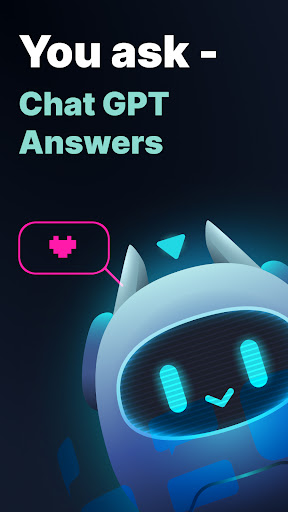
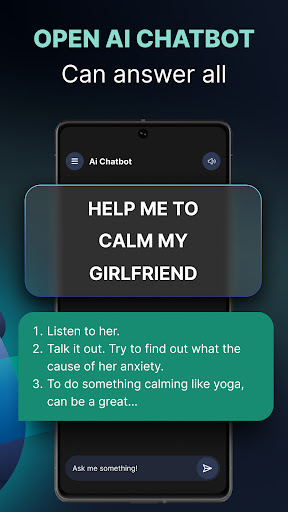
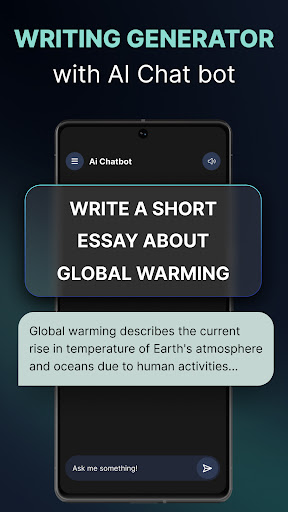
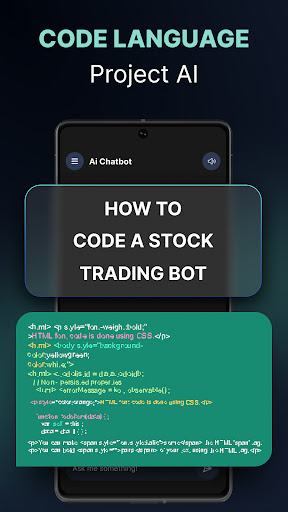
GBT Chatbot AI Assistant, Powered by Open AI's GPT3. Experience the power of AI in an amazing and fun way. Get answer to any of your Questions.
Ask our smart Chat GBT anything and he can give answers to all of your questions in a few seconds. No SignUp needed, Just chat & Genius Chat bot will help you.
This AI ChatGBT Chatbot can create engaging conversations, stories, and generate any contents from scratch. Chat GPT 3 is a great alternative to virtual assistants like Alexa and Siri, as it can simulate human communication without having to set up complex dialogs with voice commands.
Our ultimate ChatGBT AI Bot is super useful for text generation and essay writing or email. AI Writer Assistant provides you with an AI chat bot and AI text generator that utilizes AI generated algorithms to create perfectly crafted essays and paragraphs. Use the AI bot to start a conversation, learn new information, and discover creative solutions. You can also use the AI essay writer and AI paragraph generator to instantly generate content. With AI Writer Assistant you are sure to find the help you need.
GPT Features & Stuff to Try with ChatGPT3:
- Q&A: Answer questions based on existing knowledge.
- Grammar correction: Corrects sentences into standard English and other languages.
- Summarize for a 2nd grader: Translates difficult text into simpler concepts.
- Natural language to Open AI API: Create code to call to the GPT AI API using a natural language instruction with chat gpt3.
- English to other languages: Translates English text into French, Spanish and Japanese.
- Text to command: Translate text into programmatic commands. - Natural language to Stripe API: Create code to call the Stripe API using natural language.
- JavaScript helper chatbot: This is a message-style chatbot that can answer questions about using JavaScript. It uses a few examples to get the conversation started.
- Tweet classifier by using chatgbt: This is a basic prompt for detecting sentiment.
- Interview questions: Create interview questions.
- Notes to summary: Turn meeting notes into a summary.
- Essay outline easier with chatgpt: Create an outline for an essay about Elon Musk and his contributions to technology.
- Analogy maker: Create analogies. Modified from a community prompt to require fewer examples.
- Ad from product description: Turn a product description into ad copy.
- Advanced tweet classifier: This is an advanced prompt for detecting sentiment. It allows you to provide it with a list of status updates and then provide a sentiment for each one.
- Product name generator: Create product names from examples words. Influenced by a community prompt.
- Natural language to Stripe API: Create code to call the Stripe API using natural language.
- Keywords: Extract keywords from a block of text. At a lower temperature it picks keywords from the text. At a higher temperature it will generate related keywords which can be helpful for creating search indexes.
- Recipe creator (eat at your own risk): Create a recipe from a list of ingredients.
- Restaurant review creator: Turn a few words into a restaurant review by using only chatgpt.
- Create study notes: Provide a topic and get study notes.
- Marv the sarcastic chat bot: Marv is a factual chatbot that is also sarcastic.
- Mood to color: Turn a text description into a color. And a lot more for you to discover ....
Disclaimer:
This app is not affiliated with any trademarks mentioned above.
Terms of Use: http://maplelabs.co/policies/#_tos
Privacy Policy: http://maplelabs.co/policies/
Contact Us: support@maplelabs.co
Show more

1. Κατεβάστε το πρόγραμμα εγκατάστασης MEmu και ολοκληρώστε την εγκατάσταση

2. Ξεκινήστε το MEmu και στη συνέχεια ανοίξτε το Google Play στην επιφάνεια εργασίας

3. Αναζητήστε τον Open Chat GBT - AI Chatbot App στο Google Play
Install
4. Λήψη και εγκατάσταση του Open Chat GBT - AI Chatbot App
5. Μόλις ολοκληρωθεί η εγκατάσταση, κάντε κλικ στο εικονίδιο για να ξεκινήσετε

6. Απολαύστε τη χρήση του Open Chat GBT - AI Chatbot App σε υπολογιστή με το MEmu
Το MEmu Play είναι ο καλύτερος δωρεάν εξομοιωτής Android, που χρησιμοποιείται αυτήν τη στιγμή από πάνω από 50 εκατομμύρια χρήστες που απολαμβάνουν την εμπειρία εφαρμογών που προσφέρει. Μέσω της τεχνολογίας εικονικοποίησης MEmu 9, οι χρήστες μπορούν να δοκιμάσουν εφαρμογές Android στους υπολογιστές τους, ακόμα και σε εκείνους που απαιτούν υψηλή ισχύ επεξεργασίας γραφικών, οι οποίες λειτουργούν ομαλά σαν να λειτουργούν στα κινητά τηλέφωνα τελευταίας γενιάς, χωρίς να θυσιάζεται η ποιότητα της εικόνας και η εμπειρία χρήστη.
Μεγαλύτερη οθόνη με καλύτερα γραφικά. Μεγάλη διάρκεια ζωής, χωρίς περιορισμό μπαταρίας ή δεδομένων κινητής τηλεφωνίας.
Πλήρης υποστήριξη αντιστοίχισης πλήκτρων για ακριβή έλεγχο του πληκτρολογίου και του ποντικιού ή του gamepad.
Πολλαπλοί λογαριασμοί παιχνιδιών ή εργασίες σε έναν υπολογιστή ταυτόχρονα με τον διαχειριστή πολλαπλών περιπτώσεων.
Use Open Chat GBT - AI Chatbot App on PC by following steps: