Background Remover: Edit Photo
Ενημερώθηκε
Τρέχουσα έκδοση
2.0
Προσφέρεται από

Σταματήστε να ανησυχείτε για υπερβολικές χρεώσεις όταν χρησιμοποιείτε το Background Remover: Edit Photo στο κινητό σας, απελευθερώστε τον εαυτό σας από τη μικροσκοπική οθόνη και απολαύστε τη χρήση της εφαρμογής σε μια πολύ μεγαλύτερη οθόνη. Από τώρα και στο εξής, αποκτήστε εμπειρία πλήρους οθόνης της εφαρμογής σας με πληκτρολόγιο και ποντίκι. Το MEmu σας προσφέρει όλες τις εκπληκτικές δυνατότητες που περιμένατε: γρήγορη εγκατάσταση και εύκολη εγκατάσταση, διαισθητικά χειριστήρια, όχι περισσότερους περιορισμούς μπαταρίας, δεδομένα κινητής τηλεφωνίας και ενοχλητικές κλήσεις. Το ολοκαίνουργιο MEmu 9 είναι η καλύτερη επιλογή για χρήση του Background Remover: Edit Photo στον υπολογιστή σας. Κωδικοποιημένο με την απορρόφηση μας, ο διαχειριστής πολλαπλών παρουσιών καθιστά δυνατό το άνοιγμα 2 ή περισσότερων λογαριασμών ταυτόχρονα. Και το πιο σημαντικό, ο αποκλειστικός κινητήρας εξομοίωσης μπορεί να απελευθερώσει όλες τις δυνατότητες του υπολογιστή σας, να κάνει τα πάντα ομαλά και ευχάριστα.
Show more
Απολαύστε την υπέροχη εμπειρία αναπαραγωγής του Background Remover: Edit Photo σε υπολογιστή με το MEMU App Player. Πρόκειται για έναν ισχυρό δωρεάν εξομοιωτή Android που σας επιτρέπει να παίζετε χιλιάδες παιχνίδια Android. Background Remover: Edit Photo is an easy-to-use app that allows you to quickly edit your photos with just a few touches.
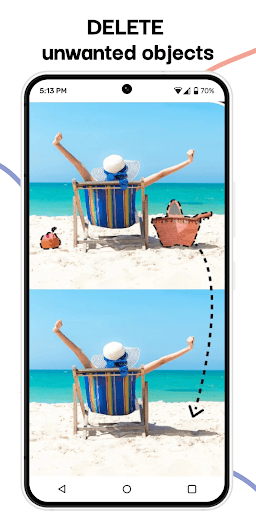
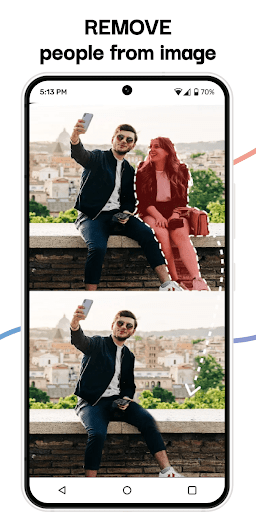
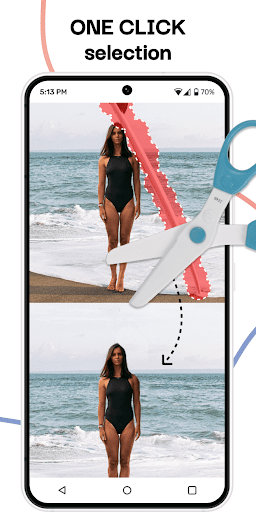
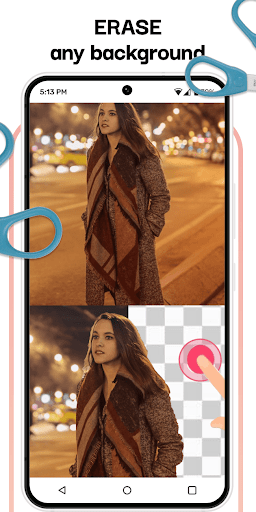
Background Remover: Edit Photo is an easy-to-use app that allows you to quickly edit your photos with just a few touches. With this app, you can remove unwanted objects and backgrounds from your images, adjust image opacity and saturation, and crop and change photo orientation. Whether you're a professional photographer or just want to enhance your personal photos, this app is essential for anyone who loves to edit their images.
One of the standout features is its ability to remove backgrounds from photos. With just a few taps, you can easily remove the background of any image, making it transparent or replacing it with a new background. This feature is perfect for creating graphics, memes, or promotional materials for your business or personal use. In addition to background removal, the app also includes an object remover tool that allows you to remove any unwanted objects from your photos. Whether it's a stray power line, a distracting sign, or a person you don't want in the shot, this app makes it easy to erase any unwanted elements from your photos.
To make your photos even more stunning, the app offers tools to adjust image opacity and saturation. With just a few swipes, you can make your images more vibrant or muted, depending on your desired effect. You can also crop and change the orientation of your photos to create the perfect composition. Once you're done editing your photos, you can save your images in a variety of formats, including PNG, JPG, and more. This makes it easy to share your photos on social media or print them out for personal or professional use.
This is a powerful and user-friendly photo editing app that provides a variety of tools to help you enhance your images. Whether you're a professional photographer or just looking to create stunning images for your personal use, this app has everything you need to make your photos stand out. Download this app today and start creating beautiful images in no time!
Functions
-Edit your image with a few touches
-Crop and change photo orientation
-Remove unwanted objects from a photo
-Quick photo background remover
-Adjust image opacity and saturation
-Save images in many formats
Subscription renewal can be automatically:
* Use the free trial period for 3 days, which will start after confirmation of the payment. The fee for this time is not charged.
The subscription automatically renews once a week for $ 29.99 when the trial period ends.
* Payment is charged to your Google Account after purchase with confirmation.
* You can turn off the app yourself and manage your subscriptions in your account settings after making a purchase.
* Any unused time from the free period will be forfeited when purchasing a premium subscription during the trial period.
All personal data is processed in accordance with the terms of the privacy policy. More detailed information can be found here: https://support.google.com/googleplay/answer/7018481?co=GENIE.Platform=Android&hl=en_US
Privacy Policy: https://docs.google.com/document/d/1TUuvWU25wbzaHKyStJMHc0WyHkVX4xNf_2aEb3wedOg/edit?usp=sharing
Terms & Conditions: https://docs.google.com/document/d/1smURQu6250eCZ7UL3zKeqBHlh2LpYLQni8kTUgeMtxs/edit?usp=sharing
Show more

1. Κατεβάστε το πρόγραμμα εγκατάστασης MEmu και ολοκληρώστε την εγκατάσταση

2. Ξεκινήστε το MEmu και στη συνέχεια ανοίξτε το Google Play στην επιφάνεια εργασίας

3. Αναζητήστε τον Background Remover: Edit Photo στο Google Play
Install
4. Λήψη και εγκατάσταση του Background Remover: Edit Photo
5. Μόλις ολοκληρωθεί η εγκατάσταση, κάντε κλικ στο εικονίδιο για να ξεκινήσετε

6. Απολαύστε τη χρήση του Background Remover: Edit Photo σε υπολογιστή με το MEmu
Το MEmu Play είναι ο καλύτερος δωρεάν εξομοιωτής Android, που χρησιμοποιείται αυτήν τη στιγμή από πάνω από 50 εκατομμύρια χρήστες που απολαμβάνουν την εμπειρία εφαρμογών που προσφέρει. Μέσω της τεχνολογίας εικονικοποίησης MEmu 9, οι χρήστες μπορούν να δοκιμάσουν εφαρμογές Android στους υπολογιστές τους, ακόμα και σε εκείνους που απαιτούν υψηλή ισχύ επεξεργασίας γραφικών, οι οποίες λειτουργούν ομαλά σαν να λειτουργούν στα κινητά τηλέφωνα τελευταίας γενιάς, χωρίς να θυσιάζεται η ποιότητα της εικόνας και η εμπειρία χρήστη.
Μεγαλύτερη οθόνη με καλύτερα γραφικά. Μεγάλη διάρκεια ζωής, χωρίς περιορισμό μπαταρίας ή δεδομένων κινητής τηλεφωνίας.
Πλήρης υποστήριξη αντιστοίχισης πλήκτρων για ακριβή έλεγχο του πληκτρολογίου και του ποντικιού ή του gamepad.
Πολλαπλοί λογαριασμοί παιχνιδιών ή εργασίες σε έναν υπολογιστή ταυτόχρονα με τον διαχειριστή πολλαπλών περιπτώσεων.
Use Background Remover: Edit Photo on PC by following steps: