Tattoo Design on My Photo - Trendy Tattoos 2019
Ενημερώθηκε
Τρέχουσα έκδοση
2.2
Προσφέρεται από

Σταματήστε να ανησυχείτε για υπερβολικές χρεώσεις όταν χρησιμοποιείτε το Tattoo Design on My Photo - Trendy Tattoos 2019 στο κινητό σας, απελευθερώστε τον εαυτό σας από τη μικροσκοπική οθόνη και απολαύστε τη χρήση της εφαρμογής σε μια πολύ μεγαλύτερη οθόνη. Από τώρα και στο εξής, αποκτήστε εμπειρία πλήρους οθόνης της εφαρμογής σας με πληκτρολόγιο και ποντίκι. Το MEmu σας προσφέρει όλες τις εκπληκτικές δυνατότητες που περιμένατε: γρήγορη εγκατάσταση και εύκολη εγκατάσταση, διαισθητικά χειριστήρια, όχι περισσότερους περιορισμούς μπαταρίας, δεδομένα κινητής τηλεφωνίας και ενοχλητικές κλήσεις. Το ολοκαίνουργιο MEmu 9 είναι η καλύτερη επιλογή για χρήση του Tattoo Design on My Photo - Trendy Tattoos 2019 στον υπολογιστή σας. Κωδικοποιημένο με την απορρόφηση μας, ο διαχειριστής πολλαπλών παρουσιών καθιστά δυνατό το άνοιγμα 2 ή περισσότερων λογαριασμών ταυτόχρονα. Και το πιο σημαντικό, ο αποκλειστικός κινητήρας εξομοίωσης μπορεί να απελευθερώσει όλες τις δυνατότητες του υπολογιστή σας, να κάνει τα πάντα ομαλά και ευχάριστα.
Show more
Απολαύστε την υπέροχη εμπειρία αναπαραγωγής του Tattoo Design on My Photo - Trendy Tattoos 2019 σε υπολογιστή με το MEMU App Player. Πρόκειται για έναν ισχυρό δωρεάν εξομοιωτή Android που σας επιτρέπει να παίζετε χιλιάδες παιχνίδια Android. Want to be the best tattoo creator?
Want to be the best tattoo creator?
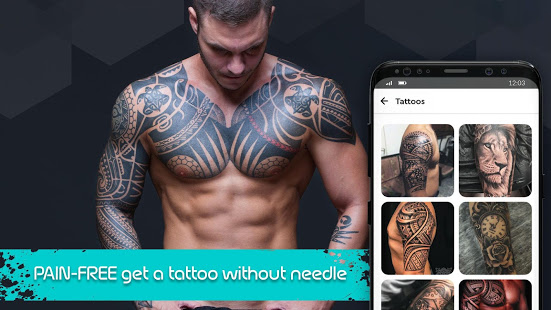
Need an awesome tattoo? Draw a tattoo! or choose from any Tattoo design in this tattoo app and Apply!
Tattoo: Tattoo Design, Background Eraser, Editor app applies any tattoo design, on any part of your body to let you see how it will look.
Features:
▪ Select a photo from the gallery or camera.
▪ Select one or more tattoo and set it on your photo.
▪ Select Text option to write any tattoo name on photo
▪ Apply tons of stylish Tattoo design
▪ Add Text On Photo.
▪ Remove tattoos
▪ Change or remove background
▪ Blur photos
▪ Erase acne and whiten your teeth
▪ Remove unwanted objects
▪ Change tattoo size, color, transparency and position easily
▪ Use lots of tattoo effects and tattoo design
▪ Get inspired from most popular tattoos
▪ Try on your own tattoo design or choose one from the gallery.
▪ Check out your tattoo from different angles!
▪ It’s super easy to make it look real using the advanced photo editor.
▪ Save and share your photo with your friends and family via social media.
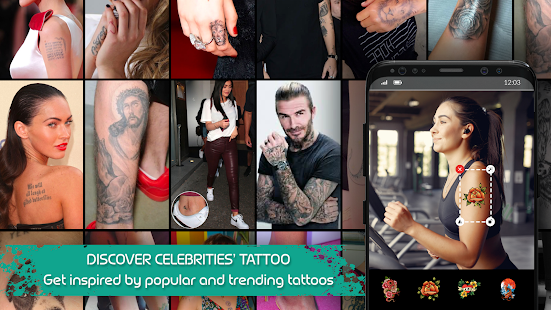
▪ Celebrity Tattoos pictures for inspiration
▪ The most popular tattoo designs
▪ Find and locate tattoo parlors near me
▪ Photo editor to edit pictures and make your best tattoo design
Now with Tattoo: Tattoo Design, Background Eraser, Editor App, you can browse amongst celebrity tattoos to get inspired for your next one. Find the most iconic celebrity tattoos pictures and copy them. You can also have a look at the most popular tattoo designs.
New feature: Tattoo has now a huge database to search Tattoo Artists worldwide by location and style of tattoo. Find Tattoo Artists and Studios near you.
Find your tattooist today with Tattoo : Tattoo Design, Background Eraser, Editor App, the best place to find tattoo artists and studios. Get inspired and start preparing your next tattoo.
Tattoo: Tattoo Design, Background Eraser, Editor App is also an app for editing photos. From the best photo editing apps, we gathered the best photo filters and camera filters, to give you a photo editor pro, and make you able to edit pics of your tattoo designs.
Tattoo: Tattoo Design, Background Eraser, Editor App, add tattoo sticker on your Instagram profile photo, or Whatsapp story photos!
Find tons of tattoo design ideas for men and tattoo ideas for women, in trendy topics: Love, Rose tattoo, Buddha Tattoo, Butterfly tattoo, Infinity tattoo, Quotes & Fonts Tattoo, Tribal Tattoo, Dragon, Horoscope, Skull Tattoo, Sexy Inked Girls Tattoo and more.
Write your girlfriend's name or your own name or any word on your picture with tattoo stickers!
Create tattoo wallpapers and tattoo backgrounds for your phone, tablet, or computer!
Nowadays, all boys and girls want stylish and cool looking tattoos on their bodies. Use Tattoo: Tattoo Design, Background Eraser, Remove Tattoo to have your body tattoo now!
Create your own virtual tattoo salon and photo booth machine with Tattoo Design. Play tattoo games with your friends and add tattoos to their photos too or remove tattoo from their photos. Create your own tattoo design.
Tattoo: Tattoo Design, Background Eraser, Remove Tattoo is popular among people who don’t want to draw permanent tattoos on their body but like to show off tattoos and stickers in social media profile pictures and so on.
Also, you have some sample tattoo bodies for inspiration! Choose the one you like, create the same on your body! Play with tattoo games and use your pictures to create a memorable tattoo on your arm.
Tattoo: Tattoo Design, Background Eraser, Inked app can add beautiful tattoos and artistic fonts on your body virtually without pain!
Show more

1. Κατεβάστε το πρόγραμμα εγκατάστασης MEmu και ολοκληρώστε την εγκατάσταση

2. Ξεκινήστε το MEmu και στη συνέχεια ανοίξτε το Google Play στην επιφάνεια εργασίας

3. Αναζητήστε τον Tattoo Design on My Photo - Trendy Tattoos 2019 στο Google Play
Install
4. Λήψη και εγκατάσταση του Tattoo Design on My Photo - Trendy Tattoos 2019
5. Μόλις ολοκληρωθεί η εγκατάσταση, κάντε κλικ στο εικονίδιο για να ξεκινήσετε

6. Απολαύστε τη χρήση του Tattoo Design on My Photo - Trendy Tattoos 2019 σε υπολογιστή με το MEmu
Το MEmu Play είναι ο καλύτερος δωρεάν εξομοιωτής Android, που χρησιμοποιείται αυτήν τη στιγμή από πάνω από 50 εκατομμύρια χρήστες που απολαμβάνουν την εμπειρία εφαρμογών που προσφέρει. Μέσω της τεχνολογίας εικονικοποίησης MEmu 9, οι χρήστες μπορούν να δοκιμάσουν εφαρμογές Android στους υπολογιστές τους, ακόμα και σε εκείνους που απαιτούν υψηλή ισχύ επεξεργασίας γραφικών, οι οποίες λειτουργούν ομαλά σαν να λειτουργούν στα κινητά τηλέφωνα τελευταίας γενιάς, χωρίς να θυσιάζεται η ποιότητα της εικόνας και η εμπειρία χρήστη.
Μεγαλύτερη οθόνη με καλύτερα γραφικά. Μεγάλη διάρκεια ζωής, χωρίς περιορισμό μπαταρίας ή δεδομένων κινητής τηλεφωνίας.
Πλήρης υποστήριξη αντιστοίχισης πλήκτρων για ακριβή έλεγχο του πληκτρολογίου και του ποντικιού ή του gamepad.
Πολλαπλοί λογαριασμοί παιχνιδιών ή εργασίες σε έναν υπολογιστή ταυτόχρονα με τον διαχειριστή πολλαπλών περιπτώσεων.
Use Tattoo Design on My Photo - Trendy Tattoos 2019 on PC by following steps: