Boating HD Marine & Lakes
Ενημερώθηκε
Τρέχουσα έκδοση
19.1
Προσφέρεται από

Σταματήστε να ανησυχείτε για υπερβολικές χρεώσεις όταν χρησιμοποιείτε το Boating HD Marine & Lakes στο κινητό σας, απελευθερώστε τον εαυτό σας από τη μικροσκοπική οθόνη και απολαύστε τη χρήση της εφαρμογής σε μια πολύ μεγαλύτερη οθόνη. Από τώρα και στο εξής, αποκτήστε εμπειρία πλήρους οθόνης της εφαρμογής σας με πληκτρολόγιο και ποντίκι. Το MEmu σας προσφέρει όλες τις εκπληκτικές δυνατότητες που περιμένατε: γρήγορη εγκατάσταση και εύκολη εγκατάσταση, διαισθητικά χειριστήρια, όχι περισσότερους περιορισμούς μπαταρίας, δεδομένα κινητής τηλεφωνίας και ενοχλητικές κλήσεις. Το ολοκαίνουργιο MEmu 9 είναι η καλύτερη επιλογή για χρήση του Boating HD Marine & Lakes στον υπολογιστή σας. Κωδικοποιημένο με την απορρόφηση μας, ο διαχειριστής πολλαπλών παρουσιών καθιστά δυνατό το άνοιγμα 2 ή περισσότερων λογαριασμών ταυτόχρονα. Και το πιο σημαντικό, ο αποκλειστικός κινητήρας εξομοίωσης μπορεί να απελευθερώσει όλες τις δυνατότητες του υπολογιστή σας, να κάνει τα πάντα ομαλά και ευχάριστα.
Show more
Απολαύστε την υπέροχη εμπειρία αναπαραγωγής του Boating HD Marine & Lakes σε υπολογιστή με το MEMU App Player. Πρόκειται για έναν ισχυρό δωρεάν εξομοιωτή Android που σας επιτρέπει να παίζετε χιλιάδες παιχνίδια Android. Get up-to-date, detailed charts you can use offline plus a boatload of features on your mobile device, so they’re on hand wherever you go.
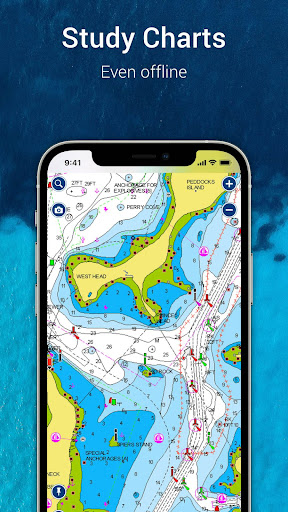
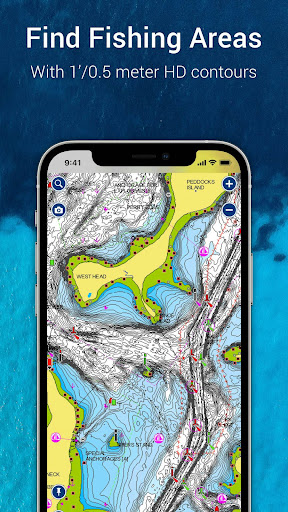
Get up-to-date, detailed charts you can use offline plus a boatload of features on your mobile device, so they’re on hand wherever you go. The Boating app is a must-have for cruising, fishing, sailing, diving and all your activities on the water. Try it free for a limited time. To continue using the charts and features, purchase a one-year renewable subscription.
A COMPLETE PACKAGE
- INTERNATIONALLY RENOWNED NAVIONICS® CHARTS: Use them offline along with multiple overlays, so you can be more aware of what’s above and below the water.
• NAUTICAL CHART: Use this premier marine reference to study port plans, anchorages and safety depth contours, locate navaids, marine services and more.
• SONARCHART™ HD BATHYMETRY MAPS: Extraordinary 1’ (0.5 meter) HD bottom contour detail is the ideal tool for locating new fishing areas.
• U.S. GOVERNMENT CHARTS (NOAA): These are available within the following coverages: U.S. and Canada, Mexico, Caribbean to Brazil.
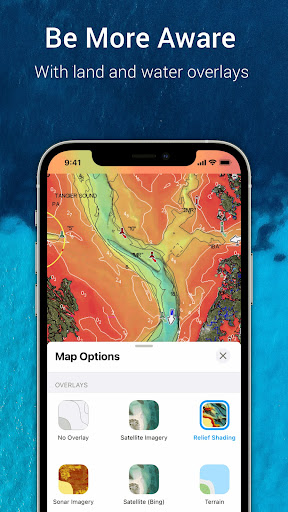
• OVERLAYS: The relief shading overlay allows you to have a better understanding of bottom topography for improved fishing and diving. Sonar imagery reveals bottom hardness clearly and in vivid color on select U.S. lakes. Want more? Display satellite imagery on land and water.
• MAP OPTIONS: Change chart-overlay combinations to customize chart views, highlight shallow areas, target multiple fishing ranges and more.
• DAILY UPDATES: Benefit from up to 5,000 daily updates worldwide.
- TOOLS FOR PLANNING AND ENJOYING YOUR DAY
• AUTO GUIDANCE+TM TECHNOLOGY*: Easily plan your trip with a suggested dock-to-dock path based on chart data and navigation aids. Get ETA, distance to arrival, heading to waypoint, fuel consumption and more.
• WEATHER AND TIDES: Knowing conditions before heading out is crucial. Access real-time weather data, daily and hourly forecasts as well as wind, weather buoys, tides and currents.
• MARKERS, TRACKS, DISTANCE**: Place a marker on a good anchorage spot or where you reeled in a big fish. Record your track, take photos and videos within the app, and look back at your day anytime. Easily check distance among two points.
- AN ACTIVE AND HELPFUL COMMUNITY
• COMMUNITY EDITS and the ACTIVECAPTAIN® COMMUNITY: Obtain and contribute useful local knowledge along with thousands of fellow boaters, such as points of interest, navigation aids and valuable recommendations from people with firsthand experience of the local environment.
• CONNECTIONS: Stay in touch with your friends and fellow boaters by sharing your live location, tracks, routes and markers to easily meet on the water or let them check out your adventures.
• GPX IMPORT/EXPORT: Share your saved data outside the app or transfer it to your chartplotter.
• SHARE MAP OBJECTS**: Share a marina, repair shop or any other location outside the app.
- EXTERNAL DEVICE-FRIENDLY FOR MORE FEATURES
• PLOTTER SYNC: If you own a compatible chartplotter, sync it with the app to transfer routes and markers, activate, update or renew your Navionics chartplotter card subscription.
• SONARCHART LIVE MAPPING FEATURE**: Connect with a compatible sonar/plotter, and create your own maps in real time while navigating.
• AIS: Connect to a compatible AIS receiver with Wi-Fi® connectivity to see nearby marine traffic. Set a safe range, and receive visual and aural alerts to signal potential collisions.
NOTES:
*Auto Guidance+ is for planning purposes only and does not replace safe navigation operations
**Free features
The app is specifically designed to load and operate on devices with an OS of 7.0 or higher. A tablet device with Wi-Fi connectivity locates your approximate position if it is connected to Wi-Fi. A tablet Wi-Fi + 3G model operates similarly to a phone device with GPS.
Wi-Fi is a registered trademark of the Wi-Fi Alliance.
Show more

1. Κατεβάστε το πρόγραμμα εγκατάστασης MEmu και ολοκληρώστε την εγκατάσταση

2. Ξεκινήστε το MEmu και στη συνέχεια ανοίξτε το Google Play στην επιφάνεια εργασίας

3. Αναζητήστε τον Boating HD Marine & Lakes στο Google Play
Install
4. Λήψη και εγκατάσταση του Boating HD Marine & Lakes
5. Μόλις ολοκληρωθεί η εγκατάσταση, κάντε κλικ στο εικονίδιο για να ξεκινήσετε

6. Απολαύστε τη χρήση του Boating HD Marine & Lakes σε υπολογιστή με το MEmu
Το MEmu Play είναι ο καλύτερος δωρεάν εξομοιωτής Android, που χρησιμοποιείται αυτήν τη στιγμή από πάνω από 50 εκατομμύρια χρήστες που απολαμβάνουν την εμπειρία εφαρμογών που προσφέρει. Μέσω της τεχνολογίας εικονικοποίησης MEmu 9, οι χρήστες μπορούν να δοκιμάσουν εφαρμογές Android στους υπολογιστές τους, ακόμα και σε εκείνους που απαιτούν υψηλή ισχύ επεξεργασίας γραφικών, οι οποίες λειτουργούν ομαλά σαν να λειτουργούν στα κινητά τηλέφωνα τελευταίας γενιάς, χωρίς να θυσιάζεται η ποιότητα της εικόνας και η εμπειρία χρήστη.
Μεγαλύτερη οθόνη με καλύτερα γραφικά. Μεγάλη διάρκεια ζωής, χωρίς περιορισμό μπαταρίας ή δεδομένων κινητής τηλεφωνίας.
Πλήρης υποστήριξη αντιστοίχισης πλήκτρων για ακριβή έλεγχο του πληκτρολογίου και του ποντικιού ή του gamepad.
Πολλαπλοί λογαριασμοί παιχνιδιών ή εργασίες σε έναν υπολογιστή ταυτόχρονα με τον διαχειριστή πολλαπλών περιπτώσεων.
Use Boating HD Marine & Lakes on PC by following steps: