Save the Guy: Funny Choice
अपडेट किया गया
वर्तमान वर्शन
0.1.737
संसाधन

अपने सेलफोन पर Save the Guy: Funny Choice का उपयोग करते समय ओवरचार्ज के बारे में चिंता करना बंद करें, अपने आप को छोटी स्क्रीन से मुक्त करें और बहुत बड़े डिस्प्ले पर ऐप का उपयोग करने का आनंद लें। अब से, कीबोर्ड और माउस के साथ अपने ऐप का पूर्ण-स्क्रीन अनुभव प्राप्त करें। एमईएमयू आपको उन सभी आश्चर्यजनक सुविधाओं की पेशकश करता है जिनकी आपको उम्मीद थी: त्वरित इंस्टॉल और आसान सेटअप, सहज नियंत्रण, बैटरी की कोई सीमा नहीं, मोबाइल डेटा और परेशान कॉल। आपके कंप्यूटर पर Save the Guy: Funny Choice का उपयोग करने का सबसे अच्छा विकल्प नया MEmu 9 है। हमारे अवशोषण के साथ कोडित, बहु-उदाहरण प्रबंधक एक ही समय में 2 या अधिक खाते खोलना संभव बनाता है। और सबसे महत्वपूर्ण, हमारा अनन्य उत्सर्जन इंजन आपके पीसी की पूरी क्षमता को जारी कर सकता है, सब कुछ सुचारू और सुखद बना सकता है।
और दिखाएं
डाउनलोड करें Save the Guy: Funny Choice पीसी पर MEmu एंड्रॉयड एमुलेटर के साथ बड़े पर्दे पर खेलने का आनंद लें। “Save the Guy” - a funny game where the hero needs to make the right choice to escape from prison and continue his adventure out of jail!


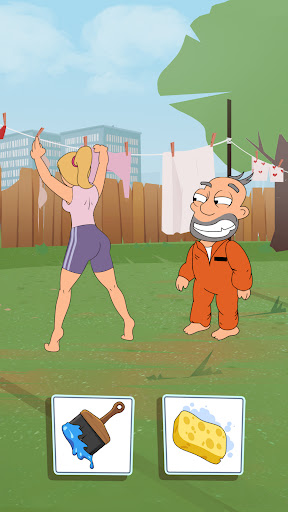
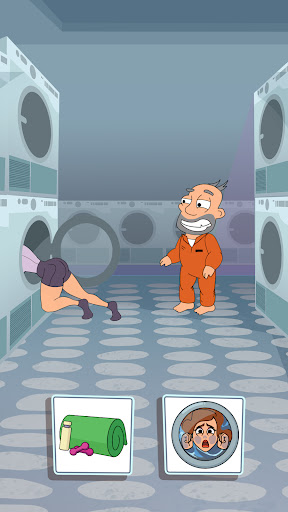
“Save the Guy” - a funny game where the hero needs to make the right choice to escape from prison and continue his adventure out of jail! Rescue the Guyin cool mini games and find out how funny it is to hang out with him!
In jail and at large, our hero is faced with tricky puzzles that will blow the brain out of any smart guy and make the most serious person in the world laugh!
It’s like the plot of the coolest thriller. The main character needs to escape from a dark jail where he’s locked in. What will his choice be: call a security guard or use a spade? Make the choice to find out what happens!
You’ll need to use your IQ during all the mini games to help the hero reach the end and taste the freedom. Funny and tricky puzzles are gathered in “Save the Guy”. You’ll have a real pleasure while solving them!
Blow your brain out and start solving cool games with the choice in “Save the Guy”!
Game features:
Easy gameplay and tricky puzzles
Lots of levels
Funny answers and solutions
Free brain teaser in your phone
The final of the game depends on you
Puzzle games are your favorite? Is it easy for you to solve hard tasks? “Save the Guy” is another way to prove you are the cleverest!
Can you solve all the cool games and find the right way to escape?
और दिखाएं

1. MEmu इंस्टॉलर को डाउनलोड करें और इंस्टॉलेशन को पूरा करें

2. MEmu शुरू करें फिर होमपेज पर Google Play खोलें

3. Google Play में Save the Guy: Funny Choice खोजें
Install
4. Save the Guy: Funny Choice डाउनलोड कर इंस्टॉल करें
5. इंस्टॉल पूरा होने पर आइकन दबाएं

6. MEmu से पीसी पर Save the Guy: Funny Choice खेलने का आनंद लें
MEmu Play सबसे बेहतरीन मुफ़्त Android एमुलेटर है और 5 करोड़ लोग पहले ही इसके शानदार Android गेमिंग अनुभव का आनंद ले चुके हैं। MEmu 9 वर्चुअलाइज़ेशन तकनीक आपको अपने PC पर हज़ारों Android गेम, यहाँ तक कि सबसे ज़्यादा ग्राफ़िक्स वाले गेम भी, आसानी से खेलने की सुविधा देती है।
असीमित बैटरी या मोबाइल डेटा के साथ बेहतर ग्राफिक्स के साथ बड़ी स्क्रीन; लंबी अवधि।
कीबोर्ड और माउस या गेमपैड के उत्तम नियंत्रण के लिए संपूर्ण कीमैपिंग का समर्थन करता हैं।
एक ही पीसी पर मल्टी-इंस्टेंस मैनेजर के साथ एक समय में कई गेम खाते या कार्य कर सकते हैं।
Play Save the Guy: Funny Choice on PC by following steps: