Adivasi Status Saver
अपडेट किया गया
वर्तमान वर्शन
1.0.4
संसाधन

Adivasi Status Saver पर अपनी मोबाइल डेटा सीमा पार करने को अलविदा कहें और छोटी स्क्रीन की सीमाओं से मुक्त होकर बड़े डिस्प्ले के लाभों का अनुभव करें। अब, आप अपने कीबोर्ड और माउस का उपयोग करके फुल-स्क्रीन मोड में टॉपर्स क्लैन की शक्ति का अनुभव कर सकते हैं। MEmu Play में वे सभी बेहतरीन सुविधाएँ हैं जिनकी आप अपेक्षा करते हैं: त्वरित इंस्टॉलेशन और आसान सेटअप, सहज नियंत्रण, बैटरी की आवश्यकता नहीं, और कोई डेटा या कॉल समय सीमा नहीं। नया MEmu 9 आपके कंप्यूटर पर Adivasi Status Saver का उपयोग करने के लिए सबसे अच्छा विकल्प है। हमारा मालिकाना मल्टी-इंस्टेंस मैनेजर एक साथ दो या अधिक खातों को चलाने का समर्थन करता है। इससे भी महत्वपूर्ण बात यह है कि हमारा अनूठा इम्यूलेशन इंजन आपके कंप्यूटर के प्रदर्शन का पूरा उपयोग करता है, जिससे एक सहज और निर्बाध अनुभव मिलता है।
और दिखाएं
डाउनलोड करें Adivasi Status Saver पीसी पर MEmu एंड्रॉयड एमुलेटर के साथ बड़े पर्दे पर खेलने का आनंद लें। If You Loved a Someone's Status, Images or video reels?
If You Loved a Someone's Status, Images or video reels?
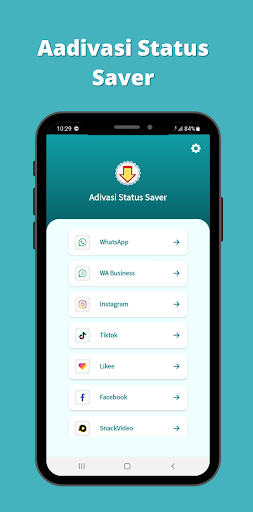
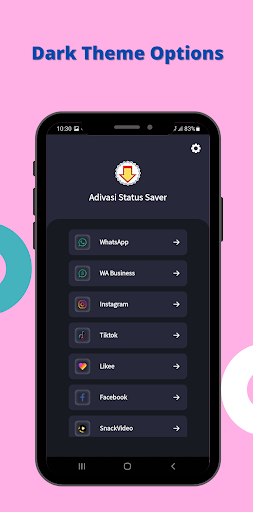
You can easily download or save status Using this Application Adivasi Status saver allow you to saved others Whtsapp adivasi status or images, insta's post from link, fb's video and easily.
Adivasi status saver app is very helpful for the peoples who want to save their favorite images and videos from whatsapp, Instagram & facebook or other videos images, sharing sites and apps. This app interface are easy to use. Hope You Guys are loved it.
App having following features:
1. story and images saver
2. status saver
3. fb video and images saver downloader
4. Insta trending hashtag
5. download multiple Instagrm private post
6. download post from link
7. whtsap story saver
8. all in one adivasi status saver
How To Use Adiwasi story saver & download post from link
* Open the status or video app
* Click three dots icon of post's top right corner and click Copy Share URL or Copy Link option
* Open this "adivasi status saver" app and click on Paste button
* Download Image or Video
How To Use Fb lite & video downloader for fbk
= open "adivasi status saver" app
= you can download fb video from two way
= from fb post link just past the fb post link to download fb video post
= in fb lite just tap on fb video post to download
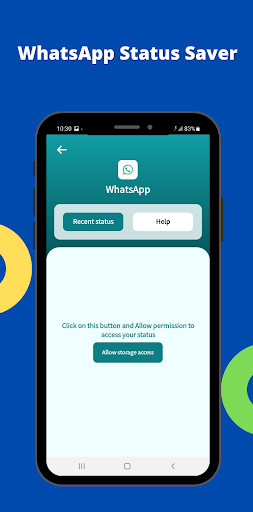
How To Use status saver for whtsap
- just open "adivasi status saver" app and save your favorite status from status saver app.
- whatsapp video status and image status show in different tab to easily findout your favorite whtsap status.
Desclaimer note:
- This app is an independent one and is not affiliated with any 3rd Party including Whatsapp inc.
- App not use to clone or hack Anything it just display downloaded files in app.
- Re-uploading image/video stories and is NOT encouraged, please seek owner approval.
- This app is not affiliated with Instagram.
- Any unauthorized downloading or re-uploading of contents and/or violations of Intellectual property rights is the sole responsibility of the user.
- This app is NOT affiliated with or endorsed by the Facebook official network.
और दिखाएं

1. MEmu इंस्टॉलर को डाउनलोड करें और इंस्टॉलेशन को पूरा करें

2. MEmu शुरू करें फिर होमपेज पर Google Play खोलें

3. Google Play में Adivasi Status Saver खोजें
Install
4. Adivasi Status Saver डाउनलोड कर इंस्टॉल करें
5. इंस्टॉल पूरा होने पर आइकन दबाएं

6. MEmu का उपयोग करके अपने कंप्यूटर पर Adivasi Status Saver का अनुभव करें
MEmu Play सबसे बेहतरीन मुफ़्त Android एमुलेटर है और 5 करोड़ लोग पहले ही इसके शानदार Android ऐप अनुभव का आनंद ले चुके हैं। MEmu 9 वर्चुअलाइज़ेशन तकनीक आपको अपने PC पर हज़ारों Android ऐप्स, यहाँ तक कि सबसे ज़्यादा ग्राफ़िक्स वाले ऐप्स भी, आसानी से चलाने की सुविधा देती है।
असीमित बैटरी या मोबाइल डेटा के साथ बेहतर ग्राफिक्स के साथ बड़ी स्क्रीन; लंबी अवधि।
कीबोर्ड और माउस या गेमपैड के उत्तम नियंत्रण के लिए संपूर्ण कीमैपिंग का समर्थन करता हैं।
एक ही पीसी पर मल्टी-इंस्टेंस मैनेजर के साथ एक समय में कई गेम खाते या कार्य कर सकते हैं।
Use Adivasi Status Saver on PC by following steps: